SQL for AI people
Wednesday, 3 pm. Divya joins a logistics startup in Coimbatore. Her manager asks for the ten most delayed routes this month. Divya asks where the CSV file is. There is no file — forty lakh delivery records live in a company database. A senior analyst types four short lines, presses enter, and the answer arrives in two seconds. Divya realises the tables she cleaned in pandas were always born here. Today you learn to ask a database questions directly.
- Almost all company data lives in databases, not files — the tables you fed to pandas in module 0.5 came out of one.
- A database can filter forty lakh rows before one byte reaches your ordinary laptop, which is how big data fits small machines.
- Analyst and data-role interviews run live SQL rounds — top-N, group, and join tasks — more often than pandas rounds.
Your pandas work in module 0.5 started from a CSV file someone handed you. Real company data does not sit in files on one laptop. It lives in a database — a shared store of tables that many people and apps read at the same time. The database guards the data, and SQL — the language used to ask a database questions — is how every tool talks to it. A query is one SQL question, written as plain text and sent to the database.
A query reads like a sentence with fixed slots. SELECT names the columns you want back. FROM names the table, WHERE keeps only matching rows, ORDER BY sorts them, and LIMIT caps how many return. The database does all that work on its own machine and sends back only the small result.
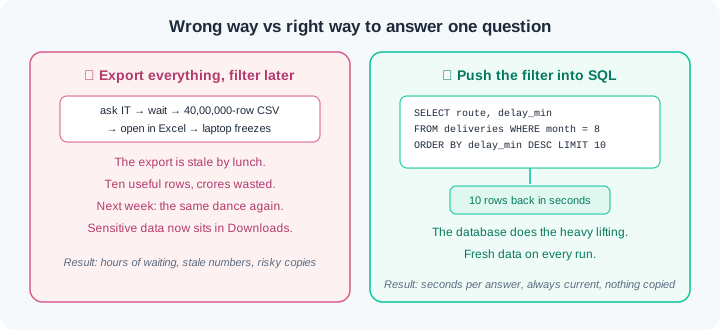
Here is the habit that separates freshers from analysts. The wrong way asks IT to export the whole table to CSV, then filters forty lakh rows in Excel while the laptop wheezes. The export is stale by lunch, and next week the whole dance repeats. The right way sends a three-line query and receives ten fresh rows in seconds. Push the question to the data; never pull all the data to the question.
For "per store" or "per day" answers you aggregate — collapse many rows into one summary number, such as a count or a sum. GROUP BY splits rows by a key column and aggregates each group, which is exactly what pandas groupby did in module 0.5. One rule differs: WHERE filters rows before the split, and HAVING filters the finished groups after it. Your groupby instinct transfers almost line for line.
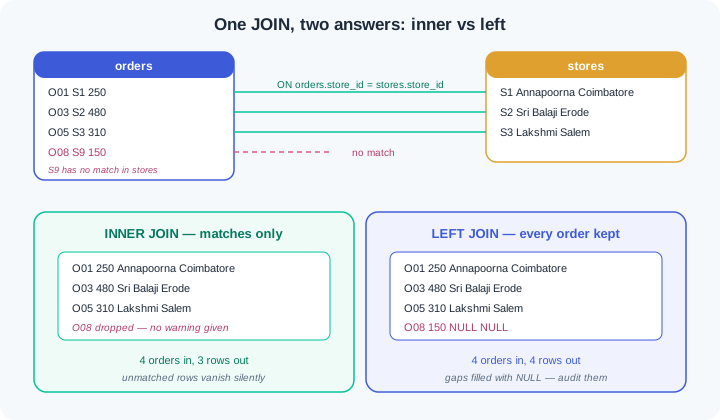
A JOIN — matching rows across two tables by a shared key — is how orders gain a store name and a city. An inner join keeps only rows that match on both sides. A left join keeps every left row and fills the gaps with NULL — the marker for a missing value. NULL is not zero and not empty text; a comparison against it is neither true nor false, so careless filters lose rows in silence. And when a key repeats on the other side, matched rows multiply, and totals quietly double — the trap in WR-016.
Watch the full flow once before you try it. Python ships with the sqlite3 module built in, so this needs no install, no server, and no internet — one script builds a real database file on your laptop.
Step 1 — build the database. Three kirana stores and eight orders, with two traps planted on purpose: order O05 has a NULL status, and order O08 points at store S9, which is not in the stores table:
import sqlite3

con = sqlite3.connect("kirana.db")
cur = con.cursor()
cur.executescript("""
DROP TABLE IF EXISTS stores;
DROP TABLE IF EXISTS orders;
CREATE TABLE stores (store_id TEXT PRIMARY KEY, name TEXT, city TEXT);
CREATE TABLE orders (order_id TEXT, store_id TEXT, amount REAL, status TEXT);
INSERT INTO stores VALUES
  ('S1','Annapoorna Stores','Coimbatore'),
  ('S2','Sri Balaji Kirana','Erode'),
  ('S3','Lakshmi Provisions','Salem');
INSERT INTO orders VALUES
  ('O01','S1',250,'PAID'), ('O02','S1',120,'PAID'),
  ('O03','S2',480,'FAILED'), ('O04','S2',90,'PAID'),
  ('O05','S3',310,NULL),    ('O06','S1',60,'FAILED'),
  ('O07','S2',700,'PAID'),  ('O08','S9',150,'PAID');
""")
con.commit()
print(cur.execute("SELECT COUNT(*) FROM orders").fetchone())
The script prints (8,) — eight rows landed. executescript ran the whole block of SQL statements, commit saved them to the kirana.db file, and the last line is your first query: count the rows. Every result comes back as a Python tuple, one per row. That is the whole bridge between Python and SQL — send text in, get tuples back.
Step 2 — the four-slot query. The three biggest successful orders:
rows = cur.execute("""
    SELECT order_id, amount
    FROM orders
    WHERE status = 'PAID'
    ORDER BY amount DESC
    LIMIT 3
""").fetchall()
for r in rows:
    print(r)
Output: ('O07', 700.0), ('O01', 250.0), ('O08', 150.0). Read the query top to bottom: take these two columns, from this table, keep only PAID rows, sort by amount largest-first, return three. The database scanned all eight rows but shipped back only three — with forty lakh rows the shape of the answer stays exactly this small. Note what SELECT named is what came back; no SELECT * grabbing columns nobody asked for.
Step 3 — GROUP BY, and the pandas mirror. One report line per store, both ways:
sql_report = cur.execute("""
    SELECT store_id, COUNT(*) AS orders, SUM(amount) AS total
    FROM orders
    GROUP BY store_id
    HAVING SUM(amount) > 300
""").fetchall()
print(sql_report)   # [('S1', 3, 430.0), ('S2', 3, 1270.0), ('S3', 1, 310.0)]

# the same report in pandas, from module 0.5:
# df.groupby("store_id").agg(orders=("order_id", "count"),
#                            total=("amount", "sum"))
# then: g[g["total"] > 300]
Line up the two halves and the mapping is one-to-one: GROUP BY store_id is groupby("store_id"), COUNT(*) and SUM(amount) are the agg pairs, and HAVING is the filter you apply to the finished groups. Store S9 (total 150) was grouped but then dropped by HAVING. If the condition had been on raw rows — say only PAID orders — it would go in WHERE instead, before the split. WHERE trims rows going in; HAVING trims groups coming out.
Step 4 — JOIN, inner versus left. Give every order its store name and city:
inner = cur.execute("""
    SELECT o.order_id, o.amount, s.name, s.city
    FROM orders o
    JOIN stores s ON o.store_id = s.store_id
""").fetchall()
left = cur.execute("""
    SELECT o.order_id, o.amount, s.name, s.city
    FROM orders o
    LEFT JOIN stores s ON o.store_id = s.store_id
""").fetchall()
print(len(inner), len(left))   # 7 8
print([r for r in left if r[2] is None])
# [('O08', 150.0, None, None)]
Eight orders went in; the inner join returned seven. Order O08 points at store S9, which the stores table does not have, so the inner join dropped it without a word. The left join kept all eight and filled the missing name and city with NULL — Python shows them as None. That last line is the auditor's move: after any left join, hunt for the NULL rows, because each one is a key that failed to match. Print row counts before and after every join, every time.
Step 5 — NULL, the quiet liar. Three counts that look like they should agree:
print(cur.execute(
    "SELECT COUNT(*), COUNT(status) FROM orders").fetchone())        # (8, 7)
print(cur.execute(
    "SELECT COUNT(*) FROM orders WHERE status != 'FAILED'").fetchone())   # (5,)
print(cur.execute("""
    SELECT COUNT(*) FROM orders
    WHERE status != 'FAILED' OR status IS NULL""").fetchone())       # (6,)
con.close()
COUNT(*) counts rows; COUNT(status) counts only rows where status is not NULL — that gap of one is O05. Then the filter: eight orders, two FAILED, yet != 'FAILED' returns five, not six. NULL compared to anything is neither true nor false, so WHERE quietly drops O05 as well. The only honest tests for missing values are IS NULL and IS NOT NULL, and the third query uses one to recover the lost row. This exact silence is WR-017 — meet it here first, cheaply.
Work inside your ai-lab folder from module 0.1. Everything uses Python's built-in sqlite3 — no installs, no internet. Each exercise ends with a check; you are done only when the check passes.
Your first database. Create upi.py. Using sqlite3, build upi.db with a txns table: 12 UPI transactions with columns txn_id, store, amount, status (mix SUCCESS and FAILED, and leave two statuses NULL). Then write and print four queries: (a) all FAILED transactions, (b) the top 5 by amount using ORDER BY and LIMIT, (c) transactions with amount between 100 and 500, sorted ascending, (d) COUNT(*) and COUNT(status) side by side. Check: running python upi.py twice works cleanly both times (hint: DROP TABLE IF EXISTS), the two counts in (d) differ by exactly 2, and you can say aloud which clause did each job in query (b).
Group it both ways. Create report.py reusing upi.db. Build a per-store report in SQL — COUNT(*) and SUM(amount) per store — then load the same rows with cur.execute("SELECT * FROM txns").fetchall() into a pandas DataFrame and rebuild the identical report with groupby().agg(). Compare the numbers. Next, answer "which stores have SUCCESS totals above 500?" — this needs WHERE (rows in), GROUP BY, and HAVING (groups out) in one query. Finally, reproduce WR-018 on purpose: add a bare column like txn_id to the SELECT without grouping by it, run it, and record in sql-notes.md which row SQLite silently picked and why that is dangerous. Check: the SQL report and the pandas report show identical counts and totals for every store, the WHERE+HAVING query returns only the correct stores, and your notes hold the silent-pick evidence in your own words.
Join and survive. Create join_audit.py. Add a stores master table (store code, name, city) that is missing one store your txns table uses. Join the city onto every transaction twice — inner then left — printing row counts before and after each. Use LEFT JOIN ... WHERE ... IS NULL to list the orphan transactions. Now break it the WR-016 way: insert a duplicate row for one store into the master, re-run the join, and watch that store's total inflate — record before/after sums in sql-notes.md. Fix it by de-duplicating the master and prove the sums match again. Finish with a WR-017 audit: show that status != 'FAILED' undercounts, then correct it with IS NULL handling. Check: your final report has exactly one row per store, the duplicate-key run and the clean run sums are both in your notes with the difference explained, and the corrected NULL-aware count exceeds the careless one by exactly your NULL count.
Three failures cover most first-month SQL pain. Each has a War Room entry with the full diagnosis path:
- WR-016 — the join that doubled the money. A duplicate key on the far side of a join multiplies matched rows, and totals silently inflate. No error, no warning — only a revenue number that is wrong in a meeting.
- WR-017 — the rows NULL quietly hid.
WHERE status != 'FAILED'drops NULL rows too, andCOUNT(column)skips them. Reports undercount and nobody notices until reconciliation. - WR-018 — the group that answered the wrong question. A bare column outside GROUP BY that SQLite fills with an arbitrary value, or a WHERE/HAVING mix-up that filters at the wrong stage. Both produce confident, wrong reports.
Company data lives in databases, and SQL is the language for asking them questions from any tool. A query names columns with SELECT, filters rows with WHERE, sorts with ORDER BY, and caps results with LIMIT, all computed on the database's side. GROUP BY collapses rows into one summary line per key, with WHERE trimming rows before the split and HAVING trimming groups after it. A JOIN matches rows across tables by key: inner keeps only matches, while left keeps every left row and marks gaps with NULL. Test missing values only with IS NULL, and compare row counts before and after every join, because silent doubling is worse than a crash.
- UPI settlement at Indian banks: every transaction lands in a SQL database, and "failures per bank per hour" is a GROUP BY query an analyst runs live during an incident.
- E-commerce and logistics dashboards: each metric tile — orders per city, delays per hub — is a stored SQL query with a JOIN and a GROUP BY underneath, refreshed on schedule.
- AI feature and RAG pipelines: Phase 1 models and Phase 3 retrieval systems both begin with SQL pulling clean slices out of company databases; pandas takes over only after SQL has shrunk the data.
Answer these before opening the gate assessment. Each question names its type.
type=output-prediction— Apaymentstable has 10 rows; 3 havemethod = 'CARD', 2 havemethodNULL, the rest are'UPI'. Predict the exact numbers returned bySELECT COUNT(*), COUNT(method) FROM paymentsand bySELECT COUNT(*) FROM payments WHERE method != 'CARD', and explain the gap.type=debug— A teammate joinsordersto astoresmaster and the grand total jumps from ₹2,010 to ₹3,280 with no new orders. Name the most likely cause and the one query you would run on the master table to confirm it.type=interpretation— After a LEFT JOIN of 4,000 transactions to a store master, 120 rows show NULL for every store column. What do those 120 rows tell you about the data, and why did the inner join version return 3,880 rows?type=scenario-judgement— For a weekly report, a teammate asks IT to export the full 40-lakh-row orders table to CSV so they can filter it in Excel, "because SQL is scary". Give your judgement and the one-sentence reason you would offer them.type=trade-off— Filtering with WHERE before grouping versus filtering with HAVING after grouping, for "stores whose PAID total exceeds ₹10,000": name what each stage can see, and one concrete mistake that comes from choosing the wrong one.
Explain to a friend who has never coded: what does a JOIN do, and why can a report's total double after one? Use the example of matching a college attendance register against the fee-payment ledger by roll number — including what happens when a roll number appears twice in one book. Use at most 4 sentences and no SQL words. If your friend can predict the double-counting, you own this module.