Python that AI actually uses
Tuesday, 11 am. Rohan is a new data intern at an agritech startup in Pune. His mentor sends a file of mandi crop prices and asks for the average price per state before lunch. In college, Python meant printing star patterns for exam marks. This file is different: messy records, missing fields, and a crash on line one. The red wall of error text fills his screen. The gap between exam Python and work Python is real. Today you cross it with the small toolset working engineers use.
- Every later module runs on Python: NumPy, Pandas, and RAG pipelines all build on this small toolkit.
- Interview coding rounds for AI roles test exactly this subset: dicts, loops, functions, and file handling.
- Freshers who can read a traceback fix their own crashes. That one skill saves hours every single week.
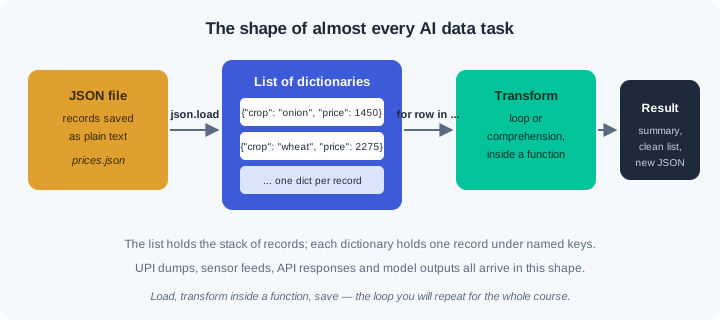
Working AI code uses a small slice of Python, and you can learn that slice in one week. Almost every task is the same move: load records, clean them, compute something, save the result. The tools are few: lists, dictionaries, loops, functions, and files. Master this small set well and the rest of the course opens up.
A list is an ordered row of values, like one column of a register. A dictionary — a container that stores values under names called keys — holds one record, like one filled form. Real data is nearly always a list of dictionaries: many forms in one stack. A JSON file is that same shape written as text, so Python loads it in one line. UPI transaction dumps, weather feeds, and model outputs all share this shape.
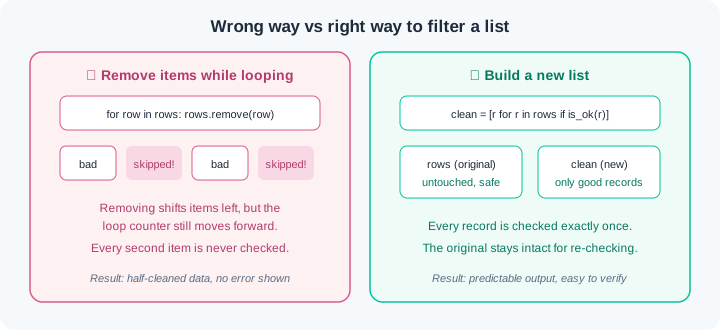
A loop walks the stack one record at a time and does something with each. A comprehension — a one-line loop that builds a new list — is the polished form you will meet in every codebase. One rule keeps you safe: never remove items from a list while looping over it. Build a new list holding the records you want to keep. The figure below shows how the first way corrupts data without any error.
A function — a named block of steps that takes inputs and returns a result — is how you stop copy-pasting code. Give it one clear job, a good name, and small inputs. A type hint is a small label on inputs and output, like def clean(price: float) -> float. Python does not enforce hints, but teammates and tools read them. An f-string fills values into text, like f"total: {total}", and you will print with it daily.
When code crashes, Python prints a traceback — a report of the path to the crash, ending with what went wrong. Read it from the bottom up: the last line names the error, and the lines above locate it. The error object itself is an exception — a signal you can catch with try and except. Catch only the errors you expect, and let the rest crash loudly. A silent wrong answer costs far more than a loud crash.
A module is any Python file you can import, and imports are how projects grow past one file. You will also meet classes — bundles of data plus functions — mostly as a user, not a designer. A bank or a logistics firm runs thousands of small scripts shaped exactly like this. Their code review rules match the habits here: small functions, new lists, loud errors.
Watch the full flow once before you try it. We build one small report the way working teams do — in steps, checking output after each one.
Step 1 — records and f-strings. Real records are dictionaries inside a list. Access one and print it cleanly:
prices = [
    {"state": "Maharashtra", "crop": "onion", "price": 1450},
    {"state": "Punjab", "crop": "wheat", "price": 2275},
    {"state": "Maharashtra", "crop": "wheat", "price": 2310},
]
first = prices[0]
print(f'{first["state"]}: {first["crop"]} at Rs {first["price"]}')
Output: Maharashtra: onion at Rs 1450. The list prices is the stack; prices[0] pulls the first record; the keys "state", "crop", "price" name each field. The f-string drops the three values straight into the sentence — no clumsy string glueing.
Step 2 — loop, then the comprehension form. Compute an average with a loop, then filter with a comprehension:
total = 0
for row in prices:
    total = total + row["price"]
print(f"average: {total / len(prices):.2f}")

wheat = [row for row in prices if row["crop"] == "wheat"]
print(f"wheat records: {len(wheat)}")
Output: average: 2011.67 then wheat records: 2. The loop visits each row once and accumulates. The comprehension reads left to right as a sentence: keep each row from prices where the crop is wheat. Note it builds a NEW list — prices is untouched, which is the safe pattern from the figure.
Step 3 — a function that loads a JSON file. Package the loading step so every script can reuse it:
import json

def load_prices(path: str) -> list:
    with open(path, encoding="utf-8") as f:
        return json.load(f)

prices = load_prices("prices.json")
print(f"{len(prices)} records loaded")
Output: 3 records loaded. import json brings in a module from Python's standard library. The type hints say: path comes in as text, a list comes out. with open(...) closes the file for you even if something fails, and encoding="utf-8" is the habit that prevents WR-009 on Windows machines.
Step 4 — your first crash, read bottom-up. A typo in a key name produces this traceback:
Traceback (most recent call last):
  File "report.py", line 12, in <module>
    print(average(prices))
  File "report.py", line 8, in average
    total = total + row["prise"]
KeyError: 'prise'
Read it from the bottom up. Bottom line: the exception type is KeyError, and the missing key was 'prise' — a spelling mistake. One line up: the crash happened at report.py line 8, inside the function average — that is the line you open. The top frame only tells you who called it. Bottom-up reading turns a red wall into an address: error, file, line.
Step 5 — handle the bad records, save the result. Catch the narrow exception you expect, and write the summary back as JSON:
def average(rows: list) -> float:
    total, counted = 0, 0
    for row in rows:
        try:
            total = total + row["price"]
            counted = counted + 1
        except KeyError:
            print(f"skipping bad record: {row}")
    return total / counted

summary = {"records": len(prices), "average": average(prices)}
with open("summary.json", "w", encoding="utf-8") as f:
    json.dump(summary, f, indent=2)
Bad records now print a warning instead of killing the run, and summary.json appears with the two computed fields. Notice the except line names KeyError only. A bare except: would also swallow real bugs — like TypeError from a price stored as text — and hand you a silent wrong answer.
Do these on your own machine, inside your ai-lab environment from module 0.1. Each exercise ends with a check — you are done only when the check passes.
Records by hand. Create marks.py. Build a list of six dictionaries, one per student, each with keys name, city, and marks (a number). Use at least three different Indian cities. Loop over the list and print one f-string line per student in the form Asha (Indore): 82. Then compute and print the class average to two decimal places, and build a comprehension toppers holding names of students with marks above 75. Check: running python marks.py prints six student lines, one average line, and the toppers list — and changing one student's marks changes the average correctly on rerun.
A real JSON pipeline. By hand, write orders.json: a list of eight kirana store orders with keys item, qty, and price — but leave the price key out of two records on purpose. Write report.py with two functions: load_orders(path) returning the parsed list, and clean_orders(rows) using a comprehension with .get() to keep only records that have a price. Compute total revenue as the sum of qty * price over clean records, and write {"orders_kept": ..., "revenue": ...} to summary.json with json.dump. Check: python -c "import json; print(json.load(open('summary.json')))" shows orders_kept equal to 6 and the revenue you can verify by hand; running report.py twice produces the same file both times.
Crash on purpose, read the wreckage. In a new crashes.py, trigger three different crashes one at a time: (a) a KeyError by misspelling a key from exercise 2, (b) a FileNotFoundError by loading oders.json, (c) a TypeError by putting one price in quotes ("1450") and summing. For each crash, before fixing anything, write one line in crash-notes.md: the exception name from the bottom line, the file and line number from the frame above it, and the one-word cause. Then fix all three. Check: crash-notes.md has three lines each naming exception, location, and cause — and the final crashes.py runs clean with correct output.
Split into modules, then meet the aliasing trap. Move load_orders and clean_orders into a new file pricing.py, and make report.py use from pricing import load_orders, clean_orders. Confirm the pipeline still works. Then run the WR-008 experiment in a fresh traps.py: create a = [1, 2, 3], set b = a, append 4 to b, and print both lists. Next define def add_order(order, orders=[]) that appends and returns, call it twice with different orders and no second argument, and print each result. Fix both surprises: copy with list(a), and use the orders=None default pattern. Check: python report.py works through the import, and traps.py prints the broken behaviour and the fixed behaviour, with a two-sentence explanation of each written in crash-notes.md.
Three failures cover most of what goes wrong in your first month of Python. Each has a War Room entry with the full diagnosis path:
- WR-007 —
IndentationError/TabErrorafter pasting code. Code copied from a browser, WhatsApp, or another editor mixes tabs and spaces. The file looks perfectly aligned; Python still refuses it. - WR-008 — "why did both lists change?" Assignment never copies a list — two names end up holding one list. Its cousin, the mutable default argument, makes a function remember values between calls.
- WR-009 —
UnicodeDecodeErrorand file-path errors on Windows. A data file that opens fine on a friend's laptop crashes on yours. Encodings and backslash paths explain nearly all of it.
Real AI data is a list of dictionaries, and JSON is that same shape saved as text. Loops and comprehensions transform records, and you build a new list instead of changing one mid-loop. Functions with clear names and type hints replace copy-pasted code, and modules let a project grow past one file. A traceback reads from the bottom up: the last line names the exception, and the frames above give the file and line. Catch only the errors you expect, because a loud crash beats a silent wrong answer.
- UPI reconciliation at fintechs: nightly Python scripts load JSON dumps of transactions, match records with dicts and loops, and flag mismatches — the exact shape of exercise 2.
- Logistics and delivery firms clean lakhs of order and tracking records with small functions in shared modules; a bad filter loop there means parcels marked delivered that never left the hub.
- Open-source AI tooling (Hugging Face dataset loaders, evaluation harnesses) is written in this same subset: functions, JSON, comprehensions, and narrow exception handling you can now read.
Answer these before opening the gate assessment. Each question names its type.
type=output-prediction— Givenrows = [{"crop": "onion", "price": 1450}, {"crop": "wheat", "price": 2275}], predict the exact printed output ofprint([r["crop"] for r in rows if r["price"] > 2000])and explain how the comprehension chose it.type=debug— A friend sends a traceback ending inTypeError: unsupported operand type(s) for +: 'int' and 'str'from the linetotal = total + row["price"]. Name the most likely cause in the data and the one print statement you would add first to confirm it.type=interpretation— A traceback shows threeFileframes:main.pyline 20, thenreport.pyline 14 insidebuild_summary, then the bottom lineKeyError: 'state'. State which file and line you open first, and what the other frames tell you.type=scenario-judgement— Demo tomorrow. A teammate proposes wrapping the whole script intry: ... except: passso "it can never crash on stage". Give your judgement and the one-sentence reason you would offer.type=trade-off— One 200-line script versus five small functions across two modules, for a report your team will rerun every week: give one concrete advantage and one concrete cost of each.
Explain to a friend who has never coded: what is a traceback, and why do you read it from the bottom up? Use at most 4 sentences, and no Python terms beyond the word "error". If your friend can point to where they would look first in a crash message, you own this module.