Pandas
Tuesday, 11 am. Ananya starts her first week at a payments startup in Kochi. Her manager sends a CSV of forty thousand UPI transactions: find yesterday's failure count per store before the 2 pm review. She opens the file in Excel. It crawls, and the amount column reads as text. Her mentor opens a notebook, types six short pandas lines, and the answer appears. Same file, same ordinary laptop. Today you learn pandas, the tool you will use every single day.
- Most data and AI work is loading, cleaning, and joining tables — and pandas is how Python does all three.
- Every later module feeds on pandas output: features for models, batches for training, results for reports.
- Analyst and fresher interviews test loc, masks, groupby, and merge directly, often as a live screen-share task.
Pandas gives you the DataFrame — a table of labelled rows and columns, built on NumPy arrays. Each single column is a Series — one column of values that share a dtype. The index — the set of row labels — lets pandas line rows up by label, not only by position. The figure below names every part once, so error messages stop being mysteries.
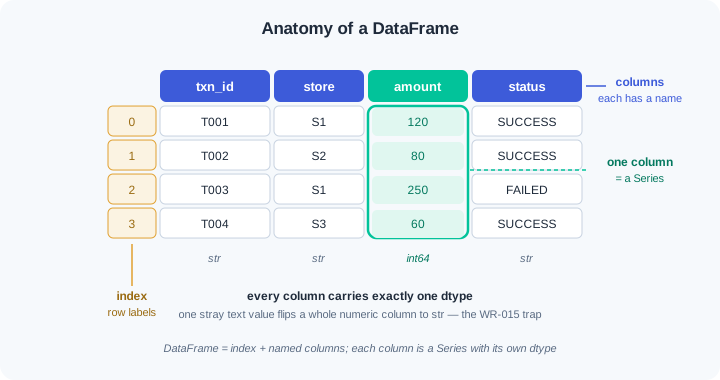
You pull data out in three ways. loc selects by label: row and column names. iloc selects by position: plain numbers, like NumPy in module 0.4. A boolean mask — a True/False Series that keeps matching rows — handles conditions such as amount above 500. Masks are the workhorse; most real questions begin as a filter.
Real files are dirty in the same three ways everywhere. Numbers arrive as text, so a sum glues digits together instead of adding. Some values are missing, and some rows are repeated. Cleaning means fixing dtypes, deciding what missing values become, and dropping repeats — in that order. A wrong dtype poisons every step after it, which is why WR-015 exists.
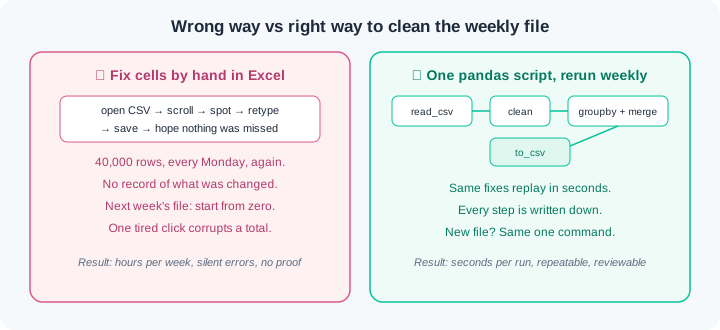
Here is the contrast that decides careers. The wrong way opens the CSV in Excel and fixes cells by hand; next week's file arrives and all that work is gone. The right way writes the fixes as a pandas script that reruns in seconds on every new file. Manual edits leave no record; a script is proof, and proof is what teammates and audits trust.
Two verbs turn a clean table into answers. groupby splits rows by a key column, computes something per group, and glues the results back together — failures per store, sales per city. merge joins two tables on a shared key column, the way a store report gains a city column from a master list. Keys must match in value and dtype, or merge floods your table with missing values. That failure has its own entry, WR-014.
Watch the full flow once before you try it. The dataset is built inline with pd.DataFrame, so everything runs offline. It is small on purpose — the moves are identical at forty thousand rows.
Step 1 — build and inspect. Seven UPI transactions from three kirana stores, deliberately dirty:
import pandas as pd

txns = pd.DataFrame({
    "txn_id": ["T001", "T002", "T003", "T004", "T005", "T005", "T006"],
    "store":  ["S1", "S2", "S1", "S3", "s2 ", "s2 ", "S1"],
    "amount": ["120", "80", "250", "60", "not paid", "not paid", "150"],
    "status": ["SUCCESS", "SUCCESS", "FAILED", "SUCCESS", "FAILED", "FAILED", None],
    "date":   ["2026-08-01", "2026-08-01", "2026-08-02", "2026-08-02",
               "2026-08-02", "2026-08-02", "2026-08-03"],
})
print(txns.head(3))
print(txns.shape)
txns.info()
head(3) prints the first three rows with the index 0, 1, 2 on the left. shape prints (7, 5) — seven rows, five columns, the same reflex as module 0.4. info() is the health report: it shows status has 6 non-null values out of 7, and every column's dtype is str (older pandas prints object). Read that dtype line twice: amount is text, not numbers. Nothing has gone wrong yet — but it will.
Step 2 — select rows and columns. Label, position, and condition:
print(txns.loc[2, "amount"])                 # 250  (row label 2, column by name)
print(txns.iloc[0, 0])                       # T001 (row 0, column 0 by position)

failed = txns[txns["status"] == "FAILED"]    # boolean mask
print(failed[["txn_id", "store"]])

s1 = txns.loc[txns["store"] == "S1", ["txn_id", "amount"]]
print(s1)
The mask txns["status"] == "FAILED" is a Series of True/False; using it as a filter keeps rows 2, 4, and 5. Notice the failed rows include store s2 — lowercase, with a trailing space. That is what real data looks like. The last line is the pattern to memorise: loc[mask, columns] selects rows by condition and columns by name in one call, and here it prints three S1 rows.
Step 3 — clean. Duplicates, dtypes, missing values, and messy text, in that order:
clean = txns.drop_duplicates(subset="txn_id").copy()
print(clean.shape)                                        # (6, 5)

clean["amount"] = pd.to_numeric(clean["amount"], errors="coerce")
print(clean["amount"].dtype, clean["amount"].sum())       # float64 660.0

clean["status"] = clean["status"].fillna("UNKNOWN")
clean["store"] = clean["store"].str.strip().str.upper()
print(clean.isna().sum())
drop_duplicates removes the repeated T005 row: shape goes from (7, 5) to (6, 5). to_numeric with errors="coerce" converts the text amounts to real numbers and turns "not paid" into NaN — the dtype becomes float64 and the sum is a true 660.0, not glued digits. fillna gives the missing status a value you chose on purpose. The string ops fix s2 into S2. Note the .copy() on line one and the whole-column assignments — this is the safe pattern that avoids WR-013.
Step 4 — group and join. One report line per store, then add the city from a master table:
by_store = clean.groupby("store").agg(
    txns=("txn_id", "count"),
    total=("amount", "sum"),
)
print(by_store)

stores = pd.DataFrame({
    "store": ["S1", "S2", "S3"],
    "city":  ["Kochi", "Thrissur", "Kollam"],
})
report = by_store.reset_index().merge(stores, on="store", how="left")
print(report)
The groupby output has one row per store: S1 with 3 transactions totalling 520.0, S2 with 2, S3 with 1 — and store has become the index. reset_index() turns it back into a normal column so we can merge on it. The merge matches each store code to its city, and how="left" keeps every report row even if a store were missing from the master. Print the shape before and after every merge — if the row count changes unexpectedly, you are living WR-014.
Step 5 — dates, daily report, save. Time handling and the output file:
clean["date"] = pd.to_datetime(clean["date"])
clean["day"] = clean["date"].dt.day_name()

daily = clean.groupby("date").agg(total=("amount", "sum"))
print(daily)

report.to_csv("store_report.csv", index=False)
to_datetime converts the date text into real timestamps, and the .dt accessor then answers calendar questions — day_name() gives Saturday, Sunday, Monday for our three dates. The daily groupby prints one total per date: 200.0, 310.0, 150.0. Finally to_csv writes the report file; index=False stops pandas writing the row numbers as an extra column. Load, clean, group, merge, save — that is the daily loop of a data person, end to end.
Do these inside your ai-lab environment from module 0.1, after pip install pandas==3.0.* — pinned, because the numbers the checks quote were produced on this version. Each exercise ends with a check — you are done only when the check passes.
Your first table. Create bookings.py. Build an IRCTC-style DataFrame with pd.DataFrame: 10 bookings with columns pnr, train, src, dst, fare, status (mix CONFIRMED, RAC, WL). Print head(), shape, and run info(). Then select: the fare of row 4 with loc, the first cell with iloc, all WL bookings with a boolean mask, and the pnr + fare of every booking from your home city using loc[mask, columns]. Check: running python bookings.py prints the shape (10, 6), the info table, and each selection — and you can say aloud which selections used labels, which used positions, and which used masks.
Clean a dirty ledger. Create ledger.py. Build a kirana ledger of 12 rows: bill_no, payment (mix "UPI", "upi ", "Cash", " cash"), and amount as text ("250", "1,200" with a comma, one "pending", one missing). Add two duplicated bill_no rows. First reproduce WR-015 on purpose: print amount.sum() before cleaning and save the glued-digits output in pandas-notes.md. Then clean: drop duplicates by bill_no, remove commas with .str.replace, convert with pd.to_numeric(errors="coerce"), count the NaN you created, and fill or drop them with a one-line comment defending the choice. Normalise payment with .str.strip().str.lower(). Check: the final info() shows a numeric amount dtype, the sum is a sensible rupee figure, payment has exactly two distinct values, and your notes file holds the before/after sums.
Group, join, and survive the blow-up. Create report.py. Build 15 transactions across 4 store codes, plus a stores master table mapping store code to city and PIN code. Produce a per-store report with groupby().agg() (count and total), then merge the city in. Now break it twice on purpose, the WR-014 way: (a) add a duplicate store row to the master, re-merge, and print shapes before and after to show the row count grow; (b) store PIN codes as int in one table and text in the other, try merging on PIN, and record the exact error or the NaN flood in pandas-notes.md. Fix both: drop_duplicates on the key, matching dtypes with astype(str), and re-merge with validate="many_to_one". Check: the final report has exactly one row per store, the shapes printed before and after the good merge are equal in row count, and your notes hold both failure records word for word.
The Monday pipeline. Create pipeline.py — one script that does the whole loop. Build 20 raw UPI transactions (dirty amounts, one duplicate, messy store text, dates as strings). Clean them with the step 3 recipe, convert dates with to_datetime, add a day column via .dt.day_name(), build a per-date and per-store summary with groupby, merge in a store master, and save summary.csv with to_csv(index=False). Along the way, trigger WR-013 on purpose: try df[df["status"] == "FAILED"]["amount"] = 0, print the column to prove nothing changed, paste the warning text into pandas-notes.md, then do it correctly with df.loc[mask, "amount"] = 0. Check: running the script twice produces an identical summary.csv both times, the chained-assignment attempt provably changed nothing while the loc version did, and the CSV opens with one row per date-store pair.
Three failures cover most first-month pandas pain. Each has a War Room entry with the full diagnosis path:
- WR-013 — the assignment that silently did nothing. Chained indexing like
df[mask]["col"] = valuewrites to a throwaway copy. Older pandas muttersSettingWithCopyWarning; pandas 3 raises aChainedAssignmentErrorwarning — either way your table did not change. - WR-014 — merge multiplied my rows, or flooded them with NaN. Duplicate keys in the master table, keys that never match, or int-versus-text key dtypes. The totals silently double-count, which is worse than a crash.
- WR-015 — numbers that were secretly text. One stray value like
"not paid"turns the whole column into strings: sums glue digits together, sorting goes alphabetical, anddescribe()stops showing a mean.
A DataFrame is a table of labelled rows and columns, and each column is a Series sharing one dtype. Select with loc by label, with iloc by position, and with boolean masks for conditions. Clean before you compute: fix dtypes first, then missing values and duplicates, because a wrong type poisons every later step. groupby splits rows by a key and aggregates each group, while merge joins two tables on keys that must match in value and dtype. Parse dates with to_datetime, assign through loc so changes land, and save with to_csv so the pipeline reruns on every new file.
- UPI reconciliation at Indian fintechs: settlement files from banks arrive daily as CSVs; teams load, clean, and merge them against internal records in pandas, and a wrong join key here means real money miscounted.
- Retail and logistics analysts build the same groupby reports you wrote in exercise 3 — sales per store, delays per hub, stock per warehouse — as scheduled scripts, not hand-edited spreadsheets.
- Every ML feature pipeline in Phase 1 starts life as a pandas DataFrame: the cleaning and joining you practised here is the input layer of every model you will ever train.
Answer these before opening the gate assessment. Each question names its type.
type=output-prediction— A fare column was built aspd.Series(["40", "25", "35"]). Predict the exact printed result ofprint(fares.sum())and explain why it is not 100.type=debug— A teammate runsdf[df["status"] == "FAILED"]["amount"] = 0, sees a long warning, and thenprint(df["amount"])shows the old values. Name the cause in one sentence and give the one-line fix.type=interpretation— A left merge of 4,000 transactions against a store master returns 4,000 rows, but every value in the newcitycolumn is NaN. What does this output tell you about the join keys?type=scenario-judgement— Your team sends a weekly sales report. A teammate proposes fixing the raw CSV by hand in Excel every Monday because "it takes only twenty minutes". Give your judgement and the one-sentence reason you would offer.type=trade-off— Dropping rows with missing amounts versus filling them with 0, for a per-store revenue report: give one concrete advantage and one concrete cost of each choice.
Explain to a friend who has never coded: what does groupby do to a table? Use the example of a kirana owner sorting a box of paper bills into piles by supplier and then totalling each pile. Use at most 4 sentences, and no pandas words at all. If your friend can predict how many totals come out of ten suppliers, you own this module.