Git & GitHub as an engineer
Thursday, 4 pm. Arjun is two weeks into a logistics startup in Chennai. He fixed his first real bug today, and the save felt like a small victory. Then his team lead asked him to raise a pull request for review. Arjun froze. His fix lived in one file on his desktop, with no history and no backup. A teammate had already edited the same file. In college, code moved around in WhatsApp zips. At work, code lives in Git. Today you learn to speak it.
- Every company you will join keeps its code in Git. Your day-one work is blocked until you can use it.
- Recruiters open your GitHub before your resume. Clean commits and merged pull requests are proof of real work.
- Conflicts and lost commits push many freshers into panic. Today you drill the calm recovery until it is routine.
Git is a version control system — a tool that records the history of your project as a chain of snapshots. Each snapshot is a commit — a saved picture of your files with a message, an author, and an id. The folder Git watches, plus that whole history, is a repository. Because every commit is kept, you can return to any past state of the project. That one fact removes most of the fear from changing code.
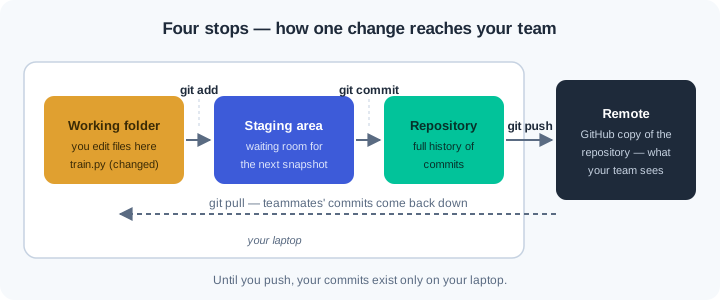
A change travels through four stops before a teammate sees it. It starts in your working folder, where you edit files. The command git add moves it to the staging area, a waiting room for the next snapshot. The command git commit stores the staged change in the repository on your laptop. The command git push copies new commits to the remote — a copy of your repository on a server such as GitHub.
A branch is a movable label that points at one line of commits. The default branch is called main, and teams protect it because it must always work. To fix a bug, you create a new branch, commit there, and leave main untouched. When the work is ready, you open a pull request — a request to merge your branch into main after a teammate reviews it. Review before merge is how teams catch mistakes early and spread knowledge.
Sometimes two branches change the same lines of the same file. Git will not guess who is right, so it stops and reports a merge conflict — a pause where a human must choose between two edits. The file shows both versions between special markers, and you keep what is correct. Nothing is lost during a conflict; both versions sit safely in history. Freshers fear this moment most, and after today you will treat it as routine.
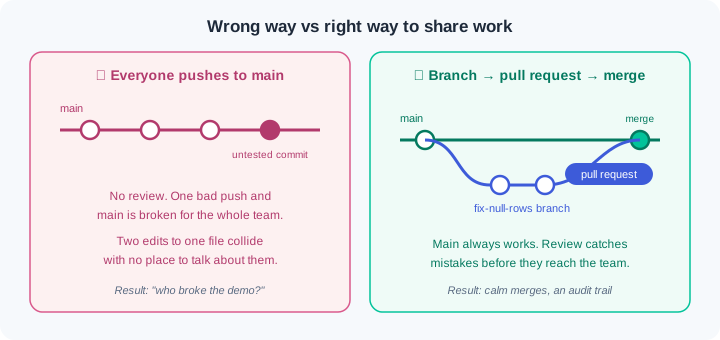
Why do teams insist on this flow? A bank or a UPI company must show who changed what, when, and who approved it. Git history is that audit trail, and pull requests are the approval record. The habits you build today — small commits, clear messages, review before merge — are the same ones those teams enforce. You are practising the real discipline on a small stage.
Watch the full flow once before you try it. The commands are identical on Windows, macOS, and Linux once Git is installed.
Step 1 — tell Git who you are, then start a repository. Every commit is stamped with a name and email, so set them once per machine:
git --version
git config --global user.name "Arjun Kumar"
git config --global user.email "arjun@example.com"
mkdir churn-model && cd churn-model
git init
git --version proves the install worked. The two config lines write your identity into every future commit — recruiters will read these on GitHub, so use your real name. git init creates a hidden .git folder: that folder IS the repository, and deleting it deletes the history.
Step 2 — make your first commit. Create a file, stage it, snapshot it, then read the history back:
echo "print('loading churn data')" > train.py
git add train.py
git commit -m "Add training script skeleton"
git log --oneline
git add moves the file into the staging area; git commit -m turns everything staged into one snapshot with a message. git log --oneline prints one line per commit — a short id plus your message. A message should say what the change does ("Add training script skeleton"), never "update" or "final2".
Step 3 — branch, then publish to GitHub. Never work on main directly; branch first, then push:
git checkout -b fix-null-rows
git add train.py
git commit -m "Drop rows with missing customer id"
git remote add origin https://github.com/<your-username>/churn-model.git
git push -u origin fix-null-rows
git checkout -b creates the branch and switches to it in one move. git remote add origin names your GitHub copy "origin"; git push -u origin fix-null-rows uploads the branch and links the two, so future pushes need only git push. On GitHub, a banner now offers to open a pull request from this branch — that is the review flow from the diagram.
Connect to GitHub once, before that first push. GitHub stopped accepting account passwords from Git in 2021, so a bare push ends in Authentication failed. Connect once and forget it: install the GitHub CLI (winget install GitHub.cli on Windows, brew install gh on macOS, or from cli.github.com), run gh auth login, pick GitHub.com, HTTPS, and "Login with a web browser", then approve in the browser. Every git push after that carries your identity automatically. The older route works too — create a Personal Access Token (classic) under Settings > Developer settings on GitHub and paste it in place of your password when Git asks — but the CLI route wins because you never store a token by hand.
Step 4 — read a conflict without panic. When a merge stops, the conflicted file looks like this:
<<<<<<< HEAD
timeout_seconds = 30
=======
timeout_seconds = 60
>>>>>>> fix-timeout
The block between <<<<<<< HEAD and ======= is your current branch's version; the block below it belongs to the incoming branch. The exit is always the same four steps: edit the file to the single correct line, delete all three marker lines, git add the file, git commit. Both original versions still exist in history — resolving a conflict risks nothing.
Do these on your own machine now. Each exercise ends with a check — you are done only when the check passes.
Your first repository. Install Git for your operating system and set your name and email with git config --global. Create a folder git-lab, run git init, and build a history of three commits: create notes.md in the first, extend it in the second and third. Write a real message for each commit. Check: git log --oneline shows exactly three commits with clear messages, and git status says "nothing to commit, working tree clean".
The full GitHub loop. Create a GitHub account if you do not have one, then an empty repository named git-lab. Connect it as origin and push. Now run the professional flow end to end: branch add-readme, commit a README.md describing the project, push the branch, open a pull request to yourself on GitHub, read your own diff, merge it there, then run git checkout main and git pull. Check: git log --oneline on main shows the README commit arriving via a merge, and your GitHub repo shows one merged pull request.
Manufacture a merge conflict, then defuse it. In git-lab, create branch title-hindi and change the first line of notes.md. Switch back to main and change the same line differently. Merge title-hindi into main — Git will stop and report the conflict. Open the file, combine both edits into one correct line, remove the markers, stage, and commit. Check: git log --oneline shows a merge commit, and git grep "<<<<<<<" returns nothing.
Lose a commit, then rescue it. In git-lab, run git log --oneline and check out your FIRST commit by its id — Git warns about "detached HEAD". Edit notes.md and commit there. Now run git checkout main — your new commit seems gone from every log. Recover it: git reflog to find its id, then git branch rescue <id>. Check: git log rescue --oneline shows the "lost" commit at the top. You have now solved WR-004 before ever meeting it at work.
Three failures cover most of what goes wrong in your first month with Git. Each has a War Room entry with the full diagnosis path:
- WR-004 — detached HEAD and the vanished commits. You checked out an old commit, worked there, and switched away. The work is not gone —
git reflogfinds it every time. - WR-005 — merge conflict markers all over a file. Git paused a merge and is waiting for a human decision. There is a calm four-step exit, and an abort button if you need it.
- WR-006 — you pushed a secret to GitHub. An API key in history stays in history, even after you delete the file. The real fix is rotating the key, and there is an order to follow.
One stop needs no War Room entry: Authentication failed or "Support for password authentication was removed" on a push means Git offered your account password — run gh auth login once (or use a token) and push again.
Git records your project as a chain of commits, and each commit is a snapshot you can return to. A change travels from your working folder to the staging area, into the repository, and up to the remote. A branch lets you work without touching main, and a pull request invites review before your work merges. A merge conflict is not damage; it is Git asking a human to choose between two edits. Commit small, write clear messages, and push daily so no laptop crash can erase your work.
- Fintech and banking teams (UPI-scale systems): every code and model change lands through a reviewed pull request, because auditors ask who changed what and who approved it.
- IT-services companies (Infosys, TCS, Wipro): freshers raise their first pull request in week one of training; those who already know the flow ship days ahead of their batch.
- Open-source AI projects (Hugging Face, scikit-learn): every outside contribution arrives as a pull request from a branch — the exact flow you practised in exercise 2.
Answer these before opening the gate assessment. Each question names its type.
type=output-prediction— You rungit add report.py, then editreport.pyagain, then rungit commit -m "update report". Predict which version of the file the commit contains, and whatgit statusshows immediately after.type=debug— A friend says: "I committed my fix an hour ago, but my teammate says GitHub still shows the old code." Name the most likely missing step and the one command you would run first to confirm it.type=interpretation—git statusprints: "On branch main. Your branch is ahead of 'origin/main' by 2 commits." What does this tell you about where those two commits live right now, and who can see them?type=scenario-judgement— Demo on Friday. A teammate proposes: "let us all push straight to main this week — branches slow us down." Give your judgement and the one-sentence reason you would offer them.type=trade-off— One commit at the end of each day versus a commit after every small working change: give one concrete advantage and one concrete cost of each for a fresher's first project.
Explain to a friend who has never coded: what is a commit, and why did the merge conflict in exercise 3 destroy nothing? Use at most 4 sentences and no Git command names. If your friend can repeat it back correctly, you own this module.