NumPy
Wednesday, 3 pm. Meera is a fresh data hire at a logistics startup in Bengaluru. Her lead asks for the average delivery delay across ten lakh shipment records. Her Python loop from last week runs, and runs, and is still running after four minutes. Her senior computes the same answer in under a second, with one line. Same laptop, same data. The difference is NumPy, the engine under every model's data. Today you stop looping over numbers and start thinking in arrays.
- Every model's data is an array: Pandas tables, PyTorch tensors, and embeddings are all this shape underneath.
- Vectorised NumPy code runs ten to a hundred times faster than Python loops on the same ordinary laptop.
- Interview screens for AI roles test shapes, axes, and broadcasting directly — freshers who read shapes fluently stand out.
A NumPy array — a grid of numbers of one type, stored in one solid block — is the container AI runs on. A Python list can hold anything, so Python checks each item's type at every step. An array skips those checks and hands whole blocks of numbers to fast compiled code. That is why one array line can beat a loop by a factor of a hundred. Speed matters here because models multiply crores of numbers every second.
Every array carries a shape — the size of the array along each of its dimensions. A single number is a scalar, a line of numbers is a vector, and a table is a matrix. Stack many tables together and you get the batch tensors that deep learning models eat. Reshaping rearranges the same numbers into a new shape without copying them. The figure below is the ladder every model's data climbs.
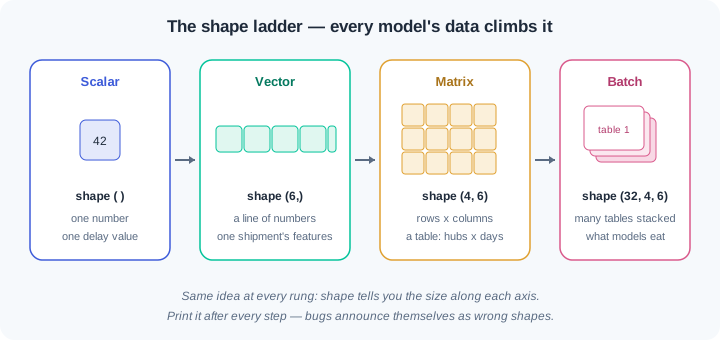
An axis — one direction through an array, numbered from 0 — is how you tell NumPy which way to work. Axis 0 runs down the rows; axis 1 runs across the columns. A reduction like sum or mean collapses one axis and keeps the rest. Ask for the mean along axis 0 and you get one value per column. Most shape confusion in real code is an axis picked wrong.
Vectorisation — replacing a Python loop with one whole-array operation — is the core habit of this module. The wrong way walks ten lakh numbers one by one in slow interpreted steps. The right way hands the whole array to NumPy in a single line. Same answer, same laptop, roughly a hundred times faster. The figure below shows the contrast you will time yourself in practice.
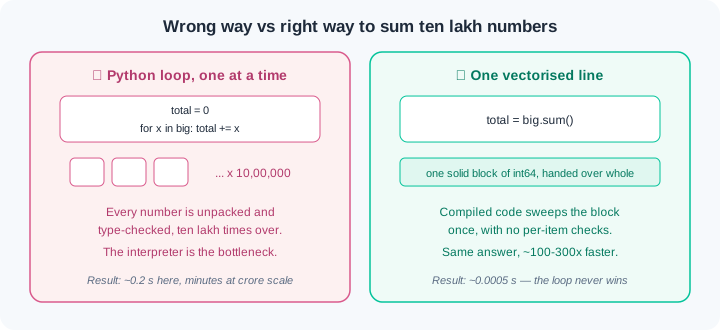
Broadcasting — NumPy's rule for stretching a smaller array across a bigger one — lets you subtract a row of column means from a whole table in one line. The rule is strict: matching sizes, or a size of 1, on every dimension. When shapes cannot match, NumPy stops you with the error that WR-010 walks through. One more label matters: the dtype — the number type every element shares, such as int64 or float32. Shape and dtype together describe any array fully, so you will print both as one reflex.
Watch the full flow once before you try it. Every step prints shapes — build the print(x.shape) reflex now, because every bug in this module announces itself through a shape.
Step 1 — from list to array. Convert a plain list and see what an array knows about itself:
import numpy as np

delays = [12, 45, 7, 30, 22, 60]      # minutes, plain Python list
arr = np.array(delays)
print(arr.shape, arr.dtype)
print(arr * 2)
Output: (6,) int64 then [ 24 90 14 60 44 120]. The shape (6,) reads as: one dimension, six numbers — a vector. Note the contrast with lists: delays * 2 would have glued two copies of the list together, while arr * 2 doubled every number. Whole-array maths is the point of the library.
Step 2 — the speed race, with a seed. Sum ten lakh numbers both ways and time them:
import time
rng = np.random.default_rng(42)               # 42 is the seed
big = rng.integers(1, 100, size=1_000_000)
print(big.shape, big.dtype)

t0 = time.perf_counter()
total = 0
for x in big:
    total += x
print(f"loop: {time.perf_counter() - t0:.3f}s, total={total}")

t0 = time.perf_counter()
fast = big.sum()
print(f"vectorised: {time.perf_counter() - t0:.4f}s, total={fast}")
Typical output: (1000000,) int64, then loop: 0.196s, then vectorised: 0.0005s — same total, a few hundred times faster. The seed 42 makes rng produce the same "random" numbers on every run, so you, a teammate, and a grader all see identical results. Seeded randomness is how ML experiments stay repeatable.
Step 3 — reshape and slice. Turn a flat vector into a grid and cut pieces out of it:
month = np.arange(1, 25)          # 24 daily shipment counts
print(month.shape)                # (24,)
grid = month.reshape(4, 6)        # 4 hubs x 6 days
print(grid.shape)                 # (4, 6)
print(grid[0])                    # first hub, all days
print(grid[:, 0])                 # all hubs, day 1
print(grid[1:3, 2:5].shape)       # (2, 3)
Output: (24,), (4, 6), [1 2 3 4 5 6], [ 1 7 13 19], (2, 3). Reshape moved no data — the same 24 numbers now read as 4 rows of 6. The slice rule is grid[rows, columns], and : means "all of this axis". Read grid[:, 0] aloud as: every row, column zero.
Step 4 — slices are views. This one causes silent bugs, so watch it break on purpose:
window = grid[0, :3]      # first hub, first 3 days
window[:] = 0
print(grid[0])            # [0 0 0 4 5 6]  <- original changed!

safe = grid[1, :3].copy()
safe[:] = 0
print(grid[1])            # [ 7  8  9 10 11 12]  <- untouched
The first print shows the original grid changed even though we only wrote to window. A slice is a view — a second name looking at the same memory, like b = a for lists in module 0.3. When you want an independent piece, say so with .copy(). WR-011 covers the debugging story when this bites silently.
Step 5 — broadcasting and axis reductions. The finale: centre a table in one line:
sales = np.array([[120,  90, 60],
                  [200, 150, 80],
                  [160, 110, 40]])     # 3 kirana stores x 3 items
print(sales.shape)                     # (3, 3)
col_mean = sales.mean(axis=0)
print(col_mean.shape, col_mean)        # (3,) [160. 116.67 60.]
centred = sales - col_mean
print(centred.shape)                   # (3, 3)
print(sales.sum(axis=1))               # [270 430 310] per-store totals
axis=0 collapsed the rows, leaving one mean per item column — shape (3,). The subtraction then broadcast that (3,) row across all three rows of the (3, 3) table: NumPy stretched the smaller array instead of erroring. axis=1 collapsed columns instead, giving one total per store. Every feature-scaling step in ML is this exact pattern.
Do these inside your ai-lab environment from module 0.1, after pip install numpy==2.5.* — pinned, because the numbers the checks quote were produced on this version. Each exercise ends with a check — you are done only when the check passes.
Arrays know themselves. Create arrays.py. Build a NumPy array of 12 daily electricity units for a hostel room (make up values between 2 and 9). Print its shape and dtype on one line — this is the reflex line you will type forever. Compute and print: units doubled, units above 5 (boolean mask, then the filtered values), and the mean to two decimals. Then show the list contrast: print units_list * 2 for the plain-list version and one comment line explaining why the outputs differ. Check: running python arrays.py prints (12,) int64 (or your dtype), the doubled array, the filtered array, the mean — and your comment names duplication vs elementwise maths.
Race your own laptop. Create race.py. With np.random.default_rng(7), make one million random delay values. Time three tasks with time.perf_counter(), each done twice — Python loop vs vectorised: total of all values, count of values above 50, and squares of all values. Print a three-line table: task, loop seconds, vectorised seconds, speed-up factor. Run the whole script twice. Check: every vectorised version is at least 20x faster on your machine, both runs show identical totals and counts because of the seed, and you write one sentence in numpy-notes.md on why the gap exists.
Reshape, slice, and meet the view trap. Create hubs.py. Build np.arange(1, 29) as 28 days of shipments and reshape to (4, 7) — 4 hubs, 7 days. Print the shape after every operation. Extract: hub 3's week, everyone's Sunday (last column), and the middle (2, 3) window. Now reproduce WR-011 on purpose: take a slice named window, zero it, and print the parent grid to show the damage. Rebuild the grid, redo it with .copy(), and show the parent survives. Check: python hubs.py prints shapes at every step, the damaged grid, then the safe version — plus two sentences in numpy-notes.md explaining views vs copies in your own words.
Broadcast like a pipeline. Create scale.py. With seed 21, build a (6, 4) array of random marks (0 to 100) — 6 students, 4 subjects. Compute per-subject mean and per-subject spread (max minus min) using axis=0, printing shapes each time. Centre the marks by subtracting the mean row — broadcasting does the stretch. Now trigger WR-010 on purpose: try subtracting the per-student mean (axis=1, shape (6,)) directly and record the exact ValueError text in numpy-notes.md. Fix it with .reshape(6, 1) or keepdims=True and prove the result's shape is (6, 4). Check: the script prints shapes before and after every operation, the error text is saved word for word, and the fixed version runs clean with the same output on every run.
Three failures cover most first-month NumPy pain. Each has a War Room entry with the full diagnosis path:
- WR-010 —
ValueError: operands could not be broadcast together. Two shapes that cannot line up under the broadcasting rule. The error prints both shapes — most people panic instead of reading them. - WR-011 — a slice silently changed the original array. Slices are views into the same memory, not copies. Data corrupts with no error, sometimes three functions away from the real cause.
- WR-012 — dtype surprises. Integer totals that wrap to negative numbers, arrays that quietly became text, and float comparisons where 0.1 + 0.2 refuses to equal 0.3.
An array is one solid block of same-type numbers, and its shape gives its size along every axis. Vectorised whole-array operations replace Python loops and run up to a hundred times faster on the same laptop. Broadcasting stretches a smaller array across a bigger one whenever every dimension matches or equals 1. Reductions like sum and mean collapse one chosen axis, and slices are views that share memory with the parent. Print shape and dtype after every step, and seed random arrays so every run repeats exactly.
- UPI fraud scoring at fintechs: each transaction becomes a row of numbers, lakhs of rows become one matrix, and the model scores the whole batch with vectorised maths — no loops anywhere.
- Logistics and delivery platforms compute delay statistics, route distances, and hub loads as axis-wise reductions over shipment arrays — the exact shape of exercises 3 and 4.
- Every PyTorch and TensorFlow tensor copies NumPy's shape, axis, dtype, and broadcasting rules, so this module is your head start on Phase 2 deep learning.
Answer these before opening the gate assessment. Each question names its type.
type=output-prediction— Giveng = np.arange(12).reshape(3, 4), predict the exact printed output ofprint(g.shape, g[:, 0], g.sum(axis=1))and explain how each part follows from the shape.type=debug— A teammate's script dies withValueError: operands could not be broadcast together with shapes (3,4) (3,). Name the most likely cause and the two print lines you would add first to confirm it.type=interpretation— A transcript showsw = g[0, :2], thenw[:] = 0, thenprint(g[0])outputs[0 0 2 3]. What does this output tell you about how NumPy slices use memory?type=scenario-judgement— Demo tomorrow on 50 lakh transaction records. A teammate proposes rewriting your NumPy pipeline as plain Python loops "because loops are easier to read". Give your judgement and the one-sentence reason you would offer them.type=trade-off— Fixing a random seed versus leaving results truly random, for a fraud-model experiment your team reruns every week: give one concrete advantage and one concrete cost of each choice.
Explain to a friend who has never coded: what is an array's shape, and why do engineers print it after almost every line while building a data pipeline? Use at most 4 sentences, and no NumPy words beyond "rows" and "columns". If your friend can say why a wrong shape is better caught early than late, you own this module.