Your machine, set up right
Monday, 9:40 am. Priya joins a Hyderabad fintech as a fresher. Her team lead says: clone the repo and run the churn model before lunch. Her laptop is a three-year-old Windows machine. She types python and the screen says command not found. Around her, everyone looks busy. Nobody warns you about this part. Every AI career starts here, at a blinking cursor. Today you cross this gap once, properly, and never fear it again.
- Every later module runs code on your machine. A broken setup blocks all of them.
- Setup errors are the top reason beginners quit in week one. You will beat that this week.
- Interviewers notice it fast. A fresher who can fix their own environment stands out on day one.
Your AI workbench is a stack of five layers. Each layer sits on the one below it. When something fails, you find the lowest broken layer and fix that first. This one habit turns panic into a checklist.
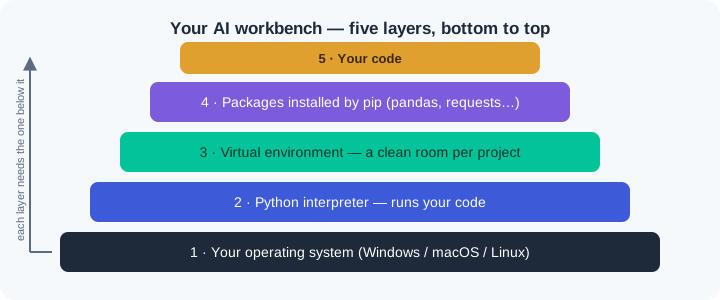
The bottom layer is your operating system: Windows, macOS, or Linux. On top of it sits the Python interpreter — the program that reads your code line by line and runs it. Your terminal — the text window where you type commands — is how you talk to both. When you type a command, the system searches a fixed list of folders for it. That list is the PATH — and a wrong PATH is the top cause of command not found.
The next layer is the virtual environment — a private folder that keeps one project's packages apart from every other project. A package is code someone else wrote that you install and reuse. The tool that installs packages is pip — Python's package installer. Packages land in whichever environment is active when you run it.
Why do working engineers refuse to install packages globally? Two projects will one day need two different versions of the same package. A global install forces them to fight over one copy. A virtual environment gives each project its own shelf.
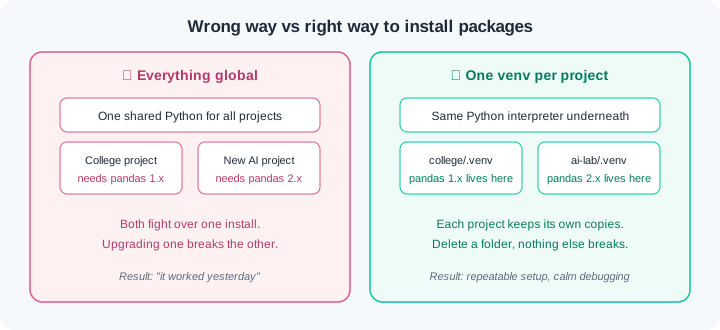
Here is the payoff. A bank or a UPI startup will never let code near production from a machine nobody can reproduce. The habit you build today — isolated, checkable, repeatable setup — is the same discipline those teams enforce. This is not a toy exercise. You are practising the real thing on a smaller stage.
Watch the full flow once before you try it. This is macOS/Linux syntax; the Windows lines are shown where they differ.
Step 1 — check what you have. Open your terminal and ask for the version:
python3 --version
# Windows (PowerShell):  py --version
Output like Python 3.12.4 means the interpreter is installed and on your PATH. An error means we install it first: download from python.org, run the installer, and on Windows tick "Add python.exe to PATH" — that checkbox is the whole game. One more Windows trap: if typing python opens the Microsoft Store instead of printing a version, you have hit Windows' built-in stub, not a broken install. Switch the stub off under Settings > Apps > Advanced app settings > App execution aliases (turn off both python entries), or type py, which never routes to the Store.
Step 2 — make a project and a virtual environment. One folder, one environment, always:
mkdir ai-lab && cd ai-lab
python3 -m venv .venv
# Windows (PowerShell):  py -m venv .venv
source .venv/bin/activate
# Windows (PowerShell):  .venv\Scripts\Activate.ps1
One Windows speed bump to expect before the prompt changes: PowerShell ships with script-running switched off, so the first Activate.ps1 can stop with "running scripts is disabled on this system". The one-time fix needs no administrator rights — run Set-ExecutionPolicy -Scope CurrentUser RemoteSigned, open a fresh terminal, and activate again. If your college machine blocks even that, run .venv\Scripts\activate.bat from Command Prompt instead — same environment, different door.
Your prompt now shows (.venv) at the left. That prefix means: everything pip installs from now on lands in this project's shelf, not on the whole machine.
Step 3 — install and verify. Install one package, then prove where it came from:
pip install requests
python -c "import requests; print(requests.__version__)"
The version prints with no error. That single line — import, then print — is the verification habit you will use after every install for the rest of your career.
Step 4 — wire up VS Code. Open the folder with code ., press Ctrl+Shift+P (Cmd on Mac), run Python: Select Interpreter, and pick the one ending in .venv. Now the editor, the terminal, and pip all agree on which Python they mean. When those three disagree, you get the classic "it works in the terminal but not in VS Code" mystery — and now you know its cause.
Do these on your own machine now. Each exercise has a check command — you are done only when the check passes.
Build your workbench from zero. Install Python 3.12+ and VS Code for your operating system. Create a folder ai-lab, create a virtual environment inside it, and activate it. Check: python --version shows 3.12+, and your prompt shows (.venv). Take a screenshot of both — this is your first proof-of-work artifact.
Prove isolation to yourself. Create a second folder test-lab with its own virtual environment. In ai-lab install requests; in test-lab do not. Check: python -c "import requests" succeeds inside ai-lab and fails with ModuleNotFoundError inside test-lab. Write two sentences in a notes file explaining why the same command behaves differently in the two folders. Then deactivate, delete test-lab entirely, and confirm ai-lab still works — proof that environments are disposable.
Break it, then fix it. Inside ai-lab with the environment active, run pip install pandas. Then open a brand-new terminal window WITHOUT activating the environment and run python -c "import pandas". It fails — reproduce the exact error a teammate would send you. Fix it two ways: (a) activate and rerun, (b) without activating, call the environment's interpreter directly by path .venv/bin/python (Windows: .venv\Scripts\python). Check: both ways print pandas' version. You have now solved WR-002 before ever meeting it at work.
Three failures cover most of what goes wrong this week. Each has a War Room entry with the full diagnosis path:
- WR-001 —
python: command not found. The interpreter is missing or your PATH does not include it. Classic after skipping the installer checkbox on Windows. - WR-002 —
ModuleNotFoundErrorafter a successful install. pip installed into one environment; your code runs in another. The fix is knowing which Python is active. - WR-003 —
pip installfails on college or office Wi-Fi. Proxy and SSL errors, timeouts, or a blocked PyPI mirror. There is a clean path through, and it is not "turn off security".
Your workbench is five layers, and you debug from the lowest broken layer upward. The terminal is where you talk to the machine, and the PATH decides which commands it can find. The interpreter runs your code, and one machine can carry several of them. A virtual environment gives every project its own package shelf, and pip fills that shelf. Verify every install with one import line, and keep VS Code pointed at the same environment as your terminal.
- Fintech and banking teams (think UPI-scale systems) demand reproducible environments before any model code ships — the exact habit from exercise 2.
- IT-services onboarding (Infosys, TCS, Wipro grade freshers within weeks): candidates who unblock their own machines finish training assignments days ahead of those who raise support tickets.
- Open-source AI projects list environment setup as step one of every README; contributors who cannot reproduce the environment cannot contribute at all.
Answer these before opening the gate assessment. Each question names its type.
type=output-prediction— Your prompt shows(.venv). You runpip install rich, then open a NEW terminal in the same folder and runpython -c "import rich". Predict the exact outcome and explain what the new terminal changed.type=debug— A friend sends this: "python3 --versionprints 3.13.1 butpip install pandassays pip is not recognized." Name the most likely cause and the one command you would run first to confirm it.type=interpretation— Read this shell transcript:pip install pandasprints "Successfully installed pandas-2.2.3" but the very next linepython -c "import pandas"raisesModuleNotFoundError. What does this pair of lines tell you about which interpreters were involved?type=scenario-judgement— Your team ships a demo on Friday. A teammate proposes installing every package globally "so we stop wasting time activating environments". Give the judgement you would make and the one-sentence reason you would offer them.type=trade-off— The official python.org installer versus the Microsoft Store / Homebrew route: name one concrete advantage and one concrete cost of each for a fresher on a locked-down laptop.
Explain to a friend who has never coded: what is a virtual environment, and why did deleting test-lab not break ai-lab? Use at most 4 sentences, no jargon beyond the word "folder". If your friend can repeat it back correctly, you own this module.