Linear & logistic regression
Monday morning in Guwahati. Karan has joined a grocery-delivery startup that promises every order within forty minutes. Last week one order in five arrived late, and the city head wants answers, not a black box. Karan's senior fits a straight line through the delivery records. Each factor gets one number: every extra kilometre adds about two minutes. The city head nods at once, because she can argue with numbers she can read. Your models must earn that same nod.
- Interviewers ask freshers to explain these two models line by line; "read this coefficient aloud" is a standard question.
- They train in seconds on an 8GB laptop and set the strong baseline every fancier model in this phase must beat.
- Banks and NBFCs still use them for credit scoring, because every number in them can be checked and defended.
Linear regression predicts a number using a recipe you can read aloud. Multiply each feature by its own number, add the results, and start from a base value. The base value is the intercept — the minutes a delivery takes before any feature is counted. Each multiplier is a coefficient — the number the model attaches to one feature. Karan's model reads: minutes = 14 + 2 × distance + 0.9 × items, roughly.
How does the model choose those numbers? It measures how wrong a candidate line is: take each point's gap from the line, square it, and add the squares up. That total is the loss, and the best line is the line with the smallest loss. Module 0.7 already gave you the picture: the loss is a curve, the slope points uphill, and you step the other way until the error stops falling. Fitting a line is that same ball-on-a-curve walk, run on the slope and the intercept at once.
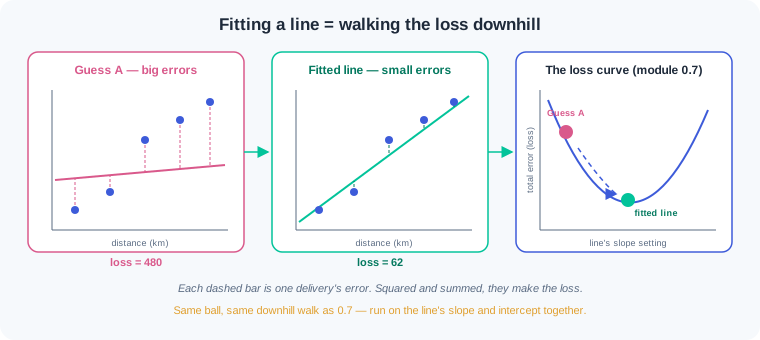
Once fitted, each coefficient tells a story a manager can use. In Karan's model, every extra kilometre adds about two minutes, holding the other features steady. That is a sentence a city head can act on, and a sentence you must be able to defend.
Here is the misread that wrecks review meetings. The wrong way compares raw coefficients: items shows 0.94 and order value shows 0.02, so someone declares order value useless. But order value is measured in rupees and swings by hundreds, while items swings by three or four. Feature scaling — putting every feature on one common spread before fitting — makes the numbers comparable, and the ranking can flip. The right way scales first, compares after, and reads every coefficient as association, never as proof of cause.
Logistic regression answers a yes-or-no question with a probability. It computes the same weighted sum, called a score, and then squashes it. The sigmoid — the S-shaped curve that does the squashing — turns any score into a value between 0 and 1. A big positive score lands near 1, a big negative score lands near 0, and a score of zero lands at exactly 0.5. So the model never shouts "churn"; it says there is an 87 percent chance.
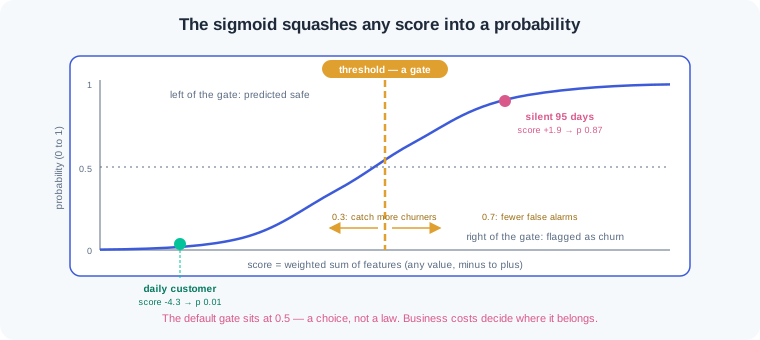
Acting on a probability needs a cutoff. That cutoff is the decision threshold — the probability above which you treat a prediction as a yes. Libraries default to 0.5, but 0.5 is a choice, not a law. When a missed churner costs ten times a voucher, a lower gate earns more money. Module 1.5 turns this trade into a full toolkit; today you learn to move the gate.
Real tables carry one more danger: two features holding nearly the same signal. The model can hand one a huge positive coefficient and the other a huge negative one, and the story turns to nonsense. Regularisation — a penalty added to the loss for large coefficients — squeezes wild numbers back towards zero. The common form is called L2, and scikit-learn's knob is C: smaller C means a stronger squeeze. A mild penalty is on by default, which is why sklearn coefficients rarely explode.
Why start every project with these two models? They run fast on your laptop, they set the baseline that module 1.4's trees must beat, and every number in them can be read aloud. That is also why credit scorecards at banks stay logistic: an auditor can question each coefficient. Explain these two models well and you carry a skill every interview panel checks.
Work inside your ai-lab environment; scikit-learn is already installed from module 1.2. Same discipline as the loop lesson: type each block, run it, then change one number and watch what moves.
Karan's delivery table — fit the line, read the recipe. Seeded data for 400 Guwahati deliveries, then the two verbs you know, fit and predict, wearing a new model:
import numpy as np
import pandas as pd
from sklearn.linear_model import LinearRegression
from sklearn.model_selection import train_test_split

rng = np.random.default_rng(7)
n = 400

deliveries = pd.DataFrame({
    "distance_km": rng.uniform(1, 12, n).round(1),
    "items": rng.integers(1, 15, n),
    "order_value": rng.integers(100, 900, n),
})
deliveries["minutes"] = (14 + 2.0 * deliveries["distance_km"]
                         + 0.9 * deliveries["items"]
                         + 0.02 * deliveries["order_value"]
                         + rng.normal(0, 3, n)).round(1)

features = ["distance_km", "items", "order_value"]
X_train, X_test, y_train, y_test = train_test_split(
    deliveries[features], deliveries["minutes"],
    test_size=0.25, random_state=42)

lin = LinearRegression()
lin.fit(X_train, y_train)

print("intercept:", round(lin.intercept_, 2))
for name, coef in zip(features, lin.coef_):
    print(f"{name:12s} {coef:+.3f}")
print("R^2 on test:", round(lin.score(X_test, y_test), 2))
Output: intercept: 13.49, then distance_km +2.037, items +0.944, order_value +0.020, then R^2 on test: 0.9. Read the model as a sentence: a delivery starts at about 13.5 minutes; each kilometre adds about 2 minutes; each extra item adds about 0.9; each rupee of order value adds 0.02. We built the data with 14, 2.0, 0.9 and 0.02 — the model recovered the recipe through the noise. The R^2 of 0.9 says the line explains most of the swing in delivery minutes; 1.5 will sharpen what that score means.
The same model, unscaled versus scaled. One review-meeting question — "which feature matters most?" — asked the wrong way and the right way:
from sklearn.preprocessing import StandardScaler

scaler = StandardScaler()
X_train_scaled = scaler.fit_transform(X_train)

lin_scaled = LinearRegression()
lin_scaled.fit(X_train_scaled, y_train)

print(f"{'feature':12s} {'raw':>8s} {'scaled':>8s}")
for name, raw, sc in zip(features, lin.coef_, lin_scaled.coef_):
    print(f"{name:12s} {raw:+8.3f} {sc:+8.3f}")
print("spread (std):", X_train.std().round(1).to_dict())
Output, row by row: distance_km +2.037 +6.615, items +0.944 +3.553, order_value +0.020 +4.371, then spread (std): {'distance_km': 3.3, 'items': 3.8, 'order_value': 224.0}. The raw column says items beats order value 47 to 1. The scaled column flips that ranking: one typical swing of order value (about 224 rupees) moves delivery time more than one typical swing of items. Both columns are correct answers to different questions — raw answers "per unit", scaled answers "per typical swing". WR-061 is the incident where a team compared the raw column and briefed leadership with the wrong story.
Churn, continued from 1.2 — and a warning you must not scroll past. Same seeded churn world as the loop lesson, now with a solver copied from a blog snippet:
from sklearn.linear_model import LogisticRegression
from sklearn.pipeline import make_pipeline

rng = np.random.default_rng(42)
n = 400
customers = pd.DataFrame({
    "orders_last_90d": rng.poisson(6, size=n),
    "days_since_last_order": rng.integers(1, 120, size=n),
    "avg_order_value": rng.integers(120, 900, size=n),
})
risk = (-3.0 + 0.07 * customers["days_since_last_order"]
        - 0.5 * customers["orders_last_90d"])
customers["churned"] = (rng.random(n) < 1 / (1 + np.exp(-risk))).astype(int)

feats = ["orders_last_90d", "days_since_last_order", "avg_order_value"]
Xc_train, Xc_test, yc_train, yc_test = train_test_split(
    customers[feats], customers["churned"],
    test_size=0.25, random_state=42, stratify=customers["churned"])

snippet_model = LogisticRegression(solver="saga")   # copied from a blog
snippet_model.fit(Xc_train, yc_train)
print("snippet accuracy:", round(snippet_model.score(Xc_test, yc_test), 2))

churn_model = make_pipeline(StandardScaler(), LogisticRegression())
churn_model.fit(Xc_train, yc_train)
print("scaled accuracy :", round(churn_model.score(Xc_test, yc_test), 2))

logit = churn_model.named_steps["logisticregression"]
for name, coef in zip(feats, logit.coef_[0]):
    print(f"{name:22s} {coef:+.2f}")
Output: first a ConvergenceWarning: The max_iter was reached which means the coef_ did not converge, then snippet accuracy: 0.74, then scaled accuracy : 0.8, then the coefficients orders_last_90d -0.82, days_since_last_order +2.14, avg_order_value +0.12. Look hard at 0.74 — that equals the do-nothing baseline from 1.2. The warning means the downhill walk ran out of steps before reaching the bottom: on unscaled features the loss valley is stretched thin, and the saga solver crawled. The pipeline scales first, converges cleanly, and its coefficients now tell the story: silence since the last order pushes churn odds up strongly (+2.14 per typical swing), while frequent ordering pulls them down. Ignoring that warning is WR-063 — a half-trained model shipped to production.
Probabilities, and the threshold as a dial. predict_proba for two customers, then a sweep of the cutoff on the test set:
from sklearn.metrics import precision_score, recall_score

two = pd.DataFrame([
    {"orders_last_90d": 9, "days_since_last_order": 4,  "avg_order_value": 450},
    {"orders_last_90d": 1, "days_since_last_order": 95, "avg_order_value": 260},
])[feats]
print("churn probability:", churn_model.predict_proba(two)[:, 1].round(2))

probs = churn_model.predict_proba(Xc_test)[:, 1]
for cut in [0.3, 0.5, 0.7]:
    pred = (probs >= cut).astype(int)
    print(f"cutoff {cut:.1f}  flagged {pred.sum():3d}"
          f"  caught {((pred == 1) & (yc_test == 1)).sum():2d} of 26"
          f"  precision {precision_score(yc_test, pred):.2f}"
          f"  recall {recall_score(yc_test, pred):.2f}")
Output: churn probability: [0. 0.87], then three sweep lines — cutoff 0.3 flagged 33 caught 17 of 26 precision 0.52 recall 0.65, cutoff 0.5 flagged 18 caught 12 of 26 precision 0.67 recall 0.46, cutoff 0.7 flagged 10 caught 8 of 26 precision 0.80 recall 0.31. The loyal daily customer scores 0.00; the customer silent for 95 days scores 0.87. Then watch the dial: the model's probabilities never change, only the gate moves. At 0.3 you catch 17 of 26 churners but 16 of your 33 vouchers go to safe customers; at 0.7 nearly every flag is right but 18 churners walk away. Precision and recall get their full treatment in 1.5 — today's point is that this choice belongs to the business, not to the library default. Shipping 0.5 without asking is WR-062.
When coefficients go wild — L2 as the tamer. Add a near-twin of an existing feature and watch what the penalty knob does:
wide = Xc_train.copy()
wide["days_since_last_login"] = (
    wide["days_since_last_order"]
    + np.random.default_rng(0).normal(0, 1, len(wide))).round(1)
feats5 = feats + ["days_since_last_login"]

X5 = StandardScaler().fit_transform(wide[feats5])

wild = LogisticRegression(C=1_000_000, max_iter=5000).fit(X5, yc_train)
tame = LogisticRegression(C=1.0).fit(X5, yc_train)

print(f"{'feature':24s} {'C=1e6':>7s} {'C=1.0':>7s}")
for name, a, b in zip(feats5, wild.coef_[0], tame.coef_[0]):
    print(f"{name:24s} {a:+7.2f} {b:+7.2f}")
Output, per feature as C=1e6 then C=1.0: orders_last_90d -0.89 -0.85, days_since_last_order +6.66 +1.19, avg_order_value +0.10 +0.13, days_since_last_login -4.35 +1.02. With the penalty switched off (huge C), the two near-twin columns fight: +6.66 against -4.35, and a reviewer would read "logging in prevents churn" — nonsense, the two columns are the same signal. With the default C=1.0, L2 squeezes both back to sane values (+1.19 and +1.02) that share the credit. Same data, same accuracy, wildly different story — which is why the penalty stays on unless you have a reason to loosen it.
Work inside ai-lab. Every exercise is seeded, so your numbers must match the checks exactly where a number is given.
If your numbers are close but not identical, triage in a fixed order before touching your code. Everything off by a little — every value drifting in the last decimal or two — points at a library version: run pip show scikit-learn, compare it with the pinned install line from 1.2, and match the pin, because the printed numbers were produced on that version. One number wildly off while the rest agree points at stale state: restart from a fresh kernel or a fresh python and run the file top to bottom, since seeded draws only reproduce when they happen in the same order from a clean start. Only when both checks pass and the numbers still disagree should you suspect your own logic — diff your script line by line against the printed code.
Your own delivery line, in a new city. The startup launches in Silchar and you own the model. Create silchar_line.py. Build 300 seeded deliveries with np.random.default_rng(11) in this draw order: distance_km uniform 1–10 rounded to 1 decimal, items integers 1–12, prep_minutes uniform 5–25 rounded to 1 decimal. Target: minutes = 10 + 2.5*distance_km + 0.6*items + 1.1*prep_minutes plus rng.normal(0, 2.5, n), rounded to 1 decimal. Split (test_size 0.25, random_state 42), fit LinearRegression, and print the intercept, each labelled coefficient, and the R^2 on test. Then refit on standard-scaled features and print raw and scaled coefficients side by side as a table. Finish with two comment lines: which feature wins per unit, and which wins per typical swing. Check: the printed intercept is 9.43, the raw coefficients land within 0.15 of 2.5, 0.6 and 1.1, and the test R^2 prints 0.91; the scaled table shows distance_km first and items last; running the script twice prints identical numbers.
The coefficient story, written for a manager. Fit the churn pipeline exactly as in the watch block (same seed 42 world, StandardScaler + LogisticRegression). Create churn_story.md and write the model's findings as five plain sentences a growth manager could read on a phone. Rules: one sentence per feature stating the direction and rough strength of its association with churn; one sentence naming the strongest signal and what one typical swing of it does to the odds; one closing sentence that says clearly these are associations in the data, not proof that changing a feature changes churn. No jargon: the words "coefficient", "scaled", "sigmoid" and "log-odds" must not appear. Check: the file has exactly five sentences; the strongest-signal sentence names days since last order; the closing sentence makes the association-versus-cause point; a classmate reading only the file can correctly answer "which customers do we call first?".
Choose the threshold with rupees, not habit. The retention team gives you real costs: a voucher costs ₹50 to send, and a churner nobody flagged walks away with about ₹500 of future margin. Create threshold_money.py: rebuild the watch block's churn pipeline, get predict_proba scores on the test set, and for every cutoff from 0.05 to 0.95 in steps of 0.05 print flagged count, missed churners, and total cost (voucher cost × flagged + ₹500 × missed). Print the best cutoff and its cost, then the cost at the default 0.5. Now rerun the whole sweep with a premium hamper (₹250) instead of a voucher and a smaller ₹250 loss per miss, and print the new best cutoff. Close with a two-line comment: what happened to the best cutoff when the costs changed, and why 0.5 was never consulted. Check: scenario one's best cutoff is 0.05 with total cost ₹3,200 against ₹7,900 at the 0.5 default; scenario two's best cutoff lands at 0.90 or above; the comment states that the threshold followed the cost ratio, not the library default.
Half-trained models and wild coefficients, on purpose. Create tame_the_model.py with three acts. Act one: fit LogisticRegression(solver="saga") on the unscaled churn features, capture the ConvergenceWarning, and print the test accuracy next to the majority-class baseline accuracy to show the model learned almost nothing. Act two: fix it two separate ways — scale the features in a pipeline, then alternatively keep raw features but set max_iter=5000 — printing accuracy and the number of solver steps (n_iter_) for each; note in a comment which fix is the honest habit and why scaling also helps the coefficients. Act three: add the days_since_last_login near-twin from the watch block and fit with C values 1000000, 1.0 and 0.01, printing the four coefficients for each; describe in two sentences what shrinks as C falls and what you would lose by squeezing too hard. Check: act one prints an accuracy equal to the baseline (0.74) and the warning text appears in your terminal; act two shows the pipeline reaching 0.80 in single-digit steps while raw-plus-max_iter needs close to 3,000 steps for 0.78; act three's table shows the twin pair collapsing from roughly +6.7/-4.4 at giant C, to about +1.2/+1.0 at C=1.0, to matched values near +0.4 at C=0.01, and your comment names the cost of over-squeezing (every signal flattened towards zero, story lost).
Three linear-model failures cover most of what this lesson meets in production. Each has a War Room entry with the full diagnosis path:
- WR-061 — the "most important feature" that wasn't. A review deck ranked features by raw coefficient size and leadership acted on the wrong lever; scaling before comparing, and reading association not cause, is the whole fix.
- WR-062 — the 0.5 cutoff shipped blind. The probabilities were good, but the default threshold ignored what a miss actually costs; the fix is choosing the cutoff against a simple cost table, in rupees.
- WR-063 — the convergence warning everyone scrolled past. A LogisticRegression stopped mid-descent, shipped half-trained, and scored no better than the baseline; scale the features, give the solver room, and treat the warning as a stop sign.
Linear regression predicts a number by giving each feature its own coefficient and picking the line with the smallest loss, the same downhill walk from module 0.7. Raw coefficients cannot be ranked against each other until feature scaling puts them on one shared spread. Logistic regression squashes its weighted score through the sigmoid, so the answer comes out as a chance between 0 and 1. The decision threshold turns that chance into action, and 0.5 is a default to question, never a law. Regularisation shrinks wild coefficients, and a linear model you can read aloud is the baseline every fancier model must beat.
- Credit scoring at Indian banks and NBFCs still runs on logistic scorecards. Auditors can question each number, and a model nobody can explain does not ship.
- Quick-commerce and logistics firms fit delivery-time lines on distance, load and weather. The coefficient table tells the ops team which lever to pull first.
- Growth teams at subscription apps sweep the churn threshold against voucher cost before each push. That is the same rupee sum you did in exercise three.
Answer these before opening the gate assessment. Each question names its type.
type=output-prediction— A fitted churn pipeline printspredict_probaof[[0.62, 0.38]]for one customer. Predict whatpredict()returns for that customer at the default threshold, and what it would return if the business set the gate at 0.3.type=debug— A teammate'sLogisticRegression(solver="saga")prints a ConvergenceWarning and its test accuracy exactly matches the majority-class baseline. Name the cause in one sentence and give the fix you would apply first, with the reason it also improves the coefficient story.type=interpretation— A scaled churn model printsdays_since_last_order +2.1andorders_last_90d -0.8. Tell the story of each number in one plain sentence, and add the one-sentence caution you would attach before a manager acts on them.type=scenario-judgement— In a review, a senior points at a raw coefficient table and says order value is 47 times less important than item count, so the pricing team can relax. Give your judgement and the single change to the analysis you would ask for before anyone acts.type=trade-off— Compare reporting raw coefficients against reporting scaled coefficients to a business audience. Give one concrete advantage and one concrete cost of each choice, and name the situation where you would show both columns.
Explain to a friend who runs a kirana shop how a line through past deliveries can promise "each extra kilometre adds two minutes", and how the same trick with a squashing curve can turn a customer's silence into a chance of losing them. Use at most 4 sentences and no word fancier than "chance". If your friend can decide which customer to call first, you own this module.