Cloud deployment (AWS)
Nandini's churn container runs on her laptop in Hubballi. An NBFC manager in Jalandhar asks for a link his risk team can open. She shares a hotspot address, and it works for ten minutes. Then the hostel power cuts, the laptop sleeps, and the link goes dead mid-demo. His reply is polite and final: send a link that stays up. Her lead adds one line: a laptop is a workshop, not a shop. Rent a counter in a market that never closes.
- Every module since 4.1 ends at your laptop's edge: the repo, the API, the box, the green pipeline. A public URL is the moment that work becomes a product someone in another city can use.
- Indian job posts for MLOps and GenAI roles name AWS more than any other cloud, and banking clients expect it. Interviewers ask you to walk a model from laptop to live URL, and after today you have done that walk yourself.
- Cloud mistakes cost money, not marks. The habits in this module — alarm first, least privilege, teardown — are what let a fresher touch a company account without fear.
Your laptop fails as a server for three reasons. It sleeps, so uptime dies with the lid. It sits behind hostel or office Wi-Fi, so it has no fixed public address. And a power cut in Hubballi ends a demo in Jalandhar. A server is a machine that promises to stay on, stay reachable and stay paid for — and renting that promise by the hour is what AWS sells.
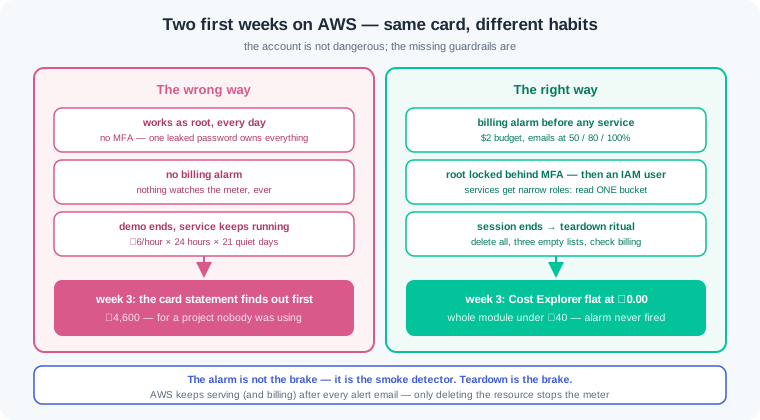
Before any service, set three guardrails, in this order. A billing alarm — an automatic email that fires when your spend crosses a limit you set — is the first thing you create, because it watches everything that follows. Next comes MFA on the root account: a second proof of sign-in beyond the password, on the one identity that can do anything, including delete the alarm. Then you stop using root at all.
Daily work happens as an IAM user — a named sign-in you create inside the account, with its own password and keys. Root stays locked away like the shop's ownership papers. Services get even less: least privilege — the rule that an identity receives only the permissions its task needs — means the churn service gets a role that can read one bucket, and nothing else. If its key ever leaks, the thief inherits that one narrow power, not your whole account.
Here is the contrast this module exists for. The wrong way is working as root with no alarm: every experiment runs with full power, nothing watches the meter, and a forgotten service bills quietly for weeks. The right way is boring: alarm first, an IAM user for you, narrow roles for services, and a teardown at the end of every session. The wrong way feels faster for a day; the right way is the only one that survives contact with a real card.
AWS lists over two hundred services, and a fresher touches five. S3 stores files in a bucket — a named container for objects, with versioning that keeps every upload you ever made. ECR is the shelf where docker images live, ready for the same 458 MB box 4.3 built. Lambda runs a small function on demand and bills per call; App Runner takes a container image and runs it as a website with a public URL. CloudWatch collects the logs from all of them.
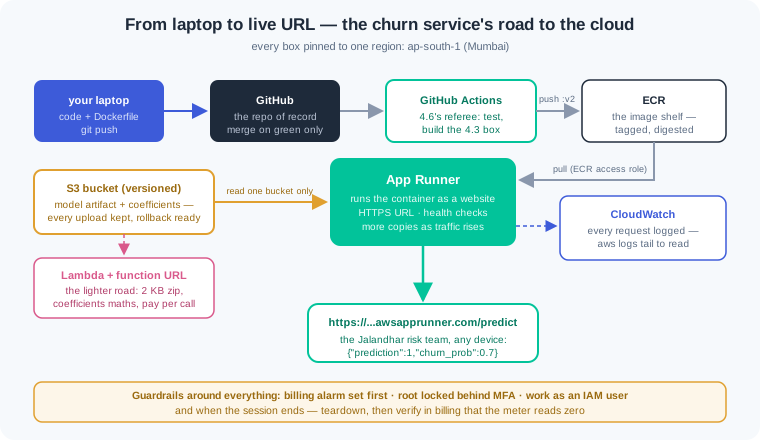
The churn service climbs to the cloud in three steps of increasing weight. First the model file goes to S3, where versioning gives you a rollback story for free. Then a Lambda behind a function URL — a public web address attached straight to one function — serves predictions for a fraction of a paisa per call. Last, App Runner pulls 4.3's image from ECR and runs it as the real service, adding copies when traffic rises and dropping them when it falls.
Lambda carries an honest size limit: a zip upload must stay under 50 MB, and 250 MB unpacked. Scikit-learn plus pandas weigh more than that, so the full pipeline cannot ride in a zip. Two exits exist: export the model's coefficients as plain numbers and do the maths in pure Python, or ship Lambda a container image, which may go up to 10 GB. We take the coefficients road, because it also proves you know what the model computes.
Every resource lives in a region — one of AWS's separate physical locations, each with its own console view. We pin everything to ap-south-1, the Mumbai region, for two reasons. A request from an Indian user answers in tens of milliseconds instead of hundreds, and customer data staying in India is what clients and the DPDP Act expect. Mixing regions is the classic first-week failure: half your resources seem to vanish because the console is pointed at the wrong city.
Money runs through every step, so here are the honest numbers. S3 and Lambda at our scale cost paise; App Runner is the heavy one at roughly ₹6 per hour while it runs. Nothing in this module needs to run overnight. Teardown — deleting every resource and verifying the meter stopped — is the final exercise, not an afterthought, and it is a skill interviewers respect. Done in one evening with teardown, the whole module costs less than a plate of biryani.
One thread ties back to 4.6. The deploy job that printed a sentence on green now gets its destination: push the fresh image to ECR and tell App Runner to deploy it. Green tests, new box, live URL — and no human copies a file anywhere.
Work inside churn-repo from 4.3, with the image building and the 4.6 pipeline green. Everything below is pinned to ap-south-1.
Honest setup note. These steps need an AWS account, and opening one needs a card and a phone number; AWS places a small refundable hold (about ₹2) to verify the card. If you cannot open an account — no card, a family card you should not use, a locked-down machine — read along instead: every command below shows its real-shaped output, every exercise carries a read-along variant, and the checks test your reading and diagnosis, which is most of the skill anyway. For those who do run it, the free tier plus the step 6 teardown keeps the total under ₹40.
One more fork at signup, new since July 2025: AWS now asks every new account to choose between a free plan and a paid plan. The free plan carries a $100 credit, a window of about six months, and a restricted service list; the paid plan opens everything and bills the card past the free tier. On free-plan credits this module costs ₹0 in cash — the roughly $0.21 total comes out of the credit, not your card. The catch is that App Runner may not be available on a free-plan account: if the console or CLI refuses to create the service in step 5, the Lambda function URL from steps 3 and 4 is your public-URL story for this module, and it stays inside the always-free tier. Whichever plan you picked, the step 1 guardrails stay exactly the same.
Step 1 — guardrails before services. Nothing that can cost money exists yet. Keep it that way until the watcher is live:
# Console, signed in as root — the only visit root ever makes:
#   1) Security credentials -> Assign MFA device -> authenticator app -> Assigned
#   2) Billing preferences  -> tick "Receive Billing Alerts"
#   3) Budgets -> Create budget -> Cost budget named "study-cap" -> $2 monthly
#        -> email alerts at 50%, 80%, 100% -> nandini.dev@example.com
#   4) IAM -> Users -> Create user "nandini-dev" -> attach policy: PowerUserAccess
#        -> Security credentials -> Create access key (CLI use)
# Sign root out. From here on, everything is the IAM user through the CLI:

$ aws configure
AWS Access Key ID [None]: AKIA................
AWS Secret Access Key [None]: ****************************************
Default region name [None]: ap-south-1
Default output format [None]: json

$ aws sts get-caller-identity
{
    "UserId": "AIDAXXXXXXXXXXXXXXXXX",
    "Account": "210987654321",
    "Arn": "arn:aws:iam::210987654321:user/nandini-dev"
}
The order is the lesson. The $2 budget exists before anything that can spend, MFA locks the root door, and root's last act is creating your daily identity. PowerUserAccess allows every service action but blocks IAM administration — enough for this whole module, far less than root. The get-caller-identity output is your proof-of-who: read the Arn and confirm it ends in :user/nandini-dev, never :root. One honest warning: budget alerts are emails, not off-switches — AWS keeps serving (and billing) after the mail arrives. The alarm buys you hours of warning; teardown is what actually stops the meter. And the region answer you typed into aws configure is the pin that prevents WR-111.
Step 2 — the model artifact goes to S3, with versioning. Bucket names are global across all of AWS, so add a suffix nobody else took:
$ aws s3 mb s3://nandini-churn-models-2026 --region ap-south-1
make_bucket: nandini-churn-models-2026

$ aws s3api put-bucket-versioning --bucket nandini-churn-models-2026 \
    --versioning-configuration Status=Enabled

$ aws s3 cp models/churn_pipeline.joblib s3://nandini-churn-models-2026/churn_pipeline.joblib
upload: models/churn_pipeline.joblib to s3://nandini-churn-models-2026/churn_pipeline.joblib

$ python export_coefficients.py     # writes models/coefficients.json (2 KB)
$ aws s3 cp models/coefficients.json s3://nandini-churn-models-2026/coefficients.json
upload: models/coefficients.json to s3://nandini-churn-models-2026/coefficients.json

# retrain once, upload the joblib again, then ask S3 for the history:
$ aws s3api list-object-versions --bucket nandini-churn-models-2026 \
    --prefix churn_pipeline.joblib \
    --query 'Versions[].{id:VersionId,latest:IsLatest,size:Size}'
[
    { "id": "8VbfkTJlcpXroDTDmJrmSpXd3dIbrHYq", "latest": true,  "size": 187406 },
    { "id": "3sL4kq2pPH6ZKzKzQxw9mPa0c7fT1uVe", "latest": false, "size": 187391 }
]
The bucket keeps both uploads: latest: true is the one readers get by default, and the older version stays fetchable by its id — that is your rollback story, one flag deep. export_coefficients.py is a short script you write once: it loads the trained pipeline and writes the scaler's means and scales plus the logistic weights and intercept into coefficients.json — two kilobytes of numbers that ARE the model, for step 3's benefit. Two things did not happen here, on purpose. The bucket was not made public — Block Public Access stays on, and WR-110 is the story of a team that switched it off. And no customer csv went up: the artifact store holds models, not people's data.
Step 3 — a pandas-free Lambda. One file, standard library plus boto3 (which Lambda's Python runtime already carries):
# lambda_function.py — the churn maths with no sklearn and no pandas
import json, math, os
import boto3

s3 = boto3.client("s3")
COEF = None                       # cached after the first (cold) call

def handler(event, context):
    global COEF
    if COEF is None:              # cold start: fetch the numbers once
        obj = s3.get_object(Bucket=os.environ["MODEL_BUCKET"],
                            Key="coefficients.json")
        COEF = json.loads(obj["Body"].read())
    row = json.loads(event["body"])
    feats = build_features(row)   # ~15 lines copied from src/features.py
    z = COEF["intercept"]
    for f in COEF["features"]:    # standardize, weigh, sum — the model, by hand
        z += f["weight"] * (feats[f["name"]] - f["mean"]) / f["scale"]
    prob = 1 / (1 + math.exp(-z))
    return {"statusCode": 200,
            "body": json.dumps({"prediction": int(prob >= 0.5),
                                "churn_prob": round(prob, 2)})}
Read the shape. COEF loads once per warm container — the same startup discipline as 4.2, shrunk to a global and an if. build_features is the one piece of src/features.py the function needs, copied in as pure Python: same recipe, same spend_share division 4.5 guards. Then the loop does exactly what the sklearn pipeline did — standardize each feature with the saved mean and scale, multiply by the saved weight, sum, sigmoid. Same numbers in, same 0.70 out. This is the honest answer to Lambda's zip limit: the environment that needed 260 MB of libraries becomes 30 lines of arithmetic, because for a linear model the coefficients are the whole story.
Step 4 — role, deploy, function URL, and the golden request. The role first, because the function is born with its permissions:
# trust-lambda.json lets the Lambda service wear this role;
# churn-policy.json allows CloudWatch logs + GetObject on ONE bucket's objects
$ cat trust-lambda.json
{
  "Version": "2012-10-17",
  "Statement": [{
    "Effect": "Allow",
    "Principal": { "Service": "lambda.amazonaws.com" },
    "Action": "sts:AssumeRole"
  }]
}
$ aws iam create-role --role-name churn-fn-role \
    --assume-role-policy-document file://trust-lambda.json
$ aws iam put-role-policy --role-name churn-fn-role \
    --policy-name churn-least-privilege --policy-document file://churn-policy.json

$ zip function.zip lambda_function.py
  adding: lambda_function.py (deflated 61%)      # 2.3 KB total
# Windows (PowerShell), no zip command:
#   Compress-Archive -Path lambda_function.py -DestinationPath function.zip -Force

$ aws lambda create-function --function-name churn-fn \
    --runtime python3.12 --handler lambda_function.handler \
    --zip-file fileb://function.zip --timeout 10 \
    --environment "Variables={MODEL_BUCKET=nandini-churn-models-2026}" \
    --role arn:aws:iam::210987654321:role/churn-fn-role
{ "FunctionName": "churn-fn", "State": "Pending", "MemorySize": 128 }

$ aws lambda create-function-url-config --function-name churn-fn --auth-type NONE
{ "FunctionUrl": "https://mfyq3e0plhbrxxjq5xxlq2.lambda-url.ap-south-1.on.aws/" }
$ aws lambda add-permission --function-name churn-fn \
    --action lambda:InvokeFunctionUrl --principal "*" \
    --function-url-auth-type NONE --statement-id public-url

# from ANY network — phone data, cafe Wi-Fi, the Jalandhar office:
$ curl -X POST https://mfyq3e0plhbrxxjq5xxlq2.lambda-url.ap-south-1.on.aws/ \
  -H "Content-Type: application/json" \
  -d '{"city": "Jalandhar", "monthly_income": 24000, "orders_last_90d": 1,
       "avg_order_value": 650, "last_order_date": "2026-03-02"}'
{"prediction": 1, "churn_prob": 0.7}

# Windows (PowerShell): the backslash continuations above are bash-only, and
# bare "curl" is an alias for Invoke-WebRequest. Call curl.exe on ONE line
# (this applies to every curl in this module):
#   curl.exe -X POST <url> -H "Content-Type: application/json" -d '{"city": "Jalandhar", "monthly_income": 24000, "orders_last_90d": 1, "avg_order_value": 650, "last_order_date": "2026-03-02"}'
The 2.3 KB zip is the punchline of step 3 — for contrast, bundling sklearn and pandas produced a 261 MB unpacked folder and create-function refused it with RequestEntityTooLargeException. The role is least privilege made concrete: logs, plus s3:GetObject on arn:aws:s3:::nandini-churn-models-2026/*, and nothing else — exercise 3 makes you write it and then prove a wider one is wrong. --auth-type NONE makes the function URL public on purpose, for this demo; the first call takes about a second (cold start: boot the runtime, fetch the coefficients), warm calls return in tens of milliseconds. And the body is the verdict you have seen three times: the Jalandhar customer at 0.70 — same model, now answering from Mumbai to any device on earth. Cost so far: Lambda's always-free tier covers a million calls a month, so ₹0.
Step 5 — the real service: ECR, App Runner, CloudWatch. Now the full 4.3 container becomes the product:
$ aws ecr create-repository --repository-name churn-service
{ "repository": { "repositoryUri":
    "210987654321.dkr.ecr.ap-south-1.amazonaws.com/churn-service" } }

$ aws ecr get-login-password | docker login --username AWS \
    --password-stdin 210987654321.dkr.ecr.ap-south-1.amazonaws.com
Login Succeeded

$ docker tag churn-service:latest \
    210987654321.dkr.ecr.ap-south-1.amazonaws.com/churn-service:v1
$ docker push 210987654321.dkr.ecr.ap-south-1.amazonaws.com/churn-service:v1
v1: digest: sha256:9f2c41d8a7e6... size: 2841

# App Runner needs its own role to pull from ECR — same trust-file shape as
# step 4, but the service that wears it is App Runner's build fleet:
$ cat trust-apprunner.json
{
  "Version": "2012-10-17",
  "Statement": [{
    "Effect": "Allow",
    "Principal": { "Service": "build.apprunner.amazonaws.com" },
    "Action": "sts:AssumeRole"
  }]
}
$ aws iam create-role --role-name apprunner-ecr-access \
    --assume-role-policy-document file://trust-apprunner.json
$ aws iam attach-role-policy --role-name apprunner-ecr-access \
    --policy-arn arn:aws:iam::aws:policy/service-role/AWSAppRunnerServicePolicyForECRAccess

$ aws apprunner create-service --service-name churn-live \
    --source-configuration '{
      "ImageRepository": {
        "ImageIdentifier": "210987654321.dkr.ecr.ap-south-1.amazonaws.com/churn-service:v1",
        "ImageRepositoryType": "ECR",
        "ImageConfiguration": { "Port": "8000" } },
      "AuthenticationConfiguration": {
        "AccessRoleArn": "arn:aws:iam::210987654321:role/apprunner-ecr-access" } }' \
    --instance-configuration '{ "Cpu": "1024", "Memory": "2048" }'
{ "Service": { "ServiceUrl": "abpxu3mfyq.ap-south-1.awsapprunner.com",
               "Status": "OPERATION_IN_PROGRESS" } }

# about four minutes later the console shows RUNNING — then, from anywhere:
$ curl https://abpxu3mfyq.ap-south-1.awsapprunner.com/health
{"status":"ok","model_loaded":true}
$ curl -X POST https://abpxu3mfyq.ap-south-1.awsapprunner.com/predict \
  -H "Content-Type: application/json" \
  -d '{"city": "Jalandhar", "monthly_income": 24000, "orders_last_90d": 1,
       "avg_order_value": 650, "last_order_date": "2026-03-02"}'
{"prediction":1,"churn_prob":0.7}

$ aws logs tail /aws/apprunner/churn-live/f31a9c.../application --since 10m
2026-08-11T19:42:03 INFO: model loaded from models/churn_pipeline.joblib
2026-08-11T19:44:17 INFO: 152.58.34.11 - "POST /predict HTTP/1.1" 200
The push sequence is three moves: log in to your account's registry (ECR mints a 12-hour password from your IAM identity), tag the local image with the registry's full name, push — and the layers 4.3 built travel up once, cached like the build cache taught you. The App Runner call reads as a sentence: run THIS image, its service listens on port 8000 (matching the Dockerfile's EXPOSE), give the puller a role that may read ECR — least privilege again, this time for App Runner itself. OPERATION_IN_PROGRESS means pulling and health-checking; curl during it fails, which is exercise 2's first trap. Once RUNNING, the URL comes with HTTPS for free, and App Runner adds container copies when traffic rises. The log tail is 4.2's startup line and one request — the caller's IP is the Jalandhar office, and reading this stream is how you will answer "is it actually being used?" The CD hook lands here too: in ci.yml, the deploy job's echo becomes two real steps — push :v2 to ECR, then aws apprunner start-deployment --service-arn <arn> — and the 4.6 pipeline now ships to this URL on every green merge to main.
Step 6 — teardown, and the proof the meter stopped. Deleting is a first-class skill. Kill the hourly biller first:
$ aws apprunner delete-service --service-arn \
    arn:aws:apprunner:ap-south-1:210987654321:service/churn-live/f31a9c...
{ "Service": { "Status": "DELETING" } }

$ aws ecr delete-repository --repository-name churn-service --force   # images too
$ aws lambda delete-function --function-name churn-fn
$ aws iam delete-role-policy --role-name churn-fn-role --policy-name churn-least-privilege
$ aws iam delete-role --role-name churn-fn-role
$ aws iam detach-role-policy --role-name apprunner-ecr-access \
    --policy-arn arn:aws:iam::aws:policy/service-role/AWSAppRunnerServicePolicyForECRAccess
$ aws iam delete-role --role-name apprunner-ecr-access

# a versioned bucket hides old versions from "aws s3 rm" — delete versions, then the bucket:
$ aws s3api delete-objects --bucket nandini-churn-models-2026 \
    --delete "$(aws s3api list-object-versions --bucket nandini-churn-models-2026 \
        --query '{Objects: Versions[].{Key:Key,VersionId:VersionId}}')"
$ aws s3 rb s3://nandini-churn-models-2026

# the account is quiet again — three empty lists:
$ aws apprunner list-services --query 'ServiceSummaryList'    # []
$ aws lambda list-functions --query 'Functions'               # []
$ aws s3 ls                                                   # (no output)

# next morning, console -> Billing -> Cost Explorer, daily view:
#   deploy day: $0.21      today so far: $0.00
Order matters: App Runner bills by the hour, so it dies first; S3 and ECR bill by stored GB-month, Lambda only per call. The versioning gotcha is real — aws s3 rm --recursive removes only the latest markers, and the old versions keep billing invisibly, so the delete-objects line clears every version by id before the bucket can be removed. The three empty lists are tonight's proof; Cost Explorer's flat $0.00 tomorrow is the final one, because billing data lags by hours. Total damage for the whole module: about $0.21 — under ₹20 — and the 50% budget alert at $1 never even fired. Run this ritual at the end of every session until it is muscle memory: the students who get surprise bills are not the careless ones, they are the ones who never made deleting a habit.
Work inside churn-repo with the 4.3 image building locally. Exercises 1, 2 and 4 need an AWS account — each carries a read-along variant that needs none, and its checks count fully.
Guardrails first. [Account required] Open the account, then do step 1 in the exact order: MFA on root, billing alerts on, a $2 monthly budget with alerts at 50/80/100%, an IAM user with PowerUserAccess, access keys, aws configure with ap-south-1, and sign root out. Check: the Budgets page shows study-cap with three alert thresholds; your authenticator app holds the root MFA entry; aws sts get-caller-identity prints an Arn ending :user/<your-name> — screenshot or copy all three, and write one sentence on why the budget had to exist before the first bucket. Read-along variant: put the seven setup actions into the safest order and defend the ordering in three sentences; then read the two get-caller-identity outputs in the watch section and WR-109, and state which identity ran each command and how you can tell root from an IAM user from an Arn alone.
The full climb. [Account required] Deploy the churn service all three ways. S3: versioned bucket, upload the joblib twice (retrain between), upload coefficients.json, and capture the two-version listing. Lambda: write export_coefficients.py and lambda_function.py, create the least-privilege role, deploy the zip, attach a function URL, and send the golden Jalandhar request from your phone's data network — not your Wi-Fi. App Runner: push the 4.3 image to ECR as :v1, create churn-live on port 8000, wait for RUNNING, and hit /health and /predict from the public URL. Then wire the CD hook: replace the 4.6 deploy job's echo with the ECR push and start-deployment, merge a trivial change, and watch the pipeline ship it. If you stop here tonight, run the teardown step first — App Runner is the one resource that bills by the hour. Check: the version listing shows two ids with one latest: true; both the function URL and the App Runner URL return {"prediction":1,"churn_prob":0.7} for Jalandhar; a curl sent while the service was still OPERATION_IN_PROGRESS failed, and you noted the error; the CloudWatch tail shows your phone request's IP; the Actions run shows the deploy job pushing and deploying after green. Read-along variant: from the watch fences alone, write the full ordered command list from empty account to live URL; predict what curl prints at each of three moments (before RUNNING, while RUNNING, after teardown); and trace the image digest sha256:9f2c41d8a7e6... through push, service config and first pull, saying at each step what would break if the tag pointed elsewhere.
The least-privilege drill. No account needed — this is a writing exercise with a live proof for those who deployed. Write churn-policy.json from scratch: the smallest policy that lets churn-fn write its logs and read objects from your one bucket, and nothing else. Then take the lazy alternative — "Action": "s3:*", "Resource": "*" — and prove it wrong in exactly two sentences that name what a leaked key could do under each policy. [Account required, optional] Attach your minimal policy, confirm the function still answers 0.70, then try to read a bucket the policy does not name. Check: your policy contains exactly two statements, names the bucket ARN with /* for objects, and grants no write, list-all-buckets or delete rights; your two sentences name a concrete harm (read every bucket, delete every model, exfiltrate data) the wide policy allows; the live test returns AccessDenied on the foreign bucket — and you can say in one line why that denial is the success condition.
Teardown and verify. [Account required] Run the full step 6 ritual: service, repository, function, both roles, every object version, bucket — in the money-first order. Capture the three empty lists tonight, then return after 24 hours and capture Cost Explorer's daily view showing the deploy-day amount and today's $0.00. Write your personal teardown checklist as a file in the repo (TEARDOWN.md) and commit it. Check: all three list commands return empty; Cost Explorer shows the meter flat at zero the day after; the total spend for the module is under $0.50 and no budget alert email arrived; TEARDOWN.md lists the resources in deletion order with the versioned-bucket step included. Read-along variant: order the seven teardown deletions and justify money-first in two sentences; explain why aws s3 rm --recursive alone leaves a versioned bucket billing; and given this Cost Explorer description — "Mon $0.00, Tue $0.21, Wed $0.19, Thu $0.02, Fri $0.00" — state which day the service was created, which day teardown most likely ran, and why Thursday is not zero.
Three first-cloud failures cover most of what this module meets in the wild. Each has a War Room entry with the full diagnosis path:
- WR-109 — the surprise bill. A demo App Runner service ran forgotten for three weeks on a no-alarm account, and the card statement broke the news at ₹4,600. Alarm-first, a teardown ritual after every session, and Cost Explorer as a daily glance turned the next month's bill to ₹40.
- WR-110 — the public bucket. Block Public Access switched off "to fix AccessDenied" put a model and a customer csv on the open internet, and scrapers found them within days. The real fix was a least-privilege role for the reader; public was never the answer.
- WR-111 — the region mix-up. A CLI defaulting to us-east-1 while the console sat on Mumbai scattered resources across two regions: App Runner's image dropdown looked empty and half the console showed nothing. One region, pinned in
aws configureand echoed in every config, ended it.
A laptop cannot promise uptime or a fixed address, so the churn service moved to rented machines in one region, ap-south-1 in Mumbai. Guardrails came before services: a billing alarm watching the spend, MFA on root, and daily work as an IAM user holding least privilege. Five services carried it all: an S3 bucket held the versioned model, ECR the image, Lambda served predictions through a function URL, App Runner ran the container as a website, and CloudWatch kept the logs. The service climbed in weight from a file upload to a pandas-free function to the real container answering 0.70 from the open internet. Teardown closed the loop: every resource deleted, the meter verified at zero, and the whole climb cost less than a plate of biryani.
- BXUP itself. The site you are reading runs on this exact stack: pages stored in S3 and served through a CDN, sign-in and progress handled by Lambda, logs in CloudWatch. Its monthly bill is lower than one movie ticket — which is why this stack is the default for small Indian teams.
- NBFC and banking scorers. Loan, fraud and churn models for Indian lenders run in the Mumbai region. Latency stays in tens of milliseconds for UPI-age users, and customer data stays in India for the DPDP Act and the client's auditors.
- One-person products. Solo builders across India run whole paid products on App Runner-class services: the platform holds the uptime pager, and the founder holds a billing alarm and a teardown habit instead of an ops team.
Answer these before opening the gate assessment. Each question names its kind.
type=output-prediction— The morning after a full teardown, predict what each of these prints:curl https://abpxu3mfyq.ap-south-1.awsapprunner.com/health,aws s3 ls, and Cost Explorer's daily view for yesterday versus today. Then name which of the three is the real proof the meter stopped, and why the other two are weaker evidence.type=debug—docker pushsucceeded ten minutes ago, but App Runner's image dropdown in the Mumbai console shows no repositories at all.aws configure get regionprintsus-east-1. Name the cause, give the two commands that prove it, and state the fix plus the discipline that prevents the whole class of bug.type=interpretation— A teammate's Lambda role policy allowss3:GetObjectonarn:aws:s3:::team-churn-models/*andlogs:*on the function's log group. Read it back: name two things the function can do, two useful-sounding things it cannot do, and explain why theAccessDeniedit throws when asked to readteam-raw-datais the policy working, not failing.type=scenario-judgement— Demo tomorrow. The Lambda keeps throwingAccessDeniedon the model bucket, and a teammate proposes switching off Block Public Access "since the bucket only holds a model anyway". Judge the proposal, name the failure it recreates from the War Room, and give the fix that takes the same five minutes without the exposure.type=trade-off— Serving the churn model from the coefficients Lambda versus the App Runner container: give one concrete gain and one concrete cost of each, pick one for an NBFC pilot that sees thirty requests a day, and name the signal in CloudWatch that would push you to the other.
Explain to a cousin who sells sarees from home why she might rent a stall in the town market instead. The stall stays open even when she is asleep, it has a numbered address any customer can find, and the market's guard, lights and electricity are part of the rent. The rent runs by the day, so the week she stops selling she returns the keys and pays nothing more. Use at most 4 sentences and no computer words. If she can say why "my house works fine" fails the customer who arrives at midnight — and why returning the keys matters as much as renting them — you own this module.