Notebook to repo
Friday demo at an NBFC office in Jodhpur. Yash shows his churn notebook: accuracy 0.82, applause, week done. On Monday a teammate clones the project to build the scoring API. The notebook fails at cell 9, and after she repairs the import, the score reads lower. Yash restarts his own kernel and gets the lower number too. The good score lived in his notebook's memory, and the restart erased it. Her advice is short: give me a repo that runs top to bottom.
- No Indian company ships a notebook. The first ticket on many fresher desks reads "make this runnable by the team" — this module is that ticket, drilled until it is routine.
- Interviewers open your GitHub and ask you to walk the repo. A clean src folder, a config file and a train script that reproduces your number answer before you speak.
- Every later Phase 4 module — the API in 4.2, Docker in 4.3, tests in 4.5, CI in 4.6 — builds on today's repo. Skip this and the rest has nothing to stand on.
Phase 1 ended with a sealed Pipeline, and the notebook served you well while you explored. Notebooks fail at a different job: being the thing a team runs. The reason is hidden state — a value alive in the notebook's memory that no visible cell still produces. Edit a cell and skip a rerun, and the screen shows a number the file can no longer rebuild. The notebook is honest about what ran, not about what is written.
Two more rots follow. Cells run in the order you clicked, not the order they sit, and the bracket numbers betray it when In [12] sits above In [3]. Copy-paste drift is the slow one: the same cleaning code pasted into three notebooks, each copy edited alone until no two agree. Six months later nobody knows which copy produced the number in the report. The watch section below walks the exact trap that hit Yash.
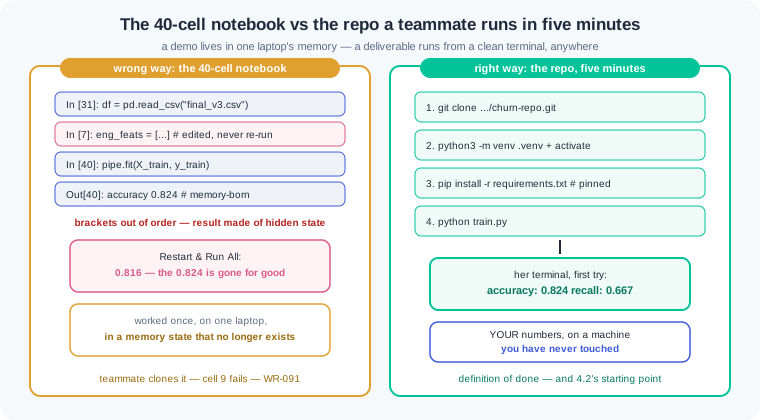
Here is the contrast this module exists for. The wrong way is a 40-cell notebook: it worked once, on one laptop, in a memory state that no longer exists. Rerun it top to bottom and it fails, or prints a new number. The right way is a small repo a teammate clones and runs in five minutes: create a venv, install pinned packages, run one script, read your exact score. The first is a demo; the second is what companies pay for.
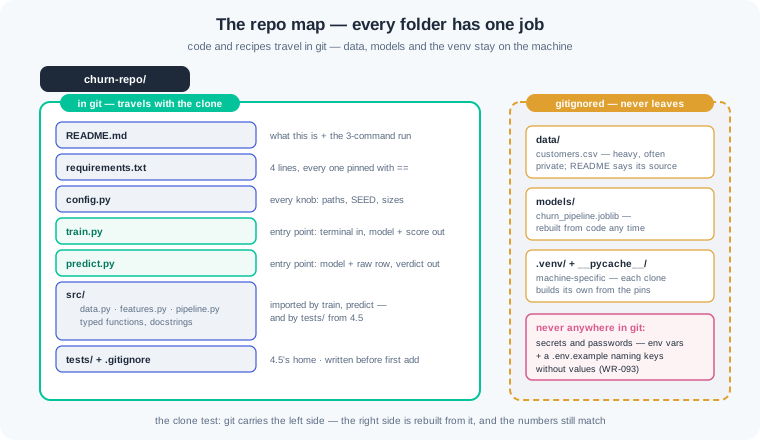
The professional layout is boring on purpose, and that is its value. Reusable functions live in src, where every script and later every test can import them. An entry point — the one script a person runs to use your project — sits at the top: train.py fits and saves, predict.py loads and answers. The data and models folders exist on your machine but never enter git, because data is heavy and often private, and a model can be rebuilt from code. A README and a requirements.txt complete the set, and tests stays empty until module 4.5.
Turning cells into functions is the heart of the move. A notebook cell mutates whatever sits in memory; a function declares what comes in and what goes out. A type hint — a label on a function saying what it accepts and returns, like a DataFrame in and a DataFrame out. A docstring — the short note under the def line saying what the function does and why. Neither changes how the code runs; both change how fast a stranger, or you in three months, can trust it.
Settings deserve their own home. A test size of 0.25 buried inside a function is a magic number: unfindable, unexplained, and easy to change in one place but not another. config.py holds every knob — the paths, the seed, the split size, the model settings — each with a name and one true value. Code asks config for numbers and never states its own. When a reviewer asks what changed between two runs, the answer is one file's diff.
The install must be as repeatable as the code. Pinned requirements — a requirements file where every package carries one exact version, like pandas==2.2.3. pip freeze prints every package in your venv with pins, which is complete but noisy: forty lines, most of them packages your code never imports. The hand-curated route lists only what your code imports, pinned to the versions you tested. This course curates by hand and keeps a freeze snapshot for deploy records; both beat an unpinned list, which is a slow-ticking bomb (WR-092).
One more habit closes the loop: seeds. A seed — the number that fixes a random generator so it deals the same cards every run. The world generation and the split both read config.SEED, so two runs on two laptops print the same score. Determinism turns "close to my number" into "my number". Without it, the clone test below cannot exist.
The definition of done for this module is a ritual, not a feeling. A teammate clones your repo, creates a fresh venv, installs from requirements.txt, and runs train.py. If her terminal prints your exact accuracy and recall, the module is done. If it prints anything else, the repo is not finished, whatever your own laptop says. Phase 4 will serve, package, test and deploy this repo — every one of those steps assumes today's ritual passes.
Work inside ai-lab. The starting point is your 1.6 sealed-pipeline script — the Ludhiana churn world, seed 42, the model Phase 4 now carries toward production.
First, the trap, reproduced on purpose. Here is Yash's notebook as the screen showed it on Friday evening. Read the comment dates carefully:
In [3]: eng_feats = raw_feats + ["days_since_last_order", "spend_share"]
        # 5 pm edit: "salary_week_order" deleted for an experiment — never re-run

In [4]: churn_pipe = build_pipeline(eng_feats)
        churn_pipe.fit(X_train, y_train)          # ran at 2 pm

In [5]: score(churn_pipe)
Out[5]: accuracy: 0.824   recall: 0.667   caught: 26 of 39

--- Kernel -> Restart & Run All ---
Out[5]: accuracy: 0.816   recall: 0.615   caught: 24 of 39
This is the deadliest form of the trap, because the brackets look clean: 3, 4, 5, in order. But cell 3 was edited at 5 pm and never re-run, so the kernel's memory still held the six-feature list from 2 pm — the 0.824 on screen was computed from code that no longer exists in the file. Restart & Run All wipes the hidden state and runs the file as written: five features, 0.816, two churners lost. The louder variant shows brackets out of order (In [12] above In [3]) and is easier to catch. The rule from today onward: no notebook number is real until Restart & Run All reproduces it.
The target repo. This is where the notebook's survivors move. Every folder has one job:
churn-repo/
├── README.md            # what this is + the three-command run
├── requirements.txt     # pinned versions, hand-curated
├── .gitignore           # data/, models/, .venv/, __pycache__/
├── config.py            # every knob in one place
├── train.py             # entry point: clean terminal -> saved model + score
├── predict.py           # entry point: saved model + one raw row -> verdict
├── src/
│   ├── __init__.py
│   ├── data.py          # load_customers(): read csv, or rebuild seeded world
│   ├── features.py      # add_features(): the three 1.6 signals
│   └── pipeline.py      # build_pipeline(): the sealed Pipeline, importable
├── tests/               # empty until module 4.5
├── data/                # gitignored — customers.csv lives here, never in git
└── models/              # gitignored — churn_pipeline.joblib lands here
src/data.py reads data/customers.csv when it exists; otherwise it rebuilds the seeded 1.6 world from config.SEED and writes the csv, so every clone starts from identical rows. In a real company that function would instead run the SQL query or download from the bucket the README names — the shape of the repo does not change.
One cell becomes one typed function. The add_features cell from 1.6, now a citizen of src/features.py:
# src/features.py — the three engineered churn signals from module 1.6
import pandas as pd

import config


def add_features(df: pd.DataFrame) -> pd.DataFrame:
    """Add days_since_last_order, spend_share and salary_week_order.

    Takes the raw customer frame, returns a copy with the three
    engineered columns appended. Never modifies the input frame.
    """
    out = df.copy()
    out["days_since_last_order"] = (
        config.SNAPSHOT_DATE - out["last_order_date"]).dt.days
    out["spend_share"] = (out["avg_order_value"]
                          * out["orders_last_90d"] / 3) / out["monthly_income"]
    out["salary_week_order"] = (out["last_order_date"].dt.day <= 7).astype(int)
    return out
The type hints promise a DataFrame in and a DataFrame out; the docstring states the contract in words, including the quiet promise that matters most — the input is never modified. Note what is absent: no snapshot date typed inline. The function asks config for it. train.py, predict.py and, from 4.5, the tests all import this one function — the copy-paste drift of the notebook era becomes impossible, the same cure the Pipeline gave you in 1.6.
Config: every knob, one home. The whole file is boring, which is the point:
# config.py — every knob in one place; no magic numbers inside functions
from pathlib import Path

import pandas as pd

DATA_PATH = Path("data/customers.csv")
MODEL_PATH = Path("models/churn_pipeline.joblib")
SNAPSHOT_DATE = pd.Timestamp("2026-06-30")

SEED = 42          # one seed for the world, the split, everything
N_CUSTOMERS = 500
TEST_SIZE = 0.25
MAX_ITER = 1000

CITIES = ["Ludhiana", "Jalandhar", "Amritsar", "Patiala", "Bathinda"]
RAW_FEATURES = ["monthly_income", "orders_last_90d", "avg_order_value"]
ENGINEERED = ["days_since_last_order", "spend_share", "salary_week_order"]
Every number that shaped your 1.6 results now has a name and exactly one address. Change TEST_SIZE here and every script sees the change; there is no second copy to forget. When a run's numbers shift, git diff config.py answers "what changed" in one screen — this file is your experiment log's honest half.
The entry point. train.py runs top to bottom from a clean terminal — no kernel, no memory, no clicking:
# train.py — entry point: clean terminal in, saved model + score out
import joblib
from sklearn.metrics import recall_score
from sklearn.model_selection import train_test_split

import config
from src.data import load_customers
from src.pipeline import build_pipeline


def main() -> None:
    customers = load_customers()
    X = customers.drop(columns="churned")
    y = customers["churned"]
    X_train, X_test, y_train, y_test = train_test_split(
        X, y, test_size=config.TEST_SIZE,
        random_state=config.SEED, stratify=y)

    pipe = build_pipeline()
    pipe.fit(X_train, y_train)
    preds = pipe.predict(X_test)
    print(f"accuracy: {pipe.score(X_test, y_test):.3f}"
          f"   recall: {recall_score(y_test, preds):.3f}"
          f"   caught: {((preds == 1) & (y_test == 1)).sum()} of {y_test.sum()}")

    config.MODEL_PATH.parent.mkdir(exist_ok=True)
    joblib.dump(pipe, config.MODEL_PATH)
    print(f"saved: {config.MODEL_PATH}")


if __name__ == "__main__":
    main()
Running it prints accuracy: 0.824 recall: 0.667 caught: 26 of 39, then saved: models/churn_pipeline.joblib. Compare with 1.6's sealed pipeline: 0.82 accuracy, 0.67 recall at two decimals — the same model, the same numbers, now born from a script instead of a kernel. predict.py is the mirror entry point: it loads the joblib file and scores the Jalandhar customer from 1.6, with no training code anywhere in it. Three decimals in the print is deliberate — the reproducibility drill below holds you to the third decimal, where 0.824 and 0.816 stop hiding behind "0.82".
The clone-test ritual — the definition of done. A teammate's terminal, starting from nothing but the repo URL:
$ git clone https://github.com/yash-r/churn-repo.git
$ cd churn-repo && python3 -m venv .venv && source .venv/bin/activate
# Windows (PowerShell):  cd churn-repo ; py -m venv .venv ; .venv\Scripts\Activate.ps1
(.venv) $ pip install -r requirements.txt
Successfully installed joblib-1.4.2 numpy-2.2.6 pandas-2.2.3 scikit-learn-1.6.1
(.venv) $ python train.py
accuracy: 0.824   recall: 0.667   caught: 26 of 39
saved: models/churn_pipeline.joblib
(.venv) $ python predict.py
prediction: 1   churn prob: 0.70
Walk the four beats. The clone brings code only — no csv, no joblib, because the gitignore kept them out. The fresh venv plus the four-line pinned requirements rebuilds the exact environment (compare that with a 40-line pip freeze dump: complete, but full of packages the code never imports — keep one as a deploy record, commit the curated one). train.py regenerates the seeded data and prints YOUR numbers — 0.824, 0.667, 26 of 39 — on a machine you have never touched. predict.py answers for the silent Jalandhar customer at 0.70, matching 1.6. That transcript is the module's definition of done, and it is what 4.2 will wrap in an API.
Work inside ai-lab. Every world is seeded: where a check states a number, your number must match it exactly.
Spring the trap yourself. Install Jupyter in your venv (pip install notebook) or use VS Code's notebook view. Build a three-cell notebook from your 1.6 script: cell one creates the seeded world (seed 42, n=500) and the split; cell two defines eng_feats with all six features and builds the sealed pipeline; cell three fits and prints accuracy, recall and caught-of-39 at three decimals. Run all cells and record the numbers. Now make the 5 pm edit: delete "salary_week_order" from cell two, do NOT re-run anything, and look at the screen — edited code beside the old result, brackets still in order. Finally run Kernel, then Restart & Run All. Check: before the restart the screen shows accuracy 0.824 and 26 of 39 beside a cell that no longer builds six features; after Restart & Run All the same cell prints accuracy 0.816, recall 0.615, 24 of 39; you write two sentences naming the hidden state that died in the restart and the rule you now apply before trusting any notebook number.
The full restructure. Turn the 1.6 loose script into churn-repo with the exact tree from the watch section. Write config.py (paths, SEED = 42, N_CUSTOMERS, TEST_SIZE, MAX_ITER, SNAPSHOT_DATE, the city and feature lists); src/data.py with load_customers() that reads data/customers.csv or rebuilds the seeded world and writes it; src/features.py with the typed, docstringed add_features; src/pipeline.py with build_pipeline(); train.py and predict.py as entry points; a README with the three-command run; a hand-curated requirements.txt with four pinned lines; a .gitignore listing data/, models/, .venv/, __pycache__/ — written BEFORE your first git add. Initialise git and commit. Check: python train.py prints accuracy 0.824, recall 0.667, caught 26 of 39, and saves models/churn_pipeline.joblib; python predict.py prints prediction 1 and churn prob 0.70; git ls-files shows no csv, no joblib and no .venv entries; every requirements line contains ==; no number from config appears inside any src/ function.
The teammate simulation. Play the person who receives your repo. Clone your own repo into a fresh folder (git clone /path/to/churn-repo churn-clone), and inside the clone build a fresh venv, install from requirements.txt, and run python train.py. Then go further than a teammate would: delete the clone's .venv, data/ and models/ entirely and rebuild everything a second time from the repo alone. Record the three-decimal scores of both rebuilds. Now break determinism on purpose: remove random_state=config.SEED from the split in train.py, run it twice, record both accuracies, then restore the seed and commit nothing. Check: both clean rebuilds print accuracy 0.824 and recall 0.667 — identical to the third decimal — and the regenerated csv produces the same rows as the original; with the seed removed, two runs print two different accuracies (ours wandered between roughly 0.80 and 0.86); you write one sentence listing every door through which config.SEED enters a run (world generation, the split).
The freeze audit. In your repo's venv run pip freeze > freeze.txt and count its lines. Mark the lines your code actually imports (joblib, numpy, pandas, scikit-learn) and note what the rest are — dependencies of dependencies. Compare against your four-line curated requirements.txt. Prove the curated file is enough: build one more fresh venv, install from the curated file only, and run python train.py. Check: freeze.txt holds at least three times as many lines as requirements.txt; the curated file names exactly four packages, each pinned with ==; the fresh venv reproduces accuracy 0.824; you write two sentences — one naming a case where the freeze output is the right artifact (recording a deploy environment exactly), one where the curated file wins (a repo teammates build on).
Three notebook-to-repo failures cover most of what this module meets at work. Each has a War Room entry with the full diagnosis path:
- WR-091 — the demo that worked once. A notebook's on-screen score was born in out-of-order memory, and nobody — including its author, after a restart — could ever produce it again. Restart & Run All before trusting any number, and move anything that must last into scripts.
- WR-092 — the unpinned install. A requirements file without versions worked for months, then a fresh install pulled a newer library and the code broke with no code change anywhere. Pinned requirements plus deliberate, reviewed upgrade pull requests are the fix.
- WR-093 — the customer file pushed to GitHub. A hurried
git add .sweptdata/customers.csvand a config holding a database password into a public repo. Rotate the secret first — the discipline from 0.2's pushed-secret entry — then purge history, and adopt .gitignore-first so it cannot recur.
A notebook's screen can show numbers its file can no longer produce, because hidden state survives edits. Trust a notebook only after Restart and Run All, and move anything a team must run into a repo. In the repo, functions with type hints and docstrings live in src, every knob lives in config, and data and models stay out of git. Pinned requirements and one seed make the install and the score repeat on any machine. Done means a teammate clones, builds a fresh venv, installs, runs train, and reads your exact numbers.
- Bank and NBFC model-risk teams must reproduce any approved score months later, when an auditor or the regulator asks. What they archive is exactly today's kit: the repo, the pinned environment, the seed — never a notebook.
- Indian GCCs and IT-services firms hand freshers inherited notebooks as a first ticket: "make this runnable". The restructure you drilled today is that ticket, and finishing it in week one is how freshers get noticed.
- Open-source ML libraries such as scikit-learn live the same habits at world scale: importable source layout, pinned CI environments, seeded tests. Reading their repos feels familiar after today.
Answer these before opening the gate assessment. Each question names its kind.
type=output-prediction— A notebook shows In [2] world and split, In [3]eng_featswith the salary flag deleted at 5 pm and never re-run, In [4] fit, In [5] score, and Out[5] reads 0.824. Predict what Restart & Run All prints — the same number, a different number, or an error — and explain why the clean bracket order 2, 3, 4, 5 gave no warning.type=debug— A teammate clones your repo, installs from requirements.txt without errors, runspython train.py, and getsFileNotFoundError: data/customers.csv. Your own laptop runs fine. Name the cause, say why the gitignore made it invisible to you, and give the repo change that fixes every future clone.type=interpretation—git ls-fileson a teammate's new repo listsdata/customers.csv,models/churn_pipeline.joblib, and aconfig.pycontainingDB_PASSWORD = "...". Read the three entries back to them: what does each one risk, and in what order do you act?type=scenario-judgement— Before Friday's demo a teammate proposes: "let us keep developing in the notebook — we will export a script at release time." Judge the plan, and name the two failures from this module that it invites.type=trade-off—pip freeze > requirements.txtversus a hand-curated four-line pinned file for churn-repo: give one concrete strength and one concrete cost of each, and name the one you would commit for a repo teammates build on — plus where the other one still belongs.
Explain to a friend who runs a tiffin service why a notebook is like cooking in your own kitchen from memory, and a repo is the written recipe card with exact measures. Cover why the card names every ingredient with its brand and quantity — your pinned requirements — and why any kitchen following it must produce the same taste, the way a clone must print your numbers. Use at most 4 sentences and no technical word beyond "recipe". If your friend can say why "it tasted right yesterday in my kitchen" is not a recipe, you own this module.