MLflow tracking & registry
Tuesday, at an NBFC in Salem, Devika's churn model posts its best score yet, and the team cheers. On Friday her lead asks her to rebuild it for the review. Which C value was it? Which feature list, which seed? The terminal history is gone, and her notes say only "tried many settings". Twenty runs lived in her memory, and memory has already voted them out. Her lead ends the meeting with one rule: a run that left no record did not happen.
- "Which settings produced Tuesday's good model?" is asked in every ML team, every week. After today your answer is a table read from disk, not a guess read from memory.
- Bank and NBFC model-risk teams must prove, months later, which exact model a decision came from. The registry version you build today is that proof, and interviewers at Indian fintechs probe for it.
- Module 4.2's service loads a loose joblib path today. After this module it loads a named, versioned model, and promoting a new one becomes a one-line move instead of a file copy.
Module 4.1 made one training script honest, and 1.8 taught you to tune with a table. Tuning multiplies runs: five C values here, a new feature there, and twenty runs pile up in a week. Now the Tuesday question lands: which settings produced the good one? "I think C was 0.5" is memory posing as a record, and memory loses. Experiment tracking — writing every run's settings, scores and model to disk automatically, at the moment it happens — replaces that memory with a system.
MLflow is the tool this course uses, and it starts smaller than its reputation. One pip install, no server, no account. A run — one recorded execution of your training script, together with everything it logged. You wrap the training code in mlflow.start_run, and inside it three calls do the work: log_params writes the settings, log_metrics writes the scores, log_model files the trained pipeline. Every record lands in a local mlruns folder beside your code, the way git keeps history in .git.
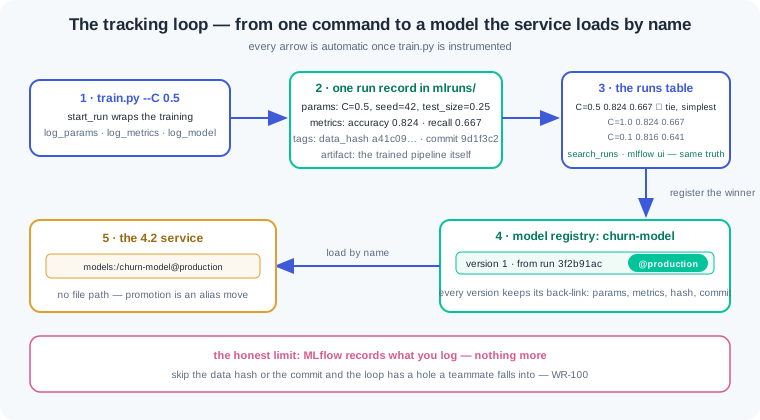
The records become useful when you read them side by side. mlflow.search_runs returns all runs of an experiment as a pandas DataFrame — the runs table. Running mlflow ui serves the same table as a local web page. You read it exactly the way you read 1.8's selection table: sort by the metric, look for ties, pick the simplest among them. The difference is that 1.8's table lived in a terminal that scrolled away, while this one rebuilds itself from disk every time you ask.
MLflow also offers a lazy road. Autolog — one line, mlflow.sklearn.autolog(), that records sklearn parameters, training metrics and the model on its own. It is the right floor for every sklearn project: even a rushed teammate leaves a usable trail. But autolog can only see what sklearn sees. Your test-set recall, your data fingerprint and your code version are outside its sight, so the explicit calls stay in the script for what matters most.
Winning runs need a home with a name. The model registry — a shelf inside MLflow where a model gets one name and a growing list of versions. Register the winning run's model under churn-model and it becomes version 1; the next candidate becomes version 2. An alias — a movable label, like production or candidate, that points at exactly one version at a time. The question "which model is live" stops being folklore and becomes a lookup.
Here is the contrast that decides whether your team trusts its models. The wrong way is a models folder holding churn_final.joblib, churn_final_v2.joblib and model_final_v2_REAL.joblib, where the live one is whichever file the service happened to load. Nobody can say who trained it, on what data, at which commit. The right way is one name, churn-model, with numbered versions, an alias marking production, and every version linked to the run that made it. Files answer nothing; versions answer everything.
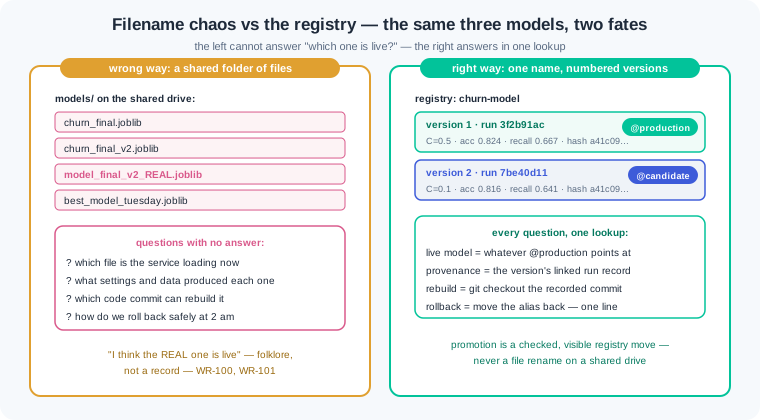
The registry closes the loop with 4.2. The service's load line stops naming a file path and starts naming a model: load churn-model at the production alias. Promoting a tested version means moving the alias — no code change, no file copy, and rollback is the same move backwards. Deployment becomes a registry operation, which is why 4.6's pipeline can automate it.
What belongs in a run record is a short, strict list: params, metrics, data, code. A data hash — a short fingerprint computed from the training table, proving which rows the run saw. The git commit names the exact code state the run used. With those four, any teammate can rebuild the run; without any one, the record has a hole.
And be honest about the tool's limit: MLflow records what you log, nothing more. Garbage discipline in, garbage records out.
Discipline has a naming half too. Experiments are named for their purpose, like churn-tuning, and runs are named for what changed, like logreg-C0.5. A run named test is a future mystery, and forty of them make the table unreadable. The rule the War Room below earns: every run gets a real name and its four facts, or it gets deleted.
Work inside churn-repo from module 4.1, venv active. First, one small edit: give build_pipeline a knob, def build_pipeline(C: float = 1.0), and pass it to LogisticRegression. The default keeps 4.1's behaviour exactly.
Step 1 — instrument train.py. The 4.1 script keeps its shape; tracking wraps around it:
# train.py — every run now leaves a record
import argparse
import hashlib
import subprocess

import joblib
import mlflow
import pandas as pd
from sklearn.metrics import recall_score
from sklearn.model_selection import train_test_split

import config
from src.data import load_customers
from src.pipeline import build_pipeline


def main() -> None:
    parser = argparse.ArgumentParser()
    parser.add_argument("--C", type=float, default=1.0)
    c_value = parser.parse_args().C

    customers = load_customers()
    data_hash = hashlib.sha256(
        pd.util.hash_pandas_object(customers).values.tobytes()).hexdigest()[:12]
    commit = subprocess.run(["git", "rev-parse", "--short", "HEAD"],
                            capture_output=True, text=True).stdout.strip()

    X = customers.drop(columns="churned")
    y = customers["churned"]
    X_train, X_test, y_train, y_test = train_test_split(
        X, y, test_size=config.TEST_SIZE,
        random_state=config.SEED, stratify=y)

    mlflow.set_experiment("churn-tuning")
    with mlflow.start_run(run_name=f"logreg-C{c_value}"):
        mlflow.log_params({"C": c_value, "seed": config.SEED,
                           "test_size": config.TEST_SIZE,
                           "max_iter": config.MAX_ITER})
        mlflow.set_tags({"data_hash": data_hash, "git_commit": commit})

        pipe = build_pipeline(C=c_value)
        pipe.fit(X_train, y_train)
        preds = pipe.predict(X_test)
        acc = pipe.score(X_test, y_test)
        rec = recall_score(y_test, preds)
        mlflow.log_metrics({"accuracy": acc, "recall": rec})
        mlflow.sklearn.log_model(pipe, artifact_path="model")
        print(f"C={c_value}   accuracy: {acc:.3f}   recall: {rec:.3f}")

    config.MODEL_PATH.parent.mkdir(exist_ok=True)
    joblib.dump(pipe, config.MODEL_PATH)


if __name__ == "__main__":
    main()
Read the additions, not the familiar middle. The --C argument makes each experiment a command-line choice instead of a code edit. The data hash fingerprints the exact rows this run trained on — two runs with the same hash provably saw the same table. The git commit ties the run to the code state, so git checkout can resurrect it. Inside start_run, params, tags, metrics and the model itself are filed automatically. The joblib dump at the end stays, so 4.2's service keeps working until we upgrade its load line in step 5.
Step 2 — install, then run three experiments. New pin into requirements.txt first, the 4.1 way:
(.venv) $ pip install mlflow==2.22.0
Successfully installed mlflow-2.22.0 ...

(.venv) $ python train.py --C 0.1
C=0.1   accuracy: 0.816   recall: 0.641
(.venv) $ python train.py --C 0.5
C=0.5   accuracy: 0.824   recall: 0.667
(.venv) $ python train.py --C 1.0
C=1.0   accuracy: 0.824   recall: 0.667

(.venv) $ ls mlruns/
0/  245101398046290471/          # one folder per experiment, one subfolder per run
Three runs, three records, zero extra typing beyond the flag. Notice C=1.0 reproduces 4.1's exact numbers — 0.824 and 0.667 — because the default knob is 4.1's model untouched. Everything landed in mlruns/ as plain files: no server ran, no network was used, and .gitignore gets an mlruns/ line because run records, like data, do not belong in git.
Step 3 — the runs table, no UI needed. search_runs turns the records into the kind of table 1.8 taught you to read:
# runs_table.py — the tuning story so far, rebuilt from disk
import mlflow

runs = mlflow.search_runs(experiment_names=["churn-tuning"])
cols = ["run_id", "params.C", "metrics.accuracy", "metrics.recall",
        "tags.data_hash", "tags.git_commit"]
table = runs[cols].sort_values("metrics.recall", ascending=False)
table["run_id"] = table["run_id"].str[:8]
print(table.to_string(index=False))
Running it prints the whole history:
(.venv) $ python runs_table.py
  run_id params.C  metrics.accuracy  metrics.recall tags.data_hash tags.git_commit
3f2b91ac      0.5             0.824           0.667   a41c09b2ee71         9d1f3c2
c07d55e1      1.0             0.824           0.667   a41c09b2ee71         9d1f3c2
8a44b0d9      0.1             0.816           0.641   a41c09b2ee71         9d1f3c2

(.venv) $ mlflow ui
[INFO] Listening at: http://127.0.0.1:5000
Read it like 1.8's mean-and-std table. Two runs tie at recall 0.667; the 1.8 rule says among ties pick the simplest, and for logistic regression a smaller C means stronger regularisation — so C=0.5 wins. The identical data_hash on all three rows proves the comparison is fair: same rows, different knobs. The identical commit proves no code drifted between runs. Then mlflow ui serves the same truth as a web page: experiments listed on the left, the runs table in the centre, and clicking any run opens its params, metrics, tags and the stored model artifact. Tick two runs and press Compare, and the UI draws the difference — useful in reviews, but everything it shows came from search_runs, so scripts and humans read one source.
Step 4 — register the winner. The C=0.5 run's model goes onto the shelf, gets a version, and the version gets the production alias:
# register.py — the winner gets a name, a version and an alias
import mlflow
from mlflow import MlflowClient

winner = mlflow.search_runs(
    experiment_names=["churn-tuning"],
    filter_string="params.C = '0.5'").iloc[0]

result = mlflow.register_model(f"runs:/{winner.run_id}/model", "churn-model")
client = MlflowClient()
client.set_registered_model_alias("churn-model", "production",
                                  result.version)
print(f"churn-model version {result.version} -> alias 'production'")
The output reads Successfully registered model 'churn-model'., then Created version '1' of model 'churn-model'., then our print: churn-model version 1 -> alias 'production'. Note the filter string quotes the value — MLflow stores every param as text, so params.C = '0.5' matches and params.C = 0.5 does not. Version 1 now points back at run 3f2b91ac forever: its params, metrics, data hash and commit are one click or one search_runs call away. That back-link is what a folder of joblib files can never give you.
Step 5 — load by name, not by path. The mirror of 4.1's predict.py, upgraded:
# predict_registry.py — 4.2's load line, upgraded: a name, not a path
import mlflow.sklearn
import pandas as pd

from src.features import add_features

model = mlflow.sklearn.load_model("models:/churn-model@production")

jalandhar = pd.DataFrame([{
    "city": "Jalandhar", "monthly_income": 24000, "orders_last_90d": 1,
    "avg_order_value": 650,
    "last_order_date": pd.Timestamp("2026-03-02")}])
prob = model.predict_proba(add_features(jalandhar))[0, 1]
print(f"prediction: {int(prob >= 0.5)}   churn prob: {prob:.2f}")
Output: prediction: 1 churn prob: 0.70 — the same verdict 4.1's predict.py printed and 4.2's API served, for the same silent Jalandhar customer. But look at what changed: no config.MODEL_PATH, no joblib filename anywhere. The string models:/churn-model@production asks the registry for whatever version the production alias marks. When version 2 is tested and promoted, this script and 4.2's lifespan loader pick it up on the next start with zero code edits — and if version 2 disappoints, moving the alias back to 1 is the whole rollback.
Work inside churn-repo with the 4.1 venv active. Every world is seeded: where a check states a number, your number must match it exactly.
First tracked run, then the lazy twin. Add the C knob to build_pipeline, instrument train.py exactly as the watch section shows, pin mlflow in requirements.txt, and add mlruns/ to .gitignore. Run once with the default (python train.py) and open mlflow ui. Then write train_auto.py: a copy that deletes every explicit log call, sets mlflow.set_experiment("churn-autolog"), and calls mlflow.sklearn.autolog() before fit. Run it once and compare the two run pages side by side in the UI. Check: the churn-tuning run shows params C, seed, test_size and max_iter, metrics accuracy 0.824 and recall 0.667, tags data_hash and git_commit, and a stored model under artifacts; the autolog run shows a long list of sklearn parameters you never typed but has no data_hash tag, no git_commit tag and no test-set recall; you write two sentences naming what autolog captured free and the facts it can never know about your project.
The sweep and the shelf. Run five experiments: python train.py --C 0.01, then 0.1, 0.5, 1.0 and 10. Extend runs_table.py to print all five sorted by recall. Ours reads: C=0.5 and C=1.0 tied at accuracy 0.824, recall 0.667; C=10 at 0.816, recall 0.667; C=0.1 at 0.816, recall 0.641; C=0.01 at 0.792, recall 0.590. Apply 1.8's selection rule: treat recalls within 0.01 of the best as tied, and among ties pick the strongest regularisation (smallest C). Register that run's model as churn-model, confirm it becomes version 1, and point the production alias at it with set_registered_model_alias. Finish with predict_registry.py loading models:/churn-model@production. Check: your table shows five rows, identical data_hash on all five, and your numbers match ours to the third decimal; the winner you register is the C=0.5 run and its version number is 1; MlflowClient().get_model_version_by_alias("churn-model", "production") returns version 1; predict_registry.py prints prediction 1 and churn prob 0.70 with no file path in the script.
Time travel, then housekeeping. Part one: a teammate asks, "what exactly produced churn-model version 1?" Answer using only the registry and its linked run — no memory, no terminal scrollback. Write the eight facts into provenance.md: C, seed, test_size, max_iter, accuracy, recall, data_hash and git_commit. Prove the record works: run git show --stat <commit> to confirm the code state exists, then re-run python train.py --C 0.5 and compare. Part two: pollute on purpose. Create an experiment scratch, fire three runs named test with no metrics logged, and watch your runs table gain noise. Clean up with MlflowClient().delete_run(...) for each junk run, then write a three-line naming convention for your team. Check: provenance.md holds all eight facts, each traceable to a registry or run field; the re-run reproduces recall 0.667 and the identical data_hash, and you write one sentence on what a changed hash would have meant; after cleanup, search_runs(experiment_names=["scratch"]) returns zero active runs; your convention names experiments by purpose, runs by what changed, and states the delete rule for unnamed runs.
Three tracking failures cover most of what this module meets at work. Each has a War Room entry with the full diagnosis path:
- WR-100 — the Tuesday model nobody could rebuild. The best demo score in months lived only in a terminal and a memory; by Friday no combination of settings reproduced it. Log-everything-or-it-did-not-happen is the fix, enforced by the script, not the human.
- WR-101 — the production alias that lied. Someone pointed the production alias at an untested version, and the service quietly served worse verdicts with no deploy on record. A promotion checklist with a metrics gate — and the one-move rollback — is the cure.
- WR-102 — the runs table drowned in junk. Four hundred runs named "test" buried the winners until the team stopped trusting the tool. Naming conventions, a scratch experiment for debugging, and periodic cleanup brought the table back.
Tuning multiplies runs, and memory cannot hold twenty of them, so every run must write its own record. MLflow's start_run, log_params, log_metrics and log_model turn train.py into a script that files that record into a local mlruns folder, with no server involved. The runs table from search_runs or the mlflow ui reads like 1.8's selection table, and the same tie-then-simplest rule picks the winner. The model registry gives the winner a name and a version, an alias marks which one is production, and 4.2's service loads it by name instead of a loose file path. MLflow records only what you log, so the data hash, the git commit and honest run names are your discipline, not the tool's.
- Bank and NBFC model governance. RBI-supervised lenders must show which exact model scored a loan months after the fact. The answer teams hand auditors is a registry version and its run record — params, metrics, data fingerprint, code commit — which is precisely today's kit.
- Indian GCCs and product teams run MLflow or its hosted cousins — Databricks, SageMaker experiments, Weights & Biases — for daily model reviews. A fresher who can read a runs table and defend a promotion joins those reviews in week one.
- UPI fraud-scoring teams retrain often as fraud patterns shift. Loading by alias means promoting a retrained model, or rolling it back at 2 am, is one registry move — minutes, not a redeploy.
Answer these before opening the gate assessment. Each question names its kind.
type=output-prediction— The registry holds churn-model version 1 (the C=0.5 run, alias production) and a teammate registers version 2 from the C=0.1 run without touching any alias. Predict whatpredict_registry.pyloads and prints on its next start, and what one command would make it serve version 2.type=debug— A teammate runspython runs_table.pyand gets an empty DataFrame, yetmlflow uishows nine runs. Their terminal prompt shows they are insidechurn-repo/src/. Name the cause, the folder evidence that confirms it, and the fix.type=interpretation— A runs table shows four runs: three with data_hash a41c09b2ee71 and recalls 0.641 to 0.667, and the newest with data_hash f88e12c04b55 and recall 0.702. A teammate wants to register the newest as the winner. Read the table back: what does the hash column say, and what must happen before the comparison is fair?type=scenario-judgement— Before a release, a teammate proposes: "skip the registry — we keep best_model.joblib on the shared drive and rename the old one to best_model_old.joblib." Judge the proposal, and name two questions this scheme cannot answer that a registry version answers in one lookup.type=trade-off— Autolog only versus explicit logging only: give one concrete gain and one concrete cost of each, then state the combination this module actually teaches and which four facts the explicit half must always carry.
Explain to a friend who runs a sweet shop why her best-ever batch of mysore pak must be written in the batch ledger, not remembered. Cover why the ledger line records the exact ghee, sugar and flame settings the moment the batch is made — your logged run — and why the display shelf tags one labelled batch as "the one we sell" — your production alias. Use at most 4 sentences and no technical word beyond "ledger". If your friend can say why "I remember roughly how I made it" cannot rebuild the batch, you own this module.