Docker for ML
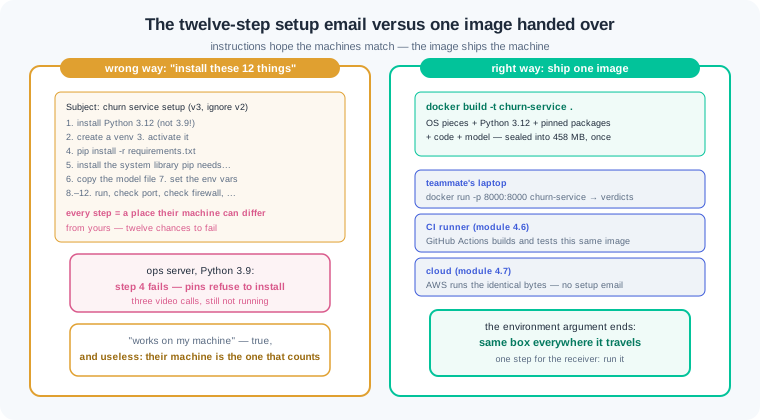
Gauri demos her churn service at an NBFC in Thiruvananthapuram. On her laptop one command starts the API and the verdicts flow. Then deployment day arrives. The ops server carries Python 3.9, two of her pinned packages refuse to install, and a system library is missing. Three calls with the ops engineer change nothing. It works on my machine, she says, and it is true, and it is useless. Her lead closes the call with one line: stop shipping instructions, ship the machine itself.
- "Works on my machine" is the sentence that stalls fresher careers, because at work the machine that matters is never yours. Docker ends the excuse: you ship the whole environment, sealed.
- Docker is named in most Indian MLOps and GenAI job posts, and interviewers hand you a Dockerfile and ask you to read it aloud. After today you can walk every line and defend the order.
- The image you build today is the exact thing CI builds in 4.6 and the cloud runs in 4.7. Skip this and the rest of Phase 4 has nothing to ship.
Module 0.1 gave you the five-layer workbench, and 4.1 pinned your packages. Pins protect one layer only. The Python version, the OS libraries and the shell under them still differ from machine to machine. That gap is where "works on my machine" lives. Docker closes it by shipping every layer, not a list of them.
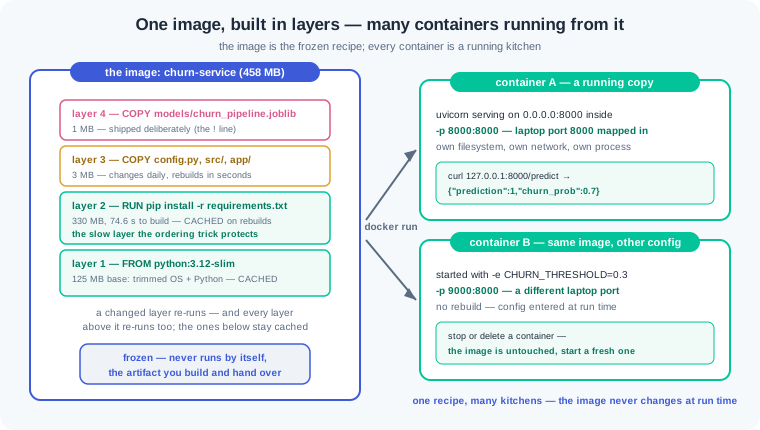
An image — a frozen snapshot of a complete machine: OS pieces, Python, packages, and your code — is the unit Docker ships. A container — a running copy of an image, with its own filesystem and its own network — is what serves traffic. The pair maps to a recipe and a running kitchen. One image can start many containers, the way one printed recipe can run many kitchens. Delete a container and the image is untouched, ready to start a fresh one.
An image is built in layers, not as one blob. A layer — the saved output of one build instruction, stacked on the layers before it — is the unit Docker stores and reuses. Our churn image stacks four: a slim Python base, the pip-installed packages, your code, and the model file.
A Dockerfile — the short build script that turns a repo into an image, one instruction per line — is where you declare the box. FROM picks the base, WORKDIR sets the folder, COPY moves files in, RUN executes a command at build time, and CMD names the one command a container runs at start. Ten lines cover the whole churn service. The watch section walks every one.
Order inside the Dockerfile decides your build speed. The build cache — Docker's reuse of any layer whose instruction and input files have not changed — makes rebuilds fast, but a changed layer kills every layer after it. Your code changes many times a day; your pins change maybe once a week. So copy requirements.txt first, install, and copy code after. Then a code edit rebuilds in seconds, because the slow pip layer is reused.
Here is the contrast this module exists for. The wrong way is a setup email: twelve steps, install this Python, these packages, set these variables — and every step is a place where a teammate's machine can differ. The right way is one image: build once, hand it over, and the same sealed box runs on her laptop, on the ops server, and in the cloud. The email ships instructions and hope; the image ships the machine.
What enters the box must be a decision, not an accident. A .dockerignore file keeps the venv, the data folder and the git history out of the build, the way .gitignore kept them out of the repo. The model file starts excluded too; then one deliberate line lets churn_pipeline.joblib back in. Shipping the model is a choice you can point to in a review. Shipping customer data by accident is how WR-097's 6 GB image was born.
A container is sealed on purpose, and that includes its network. Port mapping — the -p rule that connects a laptop port to a container port — is how a request from outside reaches the service inside. The server must also listen on 0.0.0.0 inside the box, because 127.0.0.1 in there means the container talking to itself. Config stays outside the box: an environment variable set at run time changes behaviour without a rebuild. That is the .env discipline from 3.2, now standing at the container door.
Two closing habits make you read as senior. Print image sizes: the full Python base costs about 1 GB before your code arrives, the slim one about 125 MB, and the finished churn image lands near 458 MB. Treat the image as the handoff artifact: the same bytes run on a teammate's laptop today, inside CI in 4.6, and on AWS in 4.7. When the box is the deliverable, "works on my machine" becomes "works in the box" — and the box travels.
Work inside churn-repo from 4.1 and 4.2, with models/churn_pipeline.joblib trained.
Honest setup note. Docker Desktop (Windows/macOS) or Docker Engine (Linux) needs an install and admin rights. Follow the official guide at docs.docker.com/get-docker the 0.1 way — official source, defaults, then verify with docker --version and docker run hello-world. On a locked-down college or office laptop you may not get admin, and that is fine: every command below shows its real output. Read along, do the read-along variant of each exercise, and let the checks test your reading and diagnosis. In 4.6, GitHub Actions builds this exact image for you in the cloud, and you catch up hands-on there.
Step 1 — the Dockerfile, line by line. One new file at the repo root:
# Dockerfile — the churn service, sealed in a box
FROM python:3.12-slim

WORKDIR /app

# requirements first — the slow layer, cached until the pins change
COPY requirements.txt .
RUN pip install --no-cache-dir -r requirements.txt

# code second — changes daily, rebuilds in seconds
COPY config.py .
COPY src/ src/
COPY app/ app/

# the model, shipped deliberately (see .dockerignore)
COPY models/churn_pipeline.joblib models/churn_pipeline.joblib

EXPOSE 8000
CMD ["uvicorn", "app.main:app", "--host", "0.0.0.0", "--port", "8000"]
Read it top to bottom. FROM python:3.12-slim starts from a base that is itself an image — a trimmed Debian with Python 3.12 preinstalled, about 125 MB against the 1.02 GB full variant. WORKDIR /app creates a folder inside the image and makes every later line run there. Then the ordering trick: COPY requirements.txt . brings in only the pins, and RUN pip install executes at build time, baking the packages into the image itself — no venv, no activation, because the box IS the environment. Code arrives after, in its own layers. The model line names one exact file on both sides, so a reviewer can see precisely what ships. EXPOSE 8000 is documentation for humans and tools; CMD is the one command every container from this image runs at start. Note --host 0.0.0.0 — inside a container, binding 127.0.0.1 means talking to yourself, and nobody outside can connect. That single flag is the difference between a service and WR-099.
Step 2 — .dockerignore, the bouncer at the build. Second new file at the root:
# .dockerignore — what never enters the build
.venv/
.git/
data/
__pycache__/
*.pyc
tests/
freeze.txt
models/
!models/churn_pipeline.joblib
When you run a build, Docker first bundles a copy of the folder — the build context — and every COPY line can only pick from that bundle. Without this file, the bundle carries your 300 MB venv, the private data/customers.csv, and the whole git history. With it, our context drops from 312 MB to 2.4 MB. Read the last two lines together: models/ throws out the whole folder, then the ! line re-admits exactly one file. That pair is the "shipped deliberately" pattern — the model enters the image because a visible line says so, not because a wildcard swept it in. Delete the ! line and the model COPY in the Dockerfile fails loudly with "not found", which is the correct kind of failure.
Step 3 — the first build. One command, watched closely:
(.venv) $ docker build -t churn-service .
[+] Building 87.4s (13/13) FINISHED
 => [internal] load build definition from Dockerfile                0.0s
 => [internal] load .dockerignore                                   0.0s
 => [internal] load build context — 2.4MB                           0.1s
 => [1/8] FROM docker.io/library/python:3.12-slim                   9.8s
 => [2/8] WORKDIR /app                                              0.1s
 => [3/8] COPY requirements.txt .                                   0.0s
 => [4/8] RUN pip install --no-cache-dir -r requirements.txt       74.6s
 => [5/8] COPY config.py .                                          0.0s
 => [6/8] COPY src/ src/                                            0.0s
 => [7/8] COPY app/ app/                                            0.0s
 => [8/8] COPY models/churn_pipeline.joblib models/churn_pipeline…  0.1s
 => exporting to image                                              2.6s
 => => naming to docker.io/library/churn-service:latest             0.0s
-t churn-service names the result, and the final . says "the context is this folder". Each numbered step is one Dockerfile instruction becoming one layer — eight instructions, eight layers, stacked in order. The cost lives in two places: pulling the base (9.8 s, first time only) and the pip install (74.6 s). Everything else is fractions of a second. Remember that 74.6 s number — the whole next step is about never paying it twice.
Step 4 — the cache, measured. Change one log message in app/main.py and rebuild. Then break the order on purpose and pay the difference:
# one-line edit in app/main.py, requirements-first order:
# (Windows/PowerShell has no time command — use:
#    Measure-Command { docker build -t churn-service . } )
(.venv) $ time docker build -t churn-service .
 => CACHED [2/8] WORKDIR /app                                       0.0s
 => CACHED [3/8] COPY requirements.txt .                            0.0s
 => CACHED [4/8] RUN pip install --no-cache-dir -r requirements…    0.0s
 => CACHED [5/8] COPY config.py .                                   0.0s
 => CACHED [6/8] COPY src/ src/                                     0.0s
 => [7/8] COPY app/ app/                                            0.1s
 => [8/8] COPY models/churn_pipeline.joblib models/churn_pipeline…  0.1s
real    0m3.1s

# the wrong order — COPY . . placed before the install:
#   COPY . .
#   RUN pip install --no-cache-dir -r requirements.txt
# the same one-line edit now rebuilds the world:
 => [3/4] COPY . .                                                  0.2s
 => [4/4] RUN pip install --no-cache-dir -r requirements.txt       74.9s
real    1m24.8s
The rule behind both numbers: a layer's cache key is its instruction plus the exact bytes of every file it copies. You touched app/main.py, so step 7 changed — steps 2 through 6 still match and print CACHED, and the 74.6-second pip layer costs 0.0 s. A changed layer also invalidates every layer after it, which is why step 8 re-ran too. In the wrong-order version, COPY . . changes whenever ANY file changes, so the pip layer sitting after it dies on every edit: 3.1 s against 84.8 s. Twenty rebuilds a day is the difference between 1 minute and 28 minutes — the ordering trick is not style, it is half an hour daily.
Step 5 — run, call, read logs, stop. The container life cycle end to end:
$ docker run --name churn -p 8000:8000 churn-service
INFO:     Uvicorn running on http://0.0.0.0:8000 (Press CTRL+C to quit)
INFO:     Application startup complete.

# second terminal — the same caller you were in 4.2:
$ curl http://127.0.0.1:8000/health
{"status":"ok","model_loaded":true}

$ curl -X POST http://127.0.0.1:8000/predict \
  -H "Content-Type: application/json" \
  -d '{"city": "Jalandhar", "monthly_income": 24000, "orders_last_90d": 1,
       "avg_order_value": 650, "last_order_date": "2026-03-02"}'
{"prediction":1,"churn_prob":0.7}
# Windows (PowerShell): backslash continuations are bash-only, and bare "curl"
# is an alias for Invoke-WebRequest — call curl.exe with the JSON on one line:
#   curl.exe -X POST http://127.0.0.1:8000/predict -H "Content-Type: application/json" -d '{"city": "Jalandhar", "monthly_income": 24000, "orders_last_90d": 1, "avg_order_value": 650, "last_order_date": "2026-03-02"}'

$ docker logs churn | grep "model loaded"
INFO: model loaded from models/churn_pipeline.joblib

$ docker stop churn && docker rm churn
-p 8000:8000 is the port mapping: laptop port on the left, container port on the right. Change it to -p 9000:8000 and the same service answers on localhost:9000 while the container still listens on 8000 inside — proof the box has its own network. The Jalandhar customer returns {"prediction":1,"churn_prob":0.7} — the exact verdict from 4.1's predict.py and 4.2's bare service. Same model, third body. docker logs reads the container's output from outside, and the single "model loaded" line proves the 4.2 startup discipline survived the move into the box. docker stop ends it; docker ps between the two commands would show it alive with its port column filled.
Step 6 — size sense, and config through the door. Two habits that mark a production hand:
$ docker images
REPOSITORY           TAG         SIZE
churn-service        latest      458MB
churn-service-full   latest      1.36GB     # same Dockerfile, FROM python:3.12
python               3.12-slim   125MB
python               3.12        1.02GB

# config from outside — same image, no rebuild:
$ docker run -p 8000:8000 -e CHURN_THRESHOLD=0.3 churn-service
# the borderline Patiala customer (churn_prob 0.41):
default run:               {"prediction":0,"churn_prob":0.41}
with CHURN_THRESHOLD=0.3:  {"prediction":1,"churn_prob":0.41}
Swapping one word in FROM costs 900 MB: the full base ships compilers and tools our service never calls. Slim images push faster, pull faster and patch less, so print docker images after every build and treat 500 MB as our budget line. The second half needs a two-line repo edit first: in config.py, add import os and THRESHOLD = float(os.environ.get("CHURN_THRESHOLD", "0.5")), and in app/main.py compare against config.THRESHOLD instead of the hardcoded 0.5. Rebuild once — 3 seconds, the cache working for you. Now -e sets an environment variable at run time: the same image flips a borderline customer's verdict because the risk team asked for a lower cutoff, and no rebuild happened. This is 12-factor config in one move — code in the image, settings in the environment — the same door your API keys used in 3.2, which is exactly how secrets stay out of images too.
Work inside churn-repo with the 4.2 service complete and the joblib trained. Every exercise carries a read-along variant for locked-down machines: the checks there test reading and diagnosis, and count fully.
First box. Install Docker from the official guide at docs.docker.com/get-docker (brief, defaults — the 0.1 routine), then run three commands: docker run hello-world; docker run --rm python:3.12-slim python -c "import sys; print(sys.version)"; and docker run --rm python:3.12-slim python -c "import pandas". Check: hello-world prints its welcome; the second command prints a 3.12 version even if your laptop carries a different Python — a machine you never installed, running anyway; the third fails with ModuleNotFoundError, and you write one sentence on why a fresh box has no pandas and what our Dockerfile does about it. Read-along variant: using only the watch outputs, predict all three results before checking them, and write the same sentence.
The full churn box. Write the Dockerfile and .dockerignore exactly as the watch section built them, build churn-service, and run it with -p 8000:8000. Call /health and then /predict with the Jalandhar customer. Read the logs, stop the container, and commit both new files. Check: the curl returns {"prediction":1,"churn_prob":0.7} — the same verdict as 4.1 and 4.2; docker images shows churn-service at or under 500 MB; docker logs shows exactly one "model loaded" line; git ls-files shows Dockerfile and .dockerignore but still no joblib and no csv — while docker run --rm churn-service ls models/ proves the joblib lives in the image; one sentence names the line that put it there. Read-along variant: write both files by hand from the watch section, then for this list — .venv/, data/customers.csv, app/main.py, models/churn_pipeline.joblib, .git/ — state which items enter the build context and which line decides each.
Break the cache. Baseline first: touch one line in app/main.py and run time docker build (PowerShell: Measure-Command { docker build ... }), recording the time and which steps print CACHED. Now reorder the Dockerfile the wrong way — a single COPY . . before the pip install — and repeat the same one-line edit and timed rebuild twice. Restore the correct order, rebuild, and confirm the cache returns. Check: a four-row table of timings; in the wrong order the pip step re-runs on a code-only edit and the rebuild takes over a minute, in the right order it takes seconds; two sentences explain the difference using the cache rule — a layer re-runs when its inputs change, and every layer after it dies too. Read-along variant: the two build logs in the watch section are your data; mark each step CACHED or re-run, then compute the minutes lost per day at twenty rebuilds.
One image, many configs. Make the two-line CHURN_THRESHOLD edit from the watch section and rebuild. From this single image start three runs: default on -p 8000:8000; a second with -e CHURN_THRESHOLD=0.3; a third with -p 9000:8000. Send the borderline Patiala customer (churn_prob 0.41) to the first two, and probe both ports for the third. Check: docker images confirms one image serves all three runs; the verdict flips from 0 to 1 when the threshold drops, with churn_prob unchanged; port 9000 answers while 8000 refuses for the third run; two sentences state why config-by-environment beats rebuilding per setting, and name where your 3.2 API keys should enter a container. Read-along variant: given the three run commands alone, predict each outcome and write the same two sentences.
Three container failures cover most first-month Docker pain. Each has a War Room entry with the full diagnosis path:
- WR-097 — the 6 GB image. A
COPY . .with no .dockerignore swept the venv, the customer csv and the git history into a full-Python base; the registry push took an hour and pulls filled a teammate's disk. Slim base, .dockerignore, deliberate COPY lines and a printed size budget brought it to 458 MB. - WR-098 — the cache that served a stale package. An unpinned install line never changed as text, so Docker reused a months-old layer and the "upgraded" container kept shipping the old package — until a
--no-cachebuild told the truth. One pinned requirements file as the single source, plus clean builds in CI, closed it. - WR-099 — the container nobody could reach. Uvicorn reported running, but it was bound to 127.0.0.1 inside the box and the port was never published; binding 0.0.0.0, mapping with
-p, and a three-step connectivity checklist made it reachable.
An image is a sealed snapshot of a whole machine, and a container is that image running. A Dockerfile builds the image in layers, and copying requirements before code keeps the slow install layer cached, so a code edit rebuilds in seconds. A .dockerignore keeps the venv, the data and the git history out of the box, and the model enters only through one deliberate line. Inside the box the server must bind 0.0.0.0, and -p maps a laptop port to the container port so callers can reach it. Config arrives as environment variables at run time, and the same image then runs on any laptop, in CI and in the cloud.
- UPI-scale banking services. The fraud and churn scorers behind Indian payment and banking apps run as containers. The deployed unit is an image with a digest, so the code that passed review is provably the code serving traffic.
- GCC handoffs. Teams in Pune and Hyderabad hand work to parent companies abroad as images, and "the container passes the smoke test" is the acceptance line — no twelve-step setup emails cross time zones.
- Hosted model APIs. The endpoints you paid per token in 3.2 ship as containers replicated across thousands of machines; one image scaling out is what makes the metered API model possible.
Answer these before opening the gate assessment. Each question names its kind.
type=output-prediction— Your Dockerfile copies requirements.txt before the pip install and your code after. You edit onlyapp/main.pyand rebuild. Predict which of the eight steps print CACHED, which re-run, and roughly what the rebuild costs against the 87-second first build — then predict the same rebuild after editing onlyrequirements.txt.type=debug— A teammate's container logs read "Uvicorn running on http://127.0.0.1:8000" anddocker psshows0.0.0.0:8000->8000/tcp, yet every curl from the laptop fails. Name the exact CMD flag at fault, explain why the port mapping cannot save it, and give the one-line fix plus the command that verifies it.type=interpretation—docker historyon a teammate's image shows: base 1.02 GB, pip layer 2.9 GB, a COPY layer 2.1 GB, code 3 MB. Read the three big numbers back: what does each one contain, which two files or folders most likely rode into the COPY layer, and which two fixes shrink this image the most?type=scenario-judgement— Before handoff, a teammate proposes copyingdata/customers.csvinto the image "so the demo works out of the box with no setup". Judge the proposal, name the two distinct harms it invites, and say what the image should contain instead.type=trade-off— Baking the joblib into the image versus downloading it from storage when the container starts: give one concrete gain and one concrete cost of each, pick one for Gauri's single-model churn service today, and name the signal that would push you to the other choice by 4.7.
Explain to a friend who sells packed sweet boxes why you stopped emailing your recipe and started shipping the finished box. The recipe assumed the other kitchen had your stove, your ghee and your pans, and every difference changed the taste. The sealed box carries the sweet already made, identical wherever it travels, and opening it is the only step left. Use at most 4 sentences and no technical word beyond "box". If your friend can say why the sealed box ends every argument about whose kitchen was wrong, you own this module.