Embeddings & vector search
Monday, 10 am, Surat. Ishita runs the support-ticket search at a textile marketplace. A seller types "refund for damaged saree" and the tool returns nothing. Yet the archive holds forty matching tickets — most say "paisa wapas" or "money back", never "refund". Her lead explains the problem in one line: the tool matches letters, not meaning. One small embedding model later, the same query finds every one of those tickets. Today you build that upgrade, on your own laptop, from vectors up.
- Embeddings power every "chat with our documents" feature, and module 3.5's RAG build stands on this lesson.
- Hiring posts for applied-AI roles ask for chunking and vector search by name — this skill is screened for.
- Freshers who can read a similarity score can debug retrieval; the rest blame the model and stay stuck.
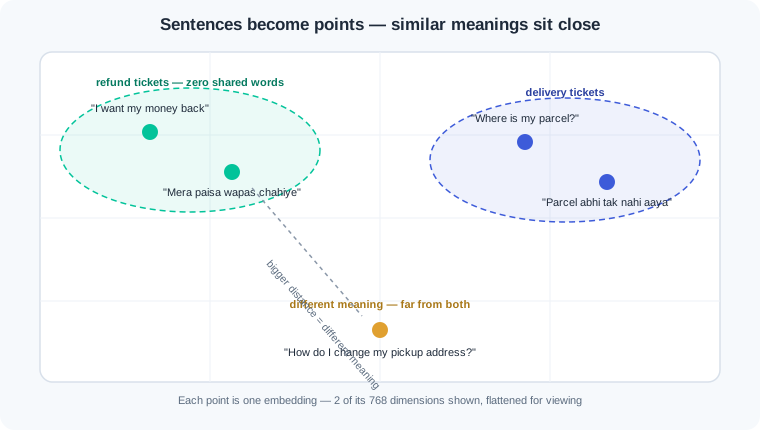
Module 0.7 gave you the tool this whole lesson stands on. There, a movie-taste vector held five ratings you typed by hand. An embedding — a list of numbers a model produces to capture the meaning of a piece of text — is the same idea at scale. You hand a sentence to an embedding model and it returns a vector of a few hundred numbers. Sentences with similar meaning land near each other in that space, whatever words they use.
There is a wrong way and a right way to search text. The wrong way matches letters: a search for "refund" scans tickets for the string r-e-f-u-n-d. A seller who wrote "paisa wapas chahiye" is invisible to it, though the meaning is identical. The right way is semantic search — finding text by comparing meaning vectors instead of matching words. Embed the query, embed every ticket, and the paraphrase rises to the top.
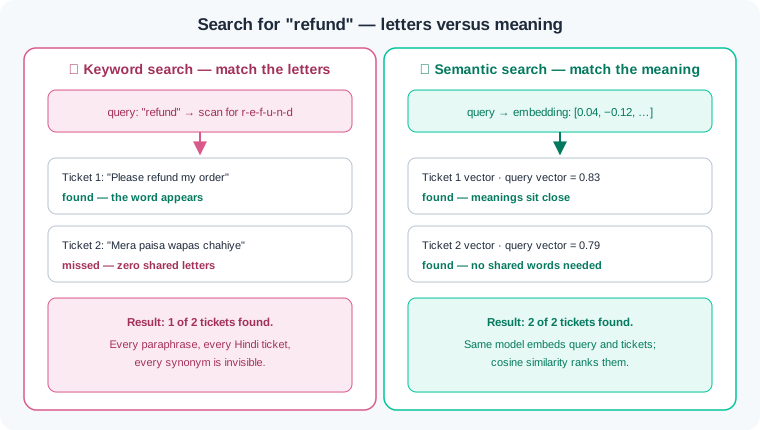
Closeness needs a score, and you already own it. The dot product from module 0.7 grows when two vectors point the same way. Raw dot products carry a flaw here: a longer vector wins on size alone, not meaning. The fix is normalisation — scaling every vector so its length equals one. The dot product of two normalised vectors is called cosine similarity — a score near 1 for same meaning, near 0 for unrelated text.
Real documents are too big to embed whole. A forty-page policy squeezed into one vector becomes a muddy average of every topic inside it. So you split documents into chunks — a chunk is one piece of a document, sized for search, often a few hundred words. Size is a trade: tiny chunks match sharply but arrive without context, while giant chunks blur into noise. A good chunk is the smallest piece that still makes sense on its own.
With chunks embedded, search is three lines of NumPy. Embed the query, take its dot product with every chunk vector, and sort the scores. This brute-force scan is honest work, and it is fast enough for thousands of chunks. At crores of vectors the every-chunk comparison becomes too slow, so teams add a vector database — a store that finds nearest vectors fast using an index. The index is a shortcut map through the space; it trades a sliver of accuracy for enormous speed.
Three habits keep this machinery honest. First, one model must embed both sides: vectors from different models live in different spaces, and mixing them produces garbage scores without raising any error. Second, scores are model-relative — a cosine of 0.7 can mean near-twins under one model and barely-related under another. So compare scores against other scores from the same model, never against a magic number from a blog. Third, know whether your library normalises for you, because normalising twice is harmless but assuming wrongly warps every ranking.
Everything below runs offline on the Ollama setup from module 3.1 — 8GB laptop, no GPU, no account. You need one new model, built for embeddings rather than chat.
Step 1 — pull an embedding model. It is a small one-time download:
ollama pull nomic-embed-text
Output: a progress bar for roughly 270MB, then success. This model never chats. Give it text and it returns 768 numbers — that is its whole job, which is why it runs comfortably beside the chat model from 3.1.
Step 2 — embed five support tickets. Mixed Hindi and English, exactly like a real Indian support inbox:
import requests
import numpy as np

URL = "http://localhost:11434/api/embed"

def embed(texts):
    r = requests.post(URL, json={"model": "nomic-embed-text", "input": texts},
                      timeout=120)
    r.raise_for_status()
    return np.array(r.json()["embeddings"])

tickets = [
    "I want my money back for this damaged kurta.",
    "Mera paisa wapas chahiye, kurta kharab nikla.",
    "Where is my parcel? It has been ten days.",
    "Parcel abhi tak nahi aaya, das din ho gaye.",
    "How do I change my shop's pickup address?",
]
vecs = embed(tickets)
print(vecs.shape)
print(np.round(vecs[0, :4], 3))
Output: (5, 768) then something like [ 0.049 -0.021 0.083 -0.146]. Five sentences became five vectors of 768 numbers each — a plain NumPy array, nothing exotic. No single number means anything on its own; the meaning lives in where the whole vector points. Your exact decimals will differ slightly; the geometry will not.
Step 3 — the cosine similarity matrix. This is the module 0.7 reflex: normalise, then @:
unit = vecs / np.linalg.norm(vecs, axis=1, keepdims=True)
sim = np.round(unit @ unit.T, 2)
print(sim)
Output:
[[1.   0.81 0.48 0.45 0.37]
 [0.81 1.   0.46 0.52 0.35]
 [0.48 0.46 1.   0.84 0.41]
 [0.45 0.52 0.84 1.   0.38]
 [0.37 0.35 0.41 0.38 1.  ]]
Read it like a map. The diagonal is 1.0 — every sentence matches itself perfectly, a free sanity check for your pipeline. Entry [0,1] is 0.81: the English refund ticket and the Hindi refund ticket share zero words, yet the model placed them side by side. Entry [2,3] does the same for the two parcel tickets, and the address question stays low against everything. Keyword search could never produce that 0.81 — this matrix is the entire sales pitch for embeddings.
Step 4 — brute-force search over a real document. Save any long policy text — a returns policy, a hostel rulebook, terms of service — as returns-policy.txt, around 8,000 characters:
policy = open("returns-policy.txt").read()
size = 400
chunks = [policy[i:i + size] for i in range(0, len(policy), size)]
print(len(chunks))

cunit = embed(chunks)
cunit = cunit / np.linalg.norm(cunit, axis=1, keepdims=True)

def search(query, k=3):
    q = embed([query])[0]
    q = q / np.linalg.norm(q)
    scores = cunit @ q
    for i in np.argsort(scores)[::-1][:k]:
        print(f"{scores[i]:.2f} | chunk {i:2d} | {chunks[i][:48]}...")

search("seller wants refund for damaged item")
Output: 20, then three ranked lines — 0.72 | chunk 7 | Damaged goods: the buyer must upload photos..., followed by chunk 8 at 0.63 and chunk 2 at 0.51. Twenty chunks, and the query's vector was compared against every one of them — that is brute-force search, and at this scale it finishes in milliseconds. The top chunk is about damaged goods even though the query never used the policy's wording. Now imagine 50 lakh chunks: comparing against every single one per query is the cost that makes teams reach for a vector database and its index.
Step 5 — same query, bad chunking. Rebuild the index with two giant chunks instead of twenty sensible ones:
big = [policy[i:i + 4000] for i in range(0, len(policy), 4000)]
bunit = embed(big)
bunit = bunit / np.linalg.norm(bunit, axis=1, keepdims=True)
q = embed(["seller wants refund for damaged item"])[0]
q = q / np.linalg.norm(q)
print(len(big), np.round(bunit @ q, 2))
Output: 2 [0.46 0.44]. The same document, the same query, the same model — and retrieval collapsed. Each giant chunk mixes refunds, delivery, penalties, and pricing, so its embedding is a blurry average that matches nothing sharply. The two scores nearly tie, which means the ranking is telling you almost nothing. The answer text is still in there; your chunking choice hid it.
Work inside your ai-lab environment with Ollama running and nomic-embed-text pulled. Each exercise ends with a check — you are done only when the check passes.
Your own similarity matrix. Create simmap.py. Write ten short sentences of your own: five pairs that mean the same thing said differently, mixing English with Hindi or your own first language for at least two pairs. Embed all ten, normalise, and print the 10×10 rounded matrix with a labelled header row so you can read it. Mark the five scores your pairs produced and the highest score between two sentences you meant to be unrelated. Check: every intended pair scores higher than every unrelated combination, and a comment in the file records the most surprising score with one sentence on why it surprised you.
Semantic search over your own notes. Create notesearch.py. Point it at a folder of your real text — class notes, README files, saved articles — using glob, and split every file into chunks of roughly 500 characters. Embed all chunks once, keep a parallel list of source filenames, and write a search(query, k=3) that prints score, filename, and the first 60 characters of each hit. Run five genuine questions you would actually ask your notes, phrased in your words rather than the notes' words. Check: at least four of the five queries return a top chunk that answers the question, and notes-3.4.md records the one miss with your best guess at why retrieval failed.
The chunk-size experiment. Reusing exercise 2's corpus, build three indexes: chunk sizes of roughly 150, 500, and 3,000 characters. Run the same five queries against all three and record a table — query versus chunk size, marking whether the top hit answered. Find one query where the 150 index returns a sharp but useless fragment, and one where the 3,000 index buries the answer in a mushy near-tie. Check: the table sits in notes-3.4.md with one sentence per failure naming the cause as too-small (no context) or too-big (muddy average), in your own words.
Prove the mixing-models gotcha. Pull a second embedding model with ollama pull all-minilm. Embed your five exercise-1 pairs' sentences with both models. First try scoring an all-minilm query vector against your nomic-embed-text index and record the shape error — 384 versus 768 dimensions refuse to multiply. Then force the comparison: slice the nomic vectors to their first 384 numbers so the shapes agree, and compute the cross-model similarity matrix anyway. Compare it with each single-model matrix. Check: notes-3.4.md shows all three results — the error message, a cross-model matrix where your meaning-pairs no longer beat unrelated sentences, and healthy single-model matrices — plus the rule this proves, written in one line.
Three failures cover most first-month embedding pain. Each has a War Room entry with the full diagnosis path:
- WR-031 — the index built with one model, queried with another. An upgraded query path met a month-old index; the scores looked normal and meant nothing, because vectors from different models live in different spaces.
- WR-032 — the answer was in the document, but retrieval returned noise. Giant fixed-size chunks turned every embedding into a muddy average, and answers straddling chunk boundaries vanished; structure-aware chunking with overlap is the exit.
- WR-033 — the 0.7 threshold copied from a blog. A cutoff tuned on one model shipped against another; cosine scores are model-relative, so thresholds must be calibrated on your own data or replaced with top-k ranking.
An embedding turns text into a vector, and similar meanings land close together in that space. Cosine similarity — the dot product of normalised vectors — puts a score on that closeness. Documents get split into chunks first, and chunk size decides whether retrieval comes back sharp or blurry. Brute-force NumPy search covers thousands of chunks; a vector database with an index takes over at millions. One model must embed both sides, and its scores only mean something next to scores from the same model.
- Bank and UPI-app complaint routing. Incoming Hindi and English messages get embedded and matched against solved cases. "Paisa kat gaya, order nahi hua" reaches the failed-debit team with no shared keyword at all.
- Indian e-commerce search. A query like "kurta for haldi function" finds yellow festive wear. The product pages never mention "haldi"; the meaning match does the work.
- Global capability centres. Their internal assistants run semantic search over policy and contract archives. It is the same pipeline you scaled down onto your laptop today.
Answer these before opening the gate assessment. Each question names its kind.
type=output-prediction—u = np.array([0.6, 0.8])andv = np.array([0.8, 0.6])are both already length one. Predict whatround(float(u @ v), 2)prints, and state what that score would claim about the two sentences these vectors came from.type=debug— A teammate's search crashes withValueError: shapes (20,768) and (384,) not aligned. The chunk index was built last month; yesterday the query code was "upgraded to a better embedding model". Diagnose the cause, then give the full fix — and say why padding the query vector with zeros is not it.type=interpretation— A retrieval log shows top-3 scores of 0.41, 0.40, and 0.39, none of the three chunks relevant, and each chunk is 4,000 characters long. What do the tight, mediocre scores plus the chunk size together tell you, and what would you change first?type=scenario-judgement— A teammate copiesif score >= 0.7: matchfrom a tutorial that used a different embedding model, sees "reasonable" results on two test queries, and wants to ship tonight. Give your judgement and the smallest piece of evidence you would demand first.type=trade-off— For a bank's internal policy search, compare 100-character chunks against 3,000-character chunks: give one concrete gain and one concrete cost of each choice.
Explain to a friend who runs a kirana-shop billing app: how can your search find tickets that say "paisa wapas" when the query was "refund", with no dictionary of synonyms anywhere in the code? Use at most 4 sentences, plain words only — "list of numbers" is allowed, "768-dimensional space" is not. If your friend can repeat back why the trick needs the same model on both sides, you own this module.