Working with LLM APIs properly
Monday morning, Lucknow. Aisha starts her internship at a startup that reads KYC documents for a bank. Her first task: a script that sends each document to a model and stores a summary. She copies a tutorial, pastes the API key into the code, and reaches for git push. Her senior stops her hand. "That key is money in text form. Push it, and bots will find it within minutes." Today you learn to call an LLM the way working teams do.
- Every AI feature you will ever ship — chat, RAG, agents — stands on one HTTP call done well.
- Freshers who leak a key or crash on a messy reply lose trust in week one; the habits here prevent both.
- Interview panels ask "what do you do with a 429" to separate tutorial followers from engineers.
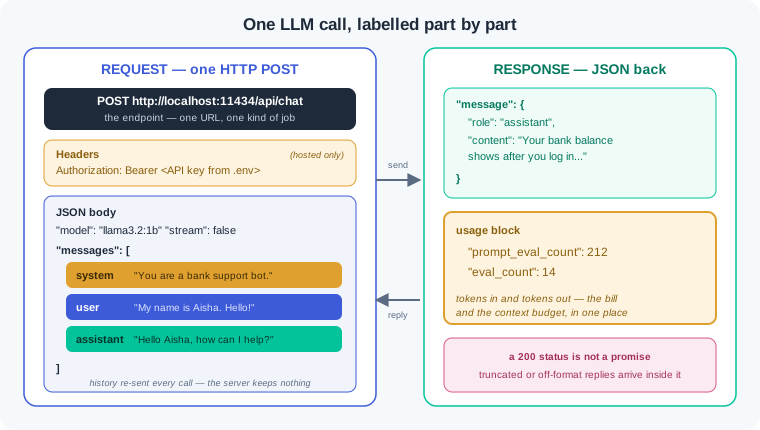
Strip away every SDK, and an LLM call is one HTTP POST. Your program sends a request to an endpoint — a URL on a server that accepts one kind of job. The request has two working parts: headers and a JSON body. Headers carry your identity, and the body carries the model name plus your messages. The reply is JSON too: the generated text and a usage block that counts tokens.
The heart of the body is the messages list, and every message has a role. The system prompt — standing instructions that shape every reply — sits at the top. Then user and assistant turns alternate, like lines in a play. The model reads the whole list and writes the next assistant turn. The server keeps nothing between calls, so your code re-sends the history every time.
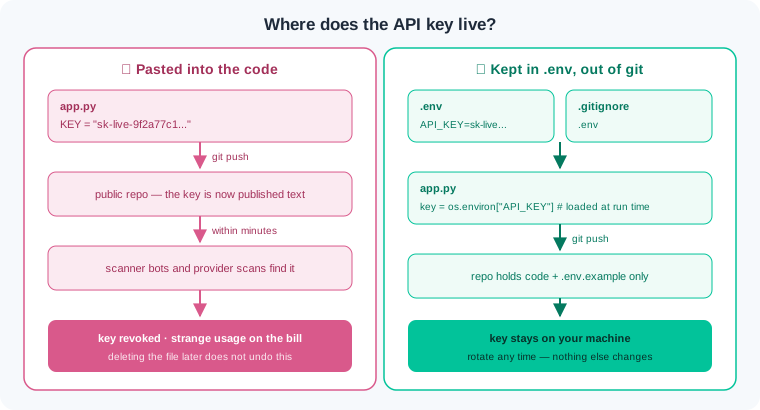
An API key is a long secret string that names your account and can spend its money. The wrong way: paste the key into the script, push to GitHub, and move on. Bots scan every public commit, so a leaked key is found and abused within minutes. The right way: keep the key in a .env file, add .env to .gitignore, and read it from the environment at run time. If a key ever touches anything public, revoke it first and ask questions later.
A model writes token by token, so you choose how to receive the reply. Non-streaming means the server holds the reply until the last token, then sends it in one piece. Streaming — receiving the reply in small chunks as they are made — shows words the moment they exist. Chat apps stream so users see progress instead of a frozen screen. Scripts that parse the reply usually wait for the whole thing.
Module 3.1 showed that models read and write tokens, and providers bill on that same unit. Every response carries a usage block: tokens in and tokens out, counted exactly. Output tokens cost more than input tokens on every major price list. History you re-send is input you pay for again, so a long chat costs more with every turn. Log these two numbers from day one, because you cannot cut a cost you never measured.
A remote service fails in patterns, and the status code tells you whose move it is. A 4xx code means your request is wrong; a 401 means the key failed. A 429 is a rate limit — the cap on how often your account may call per minute. A 5xx code means the server is struggling, and a timeout means no answer came at all. The fix for 429 and 5xx is backoff — waiting longer after each retry; retrying a 4xx forever is a bug.
Automation needs the reply as data, not prose. The hope-it-is-JSON way asks nicely in the prompt and feeds the reply straight into the parser. One chatty reply then crashes the pipeline at night. The engineering way turns on JSON mode — a request setting that forces the output to be valid JSON — then checks every field in code. When a check fails, re-ask once with the error message attached, and set the row aside if it fails again.
You will practise all of this against Ollama, the local server from module 3.1, because it is free and offline. Its chat endpoint speaks the same shape: roles in, JSON out, token counts included. A hosted API adds two things — your API key in a header, and a bill. The call shape barely changes, and that is the point: learn it once, use it with any vendor.
Everything below runs offline against the Ollama setup from module 3.1, with llama3.2:1b pulled. We build one script in six steps; type each step yourself and run it before moving on.
Step 1 — the plain call. Ollama's chat endpoint takes the same shape as every hosted provider:
import requests

URL = "http://localhost:11434/api/chat"

def chat(messages):
    r = requests.post(URL, json={
        "model": "llama3.2:1b",
        "messages": messages,
        "stream": False,
    }, timeout=60)
    r.raise_for_status()
    return r.json()

data = chat([{"role": "user", "content": "Name two UPI apps in one line."}])
print(data["message"]["role"], "->", data["message"]["content"][:60])
Output: assistant -> Two popular UPI apps are PhonePe and Google Pay. The response is plain JSON: a message object with a role and content, plus counters we read in step 6. timeout=60 means "stop waiting after a minute" — without it a dead server hangs your script forever, and raise_for_status() turns a silent HTTP error into a loud Python one.
Step 2 — roles and the system prompt. Add standing instructions, then prove the server has no memory:
msgs = [
    {"role": "system", "content": "You are a bank support bot. Answer in one short sentence."},
    {"role": "user", "content": "My name is Aisha. What is a savings account?"},
]
msgs.append(chat(msgs)["message"])          # keep the assistant's turn
msgs.append({"role": "user", "content": "What is my name?"})
print(chat(msgs)["message"]["content"])
Output: Your name is Aisha. The model knows the name only because our list still contains the earlier turns — we re-sent them. Delete the first two entries and rerun: it cannot answer. Every chat product you have ever used is this append-and-resend loop, and the system prompt at the top steers tone and format on every turn.
Step 3 — streaming. Flip one flag and read the reply piece by piece:
import json

with requests.post(URL, json={
    "model": "llama3.2:1b",
    "messages": [{"role": "user", "content": "Describe Lucknow in two sentences."}],
    "stream": True,
}, stream=True, timeout=60) as r:
    for line in r.iter_lines():
        piece = json.loads(line)
        print(piece["message"]["content"], end="", flush=True)
print()
The reply now appears word by word, exactly like a chat app. Each line the server sends is a tiny JSON object carrying a few characters; the last line has "done": true plus the token counters. Streaming is for humans watching a screen — a parser is happier waiting for one complete response, which is why our script uses stream: False everywhere else.
Step 4 — the same shape, hosted. A hosted provider changes three lines: the URL, the model name, and an auth header. The key comes from .env, never from the code:
import os
from dotenv import load_dotenv       # pip install python-dotenv==1.1.*

load_dotenv()                        # .env sits beside the script, listed in .gitignore

r = requests.post(
    "https://api.example-provider.com/v1/chat",       # vendor's documented endpoint
    headers={"Authorization": f"Bearer {os.environ['PROVIDER_API_KEY']}"},
    json={"model": "small-fast-model", "messages": msgs, "stream": False},
    timeout=60,
)
Do not run this one — the address is a stand-in. Read it against step 1 instead: same POST, same messages list, same JSON reply with a usage block. The .env file holds one line, PROVIDER_API_KEY=..., and .gitignore holds the line .env. If os.environ raises a KeyError, the key never loaded — that is a missing or misplaced .env, not a broken API.
Step 5 — JSON mode with validation and one re-ask. Now the reply becomes data. We ask for a strict shape, check it, and give the model one chance to fix its own mistake:
RULES = ('Reply with only a JSON object: {"merchant": string, '
         '"amount": number, "kind": "debit" or "credit"}')

def chat_json(messages):
    r = requests.post(URL, json={"model": "llama3.2:1b", "messages": messages,
                                 "format": "json", "stream": False}, timeout=60)
    r.raise_for_status()
    return r.json()["message"]["content"]

def extract(sms):
    msgs = [{"role": "system", "content": RULES},
            {"role": "user", "content": sms}]
    for attempt in range(2):                    # one try, one re-ask
        raw = chat_json(msgs)
        try:
            record = json.loads(raw)
            if record.get("kind") not in ("debit", "credit"):
                raise ValueError(f"bad kind: {record.get('kind')!r}")
            return record
        except ValueError as e:
            msgs += [{"role": "assistant", "content": raw},
                     {"role": "user", "content": f"Invalid: {e}. Send only corrected JSON."}]
    raise RuntimeError("failed validation twice — set this row aside")

print(extract("HDFC: Rs 450 debited for Sharma Kirana Store on 09-08"))
Output: {'merchant': 'Sharma Kirana Store', 'amount': 450, 'kind': 'debit'}. Three layers are working together: "format": "json" constrains the decoder, json.loads plus the field check verifies, and the re-ask feeds the model its own bad output with the error. Comment out the format line and run it twenty times — sooner or later a chatty reply appears, and now you know why the validation layer exists.
Step 6 — retries with backoff, and the bill. Wrap the call so temporary failures heal and permanent ones fail fast:
import time

def safe_chat(messages, tries=3):
    for attempt in range(tries):
        try:
            r = requests.post(URL, json={"model": "llama3.2:1b",
                "messages": messages, "stream": False}, timeout=60)
            if r.status_code == 429 or r.status_code >= 500:
                raise RuntimeError(f"retryable status {r.status_code}")
            r.raise_for_status()                 # other 4xx: raise, never retry
            return r.json()
        except (RuntimeError, requests.ConnectionError, requests.Timeout):
            if attempt == tries - 1:
                raise
            wait = 2 ** attempt                  # 1s, 2s, 4s
            print(f"attempt {attempt + 1} failed, waiting {wait}s")
            time.sleep(wait)

data = safe_chat([{"role": "user", "content": "One line on IRCTC."}])
print(data["message"]["content"][:60])
print(data["prompt_eval_count"], "tokens in,", data["eval_count"], "tokens out")
Typical output ends with 29 tokens in, 24 tokens out. The wrapper retries only what heals on its own — 429, 5xx, network drops, timeouts — with a doubling wait. A 401 or 404 escapes through raise_for_status() on the first attempt, because repeating a wrong request only delays the stack trace. Those two token counts are the numbers a hosted provider bills; logging them per call is a habit worth more than any single lesson.
Work inside your ai-lab environment with Ollama running. Each exercise ends with a check — you are done only when the check passes.
Key hygiene before any key exists. Create a folder api-lab with a git repo. Add .env containing PROVIDER_API_KEY=demo-not-real-123, a .gitignore containing .env, and a .env.example with the variable name and a fake value. Write env_check.py that loads the file with python-dotenv and prints the length of the key, never the key itself. Then rebuild step 1 and step 2 from the watch section in a file chat_basics.py, with a system prompt that fixes the reply style. Check: git status does not list .env, env_check.py prints a length and not the secret, and chat_basics.py proves the memory trick — the model recalls a name only when the earlier turns are re-sent.
A chat loop that pays per turn. Build chat_loop.py: read user input in a loop, append it to the messages list, call the endpoint, print and append the assistant reply. After every call, append one row to usage_log.csv: turn number, prompt_eval_count, eval_count. Hold a conversation of at least six turns about one topic. Open the CSV and study the input-token column. Check: the CSV has six or more rows, tokens-in rises turn after turn while tokens-out stays roughly flat, and two sentences at the top of the file explain what is being re-sent and what this would do to a hosted bill.
A retry wrapper you can prove. Write safe_post.py containing the step 6 wrapper with waits of 1s, 2s, 4s. Now prove it three ways. First, stop Ollama (or point the URL at port 11435) and run: you should see two "waiting" lines and then a final raised error. Second, start Ollama again and add a flaky() test double — a function that raises requests.ConnectionError on the first two calls, then forwards to the real requests.post — and show a run that fails twice, waits 1s then 2s, and succeeds on attempt three. Third, call a wrong path such as /api/nonsense and confirm the 404 fails on the first attempt with no waiting. Check: your saved transcript shows all three behaviours — rising waits then failure, rising waits then success, and instant fail-fast on a 4xx.
End to end: SMS to clean records. Write eight bank-style SMS strings of your own — debits, credits, one UPI transfer, and one deliberately messy line with a typo and no clear amount. Build expense_extract.py that runs each through the step 5 extract() with JSON mode, validation, and one re-ask, using the step 6 wrapper for transport. Collect the good records into records.json; rows that fail twice go into quarantine.json instead of crashing the run. Sum token usage across all calls and print it at the end. Check: records.json holds only records whose kind is debit or credit and whose amount is a number, the messy SMS either got repaired or sits in quarantine, the script never crashed, and the final line reports total tokens in and out for the whole run.
Three failures cover most first-month API pain. Each has a War Room entry with the full diagnosis path:
- WR-025 — the key you pushed at lunch is dead by evening. A key committed to a public repo is found by scanners within minutes and abused or auto-revoked; rotation is the fix, deleting the file is not.
- WR-026 — a loop of 429s that made everything worse. A batch script hit a rate limit and retried instantly, feeding the storm; backoff and pacing turn the same job into a clean run.
- WR-027 — the JSON parser that died at 2 am. The model wrapped its JSON in prose and markdown, and
json.loadsmet it unguarded; JSON mode, validation, and a re-ask keep the pipeline alive.
An LLM call is one HTTP POST: an endpoint, headers that carry your API key, and a JSON body of role-tagged messages. The server keeps no memory, so your code re-sends the history and pays for it as input tokens every turn. Keys live in a .env file that git never sees, and a key that touches anything public gets revoked the same minute. Rate limits and server errors are met with backoff, while 4xx errors are fixed, never retried. When the reply must be data, turn on JSON mode, validate every field, and re-ask once with the error before trusting the result.
- UPI and bank support bots run this exact loop at scale: history re-sent each turn, keys held in vaults, and strict JSON contracts so every reply can be logged and audited.
- Logistics platforms in India batch thousands of shipment queries overnight; backoff and rate-limit discipline decide whether the run finishes or dies at 2 am.
- GCC document pipelines route KYC text through JSON-mode extraction with validation, because one unparsed reply must quarantine a row, not block the whole queue.
Answer these before opening the gate assessment. Each question names its type.
type=output-prediction— Your script calls the local chat endpoint, but you stopped Ollama five minutes ago. Predict the exact kind of failure, whetherraise_for_status()ever runs, and what a good retry wrapper does with this case.type=debug— A script prints replies fine on your laptop. Cloned fresh onto the college server, every run dies withKeyError: 'PROVIDER_API_KEY'. Name the cause and the fix that does not weaken security.type=interpretation— A usage log from a six-turn chat shows tokens-in climbing 42, 118, 209, 335, 480, 655 while tokens-out stays near 60. Explain what the client re-sends each turn and why the bill grows.type=scenario-judgement— A teammate pushed an API key to a public repo, then deleted the file in a second commit. He says rotation is unnecessary since the file is gone. Give your judgement and the two-minute drill you would run instead.type=trade-off— Streaming versus non-streaming for two jobs: a customer-facing chat window, and a nightly script that parses model replies as JSON. Give one concrete gain and one concrete cost of each choice.
Explain to a friend who builds websites but has never called a model: what one LLM API call contains, why the server remembers nothing between calls, and why the key never sits inside the code. Use at most 4 sentences, plain words only. If your friend can repeat back the request, the response, and the .env habit, you own this module.